The Ancestry Card Catalog is the single most powerful, yet criminally ignored, feature on the entire genealogy platform.
If you are like most people, you probably didn’t even know it existed. You log in, you see the friendly green “Search” button, and you type a name. The algorithm spins. It thinks. And then, it vomits 452,000 results onto your screen.
Table of Contents
You get census records from the wrong state. You get birth certificates for people born fifty years too late. Worst of all, you get a pile of “Member Tree” hints that are nothing more than digital hearsay.
This is the “Shotgun Approach.” You are spraying bullets at a barn hoping to hit a target.
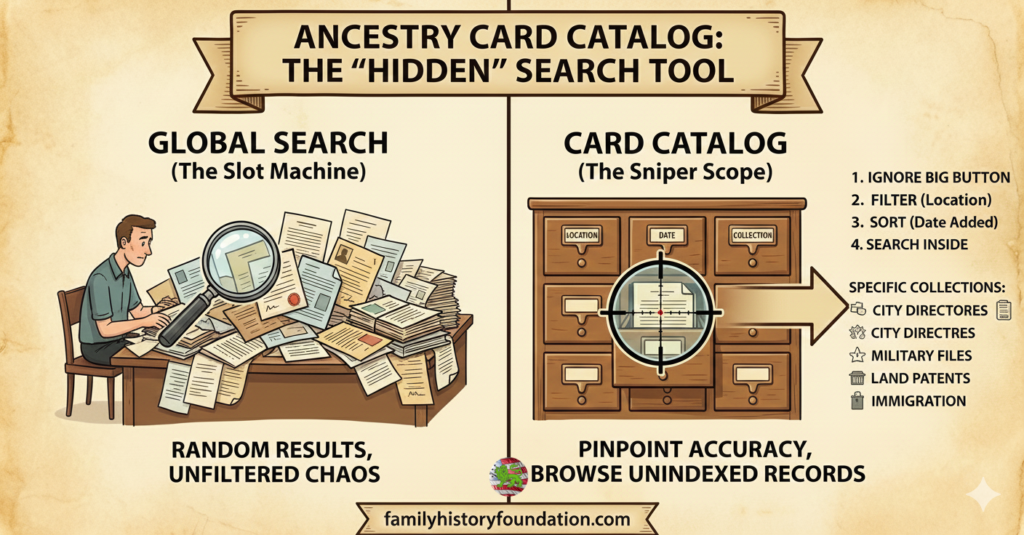
I am going to say something that might annoy the marketing team at Ancestry.com: The “Search All Records” button is a slot machine.
It gives you a dopamine hit when you see a match, but it is designed to keep you clicking, not necessarily to help you find the truth. If you want to find the real stories—the stuff that actually matters—you need to stop acting like a gambler and start acting like a Sniper.
You need to master the Ancestry Card Catalog.
In this guide, I am going to teach you how to stop feeding the beast and start finding the records that the algorithm hides. We are going to move from being “Clickers” to being “Source Hounds.”
If you are feeling overwhelmed by the sheer volume of bad data out there, I highly recommend pausing here and reading our foundational guide on genealogy research online. It will give you the structural blueprint you need before you start diving into specific collections.
Why Should I Use the Ancestry Card Catalog Instead of Global Search?
The Ancestry Card Catalog allows researchers to browse specific record collections by location, time period, and document type before entering a name. This “targeted” approach eliminates irrelevant search noise and helps uncover unindexed images, military pension files, and land patents that the global search algorithm frequently misses or buries.
The “Digital Junk Drawer” vs. The Library 📚
Imagine walking into a massive library.
The Global Search is like dumping all 10 million books into a massive pile in the lobby. You try to find one specific page by shouting a name into the pile. The librarian (the algorithm) shouts back, “Here are 5,000 pages that mention a ‘John’!”
That is not research. That is chaos.
The Ancestry Card Catalog is different. It is the equivalent of walking past the pile, going to the History section, finding the shelf for “Ohio,” pulling down the book for “1860 Land Records,” and opening the index.
The Global Search is designed for speed. The Ancestry Card Catalog is designed for precision.
I learned this lesson the hard way.
Years ago, I was hunting for my ancestor who fought in the Civil War. I spent months typing his name into the main search bar. I got nothing but basic census ticks and a few generic index cards. I assumed the records didn’t exist.
I was wrong.
I decided to stop trusting the “Smart Search” and manually dug into the Ancestry Card Catalog. I filtered for Civil War records specific to his regiment’s state.
Boom.
I unlocked a specific collection that held a 34-page testimony of his service. It detailed his injuries, his movements, and his life after the war. The main search bar gave me zero. The Ancestry Card Catalog gave me his life story.
I also found original land patents this way—records that the OCR (Optical Character Recognition) software had failed to read correctly. Because I was browsing the book instead of searching for a keyword, I found him.
That is the power of manual verification.
The Source Hound Strategy: A Step-by-Step Guide 🕵️♂️
So, how do we actually do this?
Most beginners rely on the “Global Search Bar” because it feels easy. But “easy” rarely leads to accurate genealogy. If you want to build a tree that survives scrutiny, you have to do the work.
Here is the “Sniper Method” for using the Ancestry Card Catalog.
Step 1: Ignore the Big Button
When you log in, your eyes are drawn to the middle of the screen. Fight that urge.
Do not type a name in the homepage search box.
Instead, go to the “Search” dropdown menu at the very top of the page. Select Card Catalog.
You have now entered the engine room of the website. This is where the pros live.
Step 2: Filter by Location (The “Funnel”)
On the left-hand sidebar, you will see a list of filters. This is your weapon.
The Ancestry Card Catalog currently holds over 33,000 distinct record collections. You cannot search them all at once without getting noise.
- Filter by Location: Click “USA.”
- Filter by State: Click “Pennsylvania” (or your target state).
- Filter by County: Click “Lancaster” (or your target county).
Watch the number of collections drop. You might go from 33,000 collections down to 50 specific datasets.
You have just eliminated 99.9% of the garbage results that would have clogged your screen. You are no longer looking for “John Smith” in the entire world; you are looking for him in the one place he actually lived.
This is vital for overcoming common hurdles. If you are stuck, check out our guide on how to overcome genealogy brick walls.
Step 3: Sort by “Date Added” (The Freshness Check)
By default, the Ancestry Card Catalog sorts results by “Popularity.”
This means it shows you the Census records first. While useful, you likely already have those.
Change the sort settings (top right of the list) to “Date Added” or “Date Updated.”
This is how you find the new stuff. Ancestry is constantly digitizing new microfilm. By sorting this way, you can see the obscure probate record or church register that was uploaded last week.
Step 4: Search Inside the Collection
This is the magic moment.
Click on a specific collection title, for example: Pennsylvania, U.S., Civil War Muster Rolls, 1860-1869.
Now, you will see a search box. But this isn’t the global search box. This search box is specific to that collection only.
When you type “John Smith” here, the algorithm is only looking at Pennsylvania Civil War soldiers. It is not looking at English convicts. It is not looking at modern phone books.
If you find him here, you know it is the right guy.
The Hidden Gem: “Browse Only” Collections 💎
The biggest secret of the Ancestry Card Catalog is that it contains “Browse Only” collections.
These are sets of images that have no search index.
Let me repeat that because it is crucial: The computer cannot read these documents.
If you type a name into the Global Search, these records will literally never appear because there is no text for the computer to match against your query.
A prime example is often found in older probate packets or the U.S., Confederate Pensions. Many of these are poorly indexed or not indexed at all.
I often find that navigating to the collection via the Ancestry Card Catalog and browsing the images page-by-page (like reading a physical book) reveals names that the search engine butchered.
If you are relying on the search bar, you are only seeing the history that was easy to read. The Ancestry Card Catalog lets you see the history that is hard to read—which is usually where the drama is.
This is often where you find the maidens. If you are struggling to identify female ancestors, this browsing method is essential. See our tips on finding maiden names.
Why the “Global Search” is a Trap for Beginners
I want to be clear: The Global Search is not “evil.” It is just blunt.
It relies on algorithms to guess what you want. And as we know from dealing with AI and “Smart Hints,” algorithms lack nuance.
When you bypass the Ancestry Card Catalog, you are surrendering your control to a machine.
The machine doesn’t know that your ancestor went by his middle name. The machine doesn’t know that the census taker misspelled “Schmidt” as “Smith.” The machine doesn’t know that county boundaries changed in 1845.
But you know that.
By using the Ancestry Card Catalog, you apply your human intelligence to the search before the computer gets involved.
You are telling the system: “I don’t care about what you think is popular. I want to look at this specific tax list from 1798.”
This is how you avoid the common pitfalls we discuss in our article on Ancestry family tree mistakes.
Mastering the “Keywords” Field (Advanced Tactics)
One of the most underutilized features of the Ancestry Card Catalog is the ability to filter by “Keywords” rather than just “Title.”
Most users see the “Title” search box on the left-hand sidebar and only type in the name of a state or county. But the “Keyword” field below it is where the real power lies. This field searches the metadata of the collection descriptions, allowing you to find records based on type or institution rather than just geography.
For example, typing “Alumni” into the keyword field of the Ancestry Card Catalog will instantly pull up hundreds of school yearbooks and university registers. Typing “Prison” will reveal incarceration records that are often kept separate from standard court documents.
This is particularly useful for finding occupation-related records. If you suspect your ancestor worked on the railroad, typing “Railroad” into the keyword filter will display employee cards and pension lists that you would never find by simply clicking on a state map.
Using the Ancestry Card Catalog in this way allows you to pivot your research strategy. Instead of asking, “Where did they live?” you are asking, “What did they do?” This shift often breaks down brick walls because it bypasses the geographical errors common in census taking.
Specific Collections to Hunt in the Catalog
So, what should you be looking for?
Here are a few categories where the Ancestry Card Catalog shines brighter than the global search.
1. Wills and Probate Records 📜
These are notoriously difficult to index because the handwriting is often terrible. A global search might catch the deceased person’s name, but it will often miss the heirs, the witnesses, and the neighbors listed inside.
Use the catalog to find “Wills and Probate” for your specific county. Then, browse the index images at the start of the microfilm roll.
2. City Directories 🏙️
These are like the phone books of the 19th century. They are invaluable for tracking ancestors between census years (e.g., finding someone in 1895).
However, OCR software struggles with the tight columns and abbreviations in these books. Finding the specific directory in the Ancestry Card Catalog and browsing by street name or surname is often more effective. For more on this, read our guide to old city directories.
3. Non-Population Schedules 👨🌾
Everyone looks at the standard population census. But did you know there were agricultural schedules? Manufacturing schedules? Social statistics schedules?
These lists tell you how many acres of land your ancestor owned, what crops they grew, and how many sheep they had. These are rarely the top results in a global search. You have to hunt for them in the Ancestry Card Catalog.
4. Military Pension Files ⚔️
As I mentioned in my story, these are gold mines. They contain affidavits, marriage certificates, and letters. They are often buried deep in the search results because they don’t look like “standard” vital records.
Finding the specific regiment or war collection in the Ancestry Card Catalog is the only way to ensure you are seeing the whole picture.
5. Naturalization Records and Passenger Lists 🚢
Immigration records are often plagued by misspelling. A name like “Giuseppe” might be written as “Joe” or “Joseph” or completely butchered by the intake clerk.
If you use the global search, you are betting that the indexer read the handwriting correctly. If you use the Ancestry Card Catalog, you can find the “Declaration of Intention” books for the specific district court where your ancestor lived. By browsing the book chronologically, you can spot the signature even if the index is wrong. This is crucial for tracing immigrant origins. If you are dealing with tricky names, checking immigration and naturalization records directly through the catalog is your best bet.
Navigating the “Film Strip”: The Technical How-To
Once you have identified a promising collection in the Ancestry Card Catalog, you might find yourself staring at an image viewer with no search box. Do not panic. This is “Browse Mode.”
At the bottom of the image viewer, there is a small icon that looks like a film strip (or sometimes a grid of squares). Clicking this opens the “film strip” view, which allows you to see multiple pages at once.
The key to efficiently browsing a collection found via the Ancestry Card Catalog is to locate the internal index.
- Check the Front: Many old ledger books have a handwritten index in the first 10-20 images of the microfilm roll.
- Check the Back: Sometimes, the clerk wrote the index at the very end of the volume.
- Check the Center: In some court minute books, there is an index at the start of each new session.
Once you find the index page in the images, look for your surname. Note the page number (e.g., “Page 45”).
Now, here is the trick: The “Page 45” written on the paper document is rarely “Image 45” on the digital film strip. You usually have to do a bit of math. If the index is on Image 10, and you need Page 45, try jumping ahead to Image 55 and scrolling backward or forward until you match the handwritten page numbers.
This process—manual navigation of digital images—is the core skill of a Source Hound. It is tedious, yes. But it is accurate. And accuracy is the only thing that matters.
🧠 Pop Quiz: Are You a Clicker or a Source Hound?
Let’s test your new skills. Below are three scenarios. Decide which search method you would use.
Scenario A: You are looking for a common name (“William Jones”) in a big city like New York in 1880.
- Method 1: Global Search “William Jones” + “NY”.
- Method 2: Use the Ancestry Card Catalog to find the 1880 Federal Census, then search specifically within New York County.
Scenario B: You are looking for a death date for an ancestor in a county where the courthouse burned down, but you know a local church kept records.
- Method 1: Global Search “Death Record.”
- Method 2: Use the Ancestry Card Catalog to filter by location and keyword “Church,” then browse the specific parish register images.
Scenario C: You want to see if Ancestry has added any new records for your target county in the last 3 months.
- Method 1: Keep searching the name and hoping something new pops up.
- Method 2: Go to the Ancestry Card Catalog, filter by County, and sort by “Date Added.”
(Answers: If you chose Method 2 for all of them, congratulations. You are a Source Hound.)
When the Paper Trail Ends: The DNA Factor 🧬
Sometimes, no matter how well you use the Ancestry Card Catalog, the paper trail simply vanishes.
Maybe the records were destroyed. Maybe the ancestor was adopted. Maybe there was a “Non-Paternity Event” (an affair).
When the paper fails, we must turn to biology.
While I preach manual verification of documents, I also believe in the redundancy of science. If you have not taken a test yet, or if you need to upgrade to see deeper traits, grabbing an AncestryDNA kit is the necessary backup to your paper research.
Just remember: DNA matches are hints, too. They need just as much verification as a census record. Do not blindly accept ThruLines without checking the data!
For more on verifying genetic connections, you might want to read about how to find family on Ancestry using genetic tools.
The “Browse” Mindset vs. The “Search” Mindset
Using the Ancestry Card Catalog requires a shift in mindset.
The “Search” mindset is impatient. It wants the answer now. It treats genealogy like a fast-food drive-thru.
The “Browse” mindset is patient. It understands that history is messy. It treats genealogy like an archaeological dig.
When you browse a collection in the Ancestry Card Catalog, you learn the context of the record.
- You see how the handwriting changes from page to page.
- You see the neighbors.
- You see the naming patterns of the community.
This is the “FAN Club” principle (Friends, Associates, Neighbors) in action. You can’t see the FAN club if you only look at the one cropped image the Global Search gives you.
To really understand your ancestors, you need to understand their community. We talk about this in our guide on genealogy research habits.
International Research: A Global Catalog
It is important to remember that the Ancestry Card Catalog is not restricted to the United States. In fact, it is even more critical for international research.
When researching in the UK, Germany, or Canada, naming conventions and record keeping differed drastically from the US system. A Global Search often tries to apply American search logic to German church records, resulting in missed matches.
By filtering the Ancestry Card Catalog to “Germany” and then “Prussia,” you can isolate the specific parish registers relevant to your family. This allows you to browse the books directly, bypassing the language barrier that often confuses the search algorithm.
For those attempting to cross the pond, understanding the specific record sets available in the Ancestry Card Catalog for your target country is essential. It prevents you from wasting time searching for record types (like a “1890 Census”) that might not even exist in that country. If you are dealing with UK records, reviewing our guide on census records can help clarify which years are available.
Overcoming the “Fear of Missing Out” (FOMO)
One reason people cling to the Global Search is FOMO. They worry: “If I restrict my search to just this one collection in the Ancestry Card Catalog, what if I miss a record in a different collection?”
This is a valid fear.
The solution is to use the Ancestry Card Catalog first, and the Global Search last.
- Sniper Shot: Use the Catalog to check the most likely collections (Census, Vital Records, Wills).
- Shotgun Blast: Once you have exhausted the specific collections, then do a Global Search to see if you missed anything obscure (like a mention in a newspaper or a passport application).
The Catalog provides the foundation. The Global Search provides the scraps.
Never build your house on scraps.
Also, do not forget newspapers. While the catalog is great for official records, social history lives in print. Searching for newspaper research strategies can help you fill in the gaps between the official documents found in the catalog.
The Hidden Value of “Zero Results”
Here is a paradoxical truth: A “Zero Result” in the Ancestry Card Catalog is more valuable than a “Zero Result” in Global Search.
When you get zero results in Global Search, you don’t know why. Did the algorithm fail? Did you spell it wrong? Is the record missing?
When you get zero results in a specific collection in the Ancestry Card Catalog, you know something definitive: That person is not in that specific book.
This is negative evidence. It is powerful.
If you search the “1850 Census for Lancaster County” and your ancestor isn’t there, you know they weren’t there (or were missed). You can cross that location off your list and move to the next county.
You cannot do that with Global Search. Global Search leaves you in a state of eternal “maybe.”
Advanced Tip: Using Keywords in the Catalog
You can use the Ancestry Card Catalog to find records based on keywords, not just locations.
Try typing “Southern Claims Commission” or “DAR” in the keyword box to find Civil War or American Revolution research collections. Try typing “Quaker” to find religious records. Try typing “Yearbook” to find school records.
This allows you to find collections based on identity rather than just geography.
This is particularly useful for researching ancestors with common surnames. If you are stuck there, check out our article on the common name ancestor problem.
Conclusion: Take Back Control of Your Research
The algorithm is not your friend. It is a tool designed to keep you subscribed by giving you “quick wins.”
But you aren’t here for quick wins. You are here for the truth.
The Ancestry Card Catalog forces you to slow down, think about geography, and understand the records before you search them.
It is slower. It is harder. And it is infinitely more rewarding.
Stop letting the search bar dictate your family history. Pick a collection, open the book, and turn the page yourself.
When you finally find that record—the one the algorithm missed, the one that requires you to read 34 pages of handwriting—you will feel a satisfaction that a “Shaky Leaf” can never provide.
That is the feeling of being a true researcher.
Tell me in the comments: What is the most obscure record set you’ve found in the Ancestry Card Catalog that the main search bar completely missed?
Frequently Asked Questions (FAQ)
Q: Is the Ancestry Card Catalog available on the mobile app?
A: No, the full Ancestry Card Catalog interface is best accessed via a desktop browser. The app relies heavily on the “Global Search” function. For serious digging, use a computer.
Q: Do I need a special subscription to use the Ancestry Catalog?
A: No, the full Ancestry Card Catalog interface is best accessed via a desktop browser. The app relies heavily on the “Global Search” function. For serious digging, use a computer.
Q: How often is the Ancestry Card Catalog updated?

A: Ancestry adds new collections almost daily. This is why sorting by “Date Added” is such a powerful strategy for breaking down brick walls.
Q: Can I use the Catalog to find records for other countries?
A: Absolutely. You can filter the Ancestry Card Catalog by “United Kingdom,” “Canada,” “Germany,” and more. It is essential for international research where naming conventions might differ.
Q: What if I don’t know which collection to look in? A: Start broad. Filter by the State and County in the Ancestry Card Catalog, then browse the list of available collections. The titles often give you clues about where your ancestor might be (e.g., “Voter Registration Lists”).
Q: Why does the catalog show zero results when I know records exist? A: You may be over-filtering. Try removing the “County” filter and just leaving the “State” filter active. Sometimes records are cataloged at the state level even if they pertain to a specific county. Also, check your spelling in the keyword box.
About the Author
I’m Franklin, the founder and lead researcher behind The Family History Foundation.
My passion is helping “Brainy Beginners” navigate the complex, emotional, and often confusing world of genealogy. I believe that family history is more than just names and dates—it’s about understanding the people who made us who we are.
I’ve spent over two decades digging through archives, scrolling through microfilm, and yes, finding gold in the Ancestry Card Catalog. My goal is to save you from the mistakes I made when I was starting out.
When I’m not writing blog posts or filming tutorials for our YouTube Channel, you can find me organizing my own digital archives or pinning cool history finds on Pinterest.
If you’re ready to take your research to the next level, I invite you to explore more of the site. Let’s build a family tree you can be proud of, together. 🌿