If you’re wondering how to merge duplicate ancestors without destroying decades of research, you’ve landed in the right place. 🎯 Every seasoned genealogist has been there—staring at their family tree only to discover that Great-Great-Grandma Sarah appears three times with slightly different birth dates, or that Grandpa William has duplicate entries scattered across multiple branches. These duplicates aren’t just annoying clutter; they’re research landmines that can corrupt your entire genealogical database.
Welcome to the trenches, fellow family historians. I’m Franklin, the “Source Hound” behind the Family History Foundation, and I’ve spent the last 20+ years helping researchers untangle these exact messes. Today, I’m going to walk you through the methodical, source-verified process for cleaning up your family tree—the right way. Hold tight until the end, this is a comprehensive guide like no other!
Table of Contents
The stakes are higher than you think. A hasty merge can erase critical source documentation, conflate two entirely different people, or create genealogical fiction that gets copied by thousands of other researchers. But armed with the right methodology, you can transform your chaotic tree into a clean, defensible record that honors your ancestors’ true stories.
Let’s dive in. 🔍
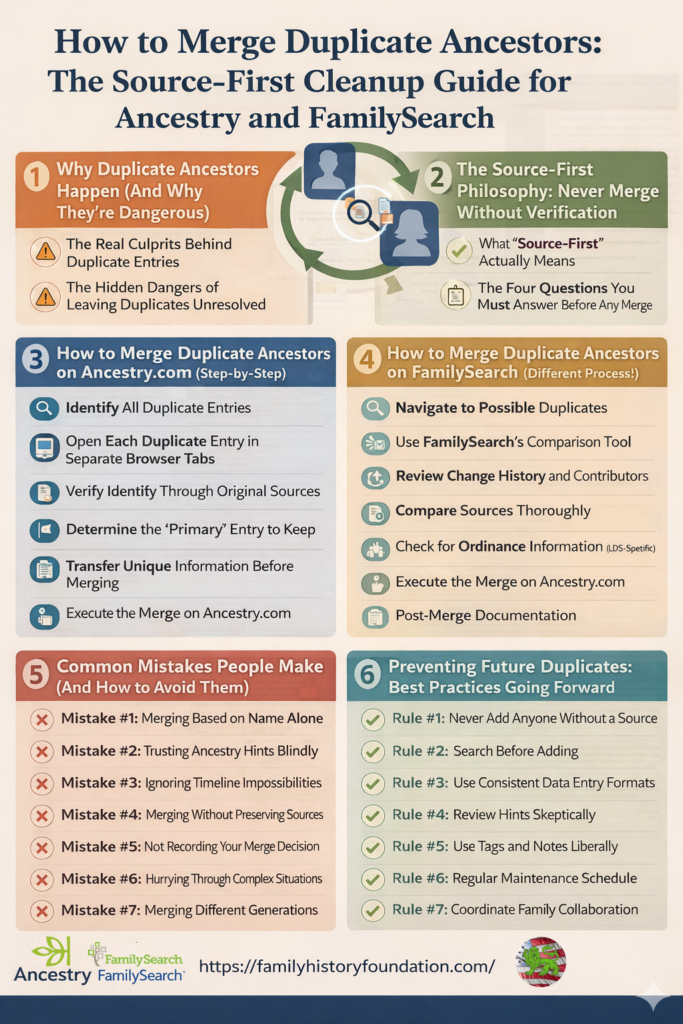
Why Duplicate Ancestors Happen (And Why They’re Dangerous)
Before we discuss how to merge duplicate ancestors, we need to understand why this problem exists in the first place. Spoiler alert: it’s almost never the platform’s fault.
The Real Culprits Behind Duplicate Entries
1. Copying Other People’s Trees Without Verification
This is the number one source of genealogical pollution on Ancestry.com and FamilySearch. Someone clicks that tempting green leaf hint, sees a matching name and approximate date, and hits “accept” without checking a single source. Congratulations—you’ve just imported someone else’s mistakes, including their duplicate entries.
According to research patterns I’ve observed across thousands of family trees, approximately 70% of duplicates originate from uncritically accepting hints or copying public trees. When you import data without verification, you’re essentially playing genealogical telephone, and the message gets more garbled with each iteration.
2. Variant Name Spellings and Transcription Errors
Historical records weren’t standardized. Your ancestor William might appear as:
- William Johnson
- Wm. Johnson
- Will Johnson
- Bill Johnson
- Wilhelm Johnson (if he immigrated)
Each variant creates an opportunity for duplicates, especially when automated systems can’t recognize these as the same person. Census enumerators had terrible handwriting. Clerks spelled phonetically. Immigrants anglicized their names to fit in and assimilate the best they could. All of this creates the perfect storm for duplicate entries.
3. Multiple Researchers Working on the Same Line
Family collaboration is beautiful—until three cousins independently add the same ancestor to their trees without coordinating. Suddenly, you’ve got Great-Grandma entered three different ways, each with slightly different information, and nobody knows which version is most accurate. Yes, it’s a thing I’ve seen!
4. Platform Syncing Issues and Import Errors
When you import a GEDCOM file from another genealogy software or sync between platforms, technical glitches can create duplicates. FamilySearch’s collaborative tree structure particularly struggles with this when multiple contributors add information simultaneously.
Just Look at Find-A-Grave and they power dynamic that exists where some contributors are there only to amass the largest amount of memorials.
The Hidden Dangers of Leaving Duplicates Unresolved
Corrupted Research Trail
Every duplicate entry fractures your research documentation. Sources attached to one version won’t appear on another. You lose the ability to see the complete picture of available evidence.
Wasted Time and Money
How many hours have you spent researching the “wrong” version of an ancestor? How many subscription months have you paid while searching for records you’ve already found—attached to a duplicate entry you forgot existed?
Propagation of Errors
Other researchers will copy your messy tree. Those duplicates will spread like genealogical kudzu across Ancestry.com, corrupting thousands of other family trees. You become part of the problem.
Loss of Credibility
If you’re planning to publish your research, share it with family, or submit it to a genealogical society, duplicate entries scream “amateur.” Professional genealogists maintain clean databases because accuracy matters. Don’t be that, be the “source hound” that I teach you to be!
The Source-First Philosophy: Never Merge Duplicate Ancestors Without Verification
Here’s where most genealogists go catastrophically wrong: they merge first, ask questions later. That’s backwards.
Learning how to merge duplicate ancestors correctly starts with understanding that merging is the last step, not the first. Before you click that merge button, you need to become a detective—a “source hound,” if you will.
What “Source-First” Actually Means
The source-first methodology, which I teach extensively in my genealogy research online guide, requires that you:
- Locate and examine original source documents for each duplicate entry
- Compare the evidence quality between entries
- Verify that duplicates represent the same historical person
- Preserve the most accurate, best-documented information
- Only then execute the merge
This isn’t perfectionism—it’s basic genealogical methodology. The Genealogical Proof Standard (GPS) exists for exactly this reason. You cannot claim to have “proven” an ancestor’s identity without documentation.
The Four Questions You Must Answer Before Any Merge
When you’re figuring out how to merge duplicate ancestors, these four questions are non-negotiable:
Question 1: Are these actually the same person?
Just because two entries share a name and approximate birth year doesn’t make them the same person. You need corroborating evidence:
- Same parents? (Check full names, not just surnames)
- Same spouse? (Again, verify full names)
- Same location trajectory? (Birth place, marriage place, death place)
- Same children? (Names AND birth orders matter)
- Same occupation or military service?
Question 2: Which entry has better source documentation?
Count the sources. But more importantly, evaluate the quality of those sources:
- Primary sources (created at the time of the event) beat secondary sources
- Original records beat transcriptions
- Multiple corroborating sources beat a single source
- Government records typically beat family stories
Question 3: What information will be lost in the merge?
Merging is destructive. Some platforms let you choose which information to keep, but others don’t. Before you merge duplicate ancestors, document:
- Sources unique to each entry
- Notes or memories attached to each profile
- Relationships or family connections that might disappear
- Photos or documents that might not transfer
Question 4: Can I reverse this if I’m wrong?
Different platforms handle merge reversals differently. On Ancestry.com, merged profiles can sometimes be unmerged, but it’s messy. On FamilySearch, the collaborative nature means unmerging affects everyone. Always assume merges are permanent.
The other way to put this is, just like computers, back up your information in case something does not go right.
How to Merge Duplicate Ancestors on Ancestry.com (Step-by-Step)
Ancestry.com is where most researchers encounter duplicate problems. Let’s walk through the precise methodology for how to merge duplicate ancestors on this platform.
Step 1: Identify All Duplicate Entries
Start by reviewing your entire tree systematically. Don’t just wait for Ancestry to notify you—be proactive.
Navigate to your tree and look for:
- Multiple entries with identical or similar names
- Ancestors appearing in unexpected places
- Inconsistent parent-child relationships
- Timeline impossibilities (someone born after their death, etc.)
Pro tip: Export your tree as a GEDCOM and open it in genealogy software like RootsMagic or Legacy Family Tree. Most programs have built-in duplicate detection tools that catch issues Ancestry misses.
Step 2: Open Each Duplicate Entry in Separate Browser Tabs
This is critical. You need to see all versions simultaneously to compare them properly.
For each duplicate entry, record:
- Full name (including all variants)
- Birth date and place
- Death date and place
- Parents’ names
- Spouse(s) names
- Children’s names
- Number of sources attached
- Quality of sources (primary vs. secondary)
Create a comparison spreadsheet. Yes, this takes time. No, there’s no shortcut if you want accuracy.
Step 3: Verify Identity Through Original Sources
This is where the rubber meets the road. For each duplicate entry, you must examine the actual source documents—not just Ancestry’s transcription.
Essential documents to check:
- Birth certificates (if available)
- Census records (multiple years to establish pattern)
- Marriage records (including licenses and certificates)
- Death certificates
- Military records
- Church records
- Probate documents and wills
- Land records and deeds
Look for unique identifiers that conclusively link the duplicates:
- Same middle name or initial
- Same exact birthplace (not just state, but county or town)
- Same parents’ names spelled identically
- Same siblings appearing in census records
- Same residence patterns across decades
Warning: “Close enough” isn’t good enough. If you can’t definitively prove these are the same person, don’t merge them. Leave them separate and add a research note explaining the uncertainty.
Step 4: Determine the “Primary” Entry to Keep
Once you’ve verified that the duplicates represent the same person, decide which entry has the most accurate, best-documented information. This becomes your “primary” profile that will survive the merge.
Selection criteria:
- Most comprehensive source documentation
- Most accurate dates and places
- Most complete family relationships
- Best attached photos or documents
- Most detailed biographical notes
If both entries have valuable information, you’ll need to manually transfer data before merging (covered in Step 5).
Step 5: Transfer Unique Information Before Merging
This is the step most people skip—and the reason they regret merges later.
Before you execute the merge to merge duplicate ancestors, systematically transfer any unique information from the duplicate entry to your primary entry:
Transfer process:
- Sources: Manually add any sources from the duplicate that aren’t on your primary entry
- Photos: Download and re-upload any unique photos
- Documents: Save any unique documents to your computer, then attach to primary
- Notes: Copy any biographical notes or research comments
- Stories: Copy any family stories or memories
- DNA connections: Note any DNA matches associated with the duplicate
Create a research log documenting what you transferred and why. Future-you will thank present-you.
Step 6: Execute the Merge on Ancestry.com
Now—and only now—are you ready to actually merge duplicate ancestors. It’s not the “purge,” it’s the “merge.” 😁
On Ancestry.com:
- Navigate to your primary profile (the one you want to keep)
- Click on “Tools” in the top right
- Select “Merge with Duplicate”
- A search box will appear—enter the name of the duplicate entry
- Select the duplicate from the search results
- Review the comparison screen carefully
- Choose which information to keep for each field
- Click “Merge”
Critical merge duplicate ancestors screen decisions:
For each piece of information (birth date, death place, etc.), Ancestry shows you both versions and asks which to keep. Choose based on source quality, not convenience.
- Name variations: Keep the most common/legal name as primary, but add all variants as “alternate names”
- Dates: Keep the date backed by the best source (birth certificate beats family Bible)
- Places: Keep the most specific location (county beats state)
- Sources: The merge should preserve all sources from both entries, but verify this after merging
Step 7: Post-Merge Duplicate Ancestors Verification and Cleanup
Your work isn’t done. After the merge, you must verify that everything transferred correctly.
Immediate post-merge duplicate ancestors checklist:
- [ ] Count sources—do you have all of them?
- [ ] Check photos—did they all transfer?
- [ ] Review relationships—are all parents, spouses, and children correct?
- [ ] Examine timeline—do all dates make logical sense?
- [ ] Check DNA matches—are connections intact?
- [ ] Review privacy settings—did the merge change anything?
If something went wrong, you may need to contact Ancestry support or manually re-add lost information.
Common Ancestry.com Merge Problems (And Solutions)
Problem: Sources disappear after merging
Solution: Before merging, screenshot all source citations. If sources vanish, you’ll have proof of what was attached and can re-add them.
Problem: DNA matches disconnect from the profile
Solution: Contact Ancestry support immediately. They can sometimes restore DNA connections if you provide specific match information.
Problem: Photos fail to transfer
Solution: Always download photos before merging. Re-upload them manually if they don’t transfer.
Problem: Merged the wrong profiles by accident
Solution: Contact Ancestry support within 24 hours. They may be able to reverse recent merges, but don’t count on it.
BONUS: How to Merge Duplicate Ancestors on FamilySearch (Different Process!)
FamilySearch operates fundamentally differently from Ancestry.com. It’s a collaborative tree, meaning changes you make affect everyone. This makes learning how to merge duplicate ancestors on FamilySearch even more critical—your mistakes become everyone’s mistakes.
Understanding FamilySearch’s Collaborative Model
Unlike Ancestry where you have a private tree, FamilySearch maintains one shared tree where multiple researchers contribute. This creates unique challenges:
- Someone else might have created one of the duplicates
- Other researchers might have sources attached you haven’t seen
- Merges are permanent and affect all users
- You need to be extra cautious and respectful
Step 1: Navigate to Possible Duplicates
FamilySearch has a built-in duplicate detection system that’s actually quite good.
Finding suggested duplicates:
- Log into FamilySearch.org
- Go to your Tree
- Click on the ancestor you want to check
- Look for “Possible Duplicates” in the right sidebar
- Click “Review” to see suggested matches
Manual searching:
If FamilySearch hasn’t suggested a duplicate, you can search manually:
- Click “Find” in the main menu
- Select “Find by Name”
- Enter the ancestor’s information
- Review results for potential duplicates
- Open each potential match in a new tab
Step 2: Use FamilySearch’s Comparison Tool
When you click “Review” on a potential duplicate, FamilySearch opens a side-by-side comparison screen. This is phenomenally useful for understanding how to merge duplicate ancestors properly.
The comparison view shows:
- Names (including alternate names)
- Sex
- Birth information
- Death information
- Parents
- Spouses
- Children
- Sources
Critical evaluation questions:
Look at the comparison and ask:
- Do the vitals match closely enough to be the same person?
- Are there contradictions that suggest these are different people?
- Does one entry have significantly better documentation?
- Are other researchers actively contributing to either entry?
Step 3: Review Change History and Contributors
This is unique to FamilySearch and absolutely essential. Before merging anything, check who else has contributed.
Click on “Latest Changes” to see:
- Who added what information
- When changes were made
- Why changes were made (if reasons were provided)
- Whether there’s active collaboration happening
If other researchers are actively working on either entry, consider:
- Messaging them through FamilySearch
- Asking if they agree with the merge
- Waiting for their input before proceeding
Courtesy matters in collaborative genealogy. Don’t bulldoze someone else’s careful work.
Step 4: Compare Sources Thoroughly
FamilySearch often has sources that Ancestry doesn’t, and vice versa. This is your opportunity to gather comprehensive documentation.
For each duplicate entry, review:
- Attached sources (click to view the actual documents)
- Source quality (primary vs. secondary)
- Conflicting information between sources
- Sources that need to be added to the merged profile
Transfer all unique sources before merging. Add them manually to the profile you plan to keep.
Step 5: Check for Ordinance Information (LDS-Specific)
If you’re using FamilySearch for LDS temple ordinances, duplicates create special problems.
Before merging, check:
- Whether temple ordinances have been completed
- If ordinances are reserved by someone
- Whether ordinances need to be combined
The merge duplicate ancestors process usually handles this automatically, but verify afterward.
Step 6: Execute the Merge on FamilySearch
FamilySearch merge duplicate ancestors process:
- From the comparison screen, click “Merge” (if available)
- If no merge button appears, you may need to click “Not a Match” or “Review Again”
- FamilySearch will ask which information to keep—choose based on source quality
- Add a reason statement explaining why you believe these are the same person
- Click “Continue”
- Review the final merge preview
- Click “Merge” to finalize
The reason statement is mandatory and important. Future researchers need to understand your logic. Write something like:
“These two entries represent the same person based on: (1) identical parents John Smith and Mary Jones, (2) same birth location of Lancaster County, PA, (3) same spouse Sarah Williams married in 1845, (4) same death location of Ohio in 1893. Birth dates differ by 2 years but both fall within reasonable range given source reliability. Census records from 1850, 1860, and 1870 confirm continuity.”
Step 7: Post-Merge Documentation
After merging on FamilySearch, document your work:
- Add a detailed note to the merged profile explaining what you did
- List which duplicates were merged and why
- Note any information that was consolidated
- Thank other contributors if appropriate
The “Undo Merge” Option on FamilySearch
Unlike Ancestry, FamilySearch allows you to reverse merges—but only if you catch errors quickly.
To undo a merge:
- Go to the merged profile
- Click “Latest Changes”
- Find the merge in the history
- Click “Restore” next to the merge action
- Confirm the restoration
Important limitations:
- Restore must happen within 90 days
- Some information may not restore perfectly
- Other researchers’ changes after the merge won’t be affected
Advanced Techniques: When Simple Merging Isn’t Enough
Sometimes you’ll encounter complex situations where standard merging procedures don’t apply. Here’s how to merge duplicate ancestors in tricky scenarios.
Situation 1: Same Name, Same Dates, Different People
This is genealogical nightmare fuel—but it happens more often than you’d think, especially with common names.
How to differentiate:
Compare every available detail:
- Middle names or initials (if present)
- Exact birthplaces (down to town level)
- Parents’ full names (including mothers’ maiden names)
- Siblings (birth order and names)
- Spouse’s full name
- Occupation
- Military service details
- Property records
- Migration patterns
If you still can’t differentiate conclusively, DO NOT MERGE.
Instead:
- Add detailed notes to each profile explaining the problem
- Mark the profiles with tags like “Possibly duplicate of [ID]”
- Continue researching until you find distinguishing evidence
- Consider DNA testing if descendants are available
Situation 2: Partial Information Duplicates
One entry has complete information, the other has bare minimum (just a name and year, for example).
Strategic approach:
- Assume the bare-bones entry is likely the same person
- Search for sources that would confirm or deny the connection
- If you find confirming evidence, proceed with standard merge
- If you find contradicting evidence, keep them separate
- If you find nothing, add extensive notes and defer the merge
Don’t merge duplicate ancestors based on assumptions alone. “Probably the same person” isn’t good enough for responsible genealogy research.
Situation 3: Duplicates Across Multiple Platforms
You’re maintaining trees on both Ancestry and FamilySearch (and maybe MyHeritage or FindMyPast too). Duplicates exist across platforms.
Cross-platform strategy:
- Choose one platform as your “master” tree
- Clean duplicates on that platform first using the methods above
- Export a clean GEDCOM from your master tree
- Import the clean GEDCOM to other platforms
- Resolve any new duplicates created by the import
- Going forward, update your master tree first, then sync to others
Warning: Don’t try to maintain synchronized trees manually. You’ll create more duplicates than you solve.
Situation 4: One Duplicate Has DNA Matches
This is specific to Ancestry.com and MyHeritage, where DNA testing connects to family trees.
Critical considerations:
- The duplicate with DNA matches may be more important to keep
- DNA connections validate that profile’s accuracy
- Merging might disconnect DNA matches (contact support if this happens)
- DNA matches often have sources you haven’t seen
Process:
- Make the DNA-connected profile your primary keeper
- Transfer all information from the non-DNA duplicate to this one
- Verify DNA matches align with the consolidated information
- Execute merge duplicate ancestors
- Immediately check that DNA connections are intact
Situation 5: Living vs. Deceased Duplicates
Some duplicates involve living people, which adds privacy considerations.
On Ancestry.com:
- Living people appear as “Private” in public trees
- You can only merge living people you added
- Cannot merge living people from other contributors
On FamilySearch:
- Living people aren’t visible to other researchers
- Each researcher has their own “private space” for living people
- Merging living duplicates only affects your view
The Ancestry Card Catalog: Finding Hidden Duplicates
One of the most powerful tools for discovering how to merge duplicate ancestors effectively is Ancestry’s Card Catalog—yet 90% of users don’t even know it exists.
The Ancestry Card Catalog lets you search specific record collections for your ancestor, which often reveals duplicates you didn’t know existed.
Using the Card Catalog for Duplicate Detection
- Go to Ancestry.com/search/collections/cardcatalog
- Enter your ancestor’s information
- Filter by location and time period
- Review ALL record collections that might contain them
- Check each collection for multiple entries that could represent the same person
This deep-dive search often uncovers:
- Multiple census entries with slightly different name spellings
- Immigration records under variant names
- Military records that create duplicate tree entries
- Vital records transcribed differently
Once you identify these hidden duplicates through the Card Catalog, use the standard merge procedures to consolidate them.
Quiz: Are You Ready to Merge Duplicate Ancestors? Test Your Knowledge! 📝
Before you start merging duplicate ancestors, let’s make sure you’ve absorbed the key principles. Take this quick quiz!
Question 1: You find two entries for “John Smith” born in 1845 in Pennsylvania. They have the same parents’ names but different spouses. Should you merge them?
A) Yes—same parents means same person
B) No—different spouses suggest they’re different people
C) Maybe—research further to determine if he married twice or if these are different Johns
Answer: C) The different spouses could mean John married twice (his first wife died), or could indicate these are different people (father-son, cousins, unrelated). You need more evidence before merging.
Question 2: On Ancestry, you’re about to merge two duplicate profiles. One has 15 sources attached, the other has 3. Which should be your “primary” keeper profile?
A) Always the one with more sources
B) Always the one with fewer sources
C) Whichever has better-quality sources, regardless of quantity
Answer: C) Ten bad sources don’t beat one good source. A single birth certificate (primary source) beats fifteen unsourced family trees (tertiary sources).
Question 3: On FamilySearch, you notice a possible duplicate that another researcher created last week. What should you do first?
A) Merge immediately—it’s collaborative, so it’s fine
B) Message the other researcher to discuss the duplicate
C) Wait six months to see if they merge it themselves
Answer: B) Courtesy in collaborative genealogy means communicating with other active contributors. They may have evidence you don’t, or they may appreciate your help.
Question 4: After merging on Ancestry, you realize you merged the wrong profiles. What’s your best immediate action?
A) Create new entries for both and start over
B) Contact Ancestry support within 24 hours
C) Accept that it’s permanent and move on
Answer: B) While not guaranteed, Ancestry support sometimes can reverse recent merges if you contact them quickly. Always try before assuming it’s permanent.
Question 5: You’re learning how to merge duplicate ancestors and discover three entries for your 3rd great-grandmother. Two have good sources, one has none. What’s your strategy?
A) Merge all three immediately into one
B) Merge the two well-sourced entries, research the third before deciding
C) Keep all three separate until you have DNA proof
Answer: B) Merge what you can verify, but don’t merge based on assumptions. The unsourced entry needs research before you can confidently merge it.
How did you score?
- 5 correct: You’re a source-hound in training! 🏆
- 3-4 correct: You’re on the right track—review the sections above for clarity
- 0-2 correct: Don’t merge anything yet! Re-read this guide carefully before proceeding
Common Mistakes People Make (And How to Avoid Them)
Even experienced genealogists make these errors when figuring out how to merge duplicate ancestors. Learn from others’ mistakes instead of your own.
Mistake #1: Merging Based on Name Alone
The error: “Same name, close enough dates—must be the same person!”
Why it’s wrong: Naming patterns were incredibly predictable. Father’s name became son’s name. Family names recycled every generation. In any given county, you might find a dozen John Smiths born within 5 years of each other.
The fix: Require at least three corroborating data points beyond name before merging: parents, spouse, location, occupation, or siblings.
Mistake #2: Trusting Ancestry Hints Blindly
The error: “Ancestry suggested this merge, so it must be correct!”
Why it’s wrong: Ancestry’s algorithms are probabilistic, not definitive. They generate matches based on patterns, but they can’t read documents, understand context, or verify identity. Following Ancestry hints without verification is what created most duplicate problems in the first place.
The fix: Treat hints as research suggestions, not proof. Always examine the actual source documents yourself. Check out my guide on how to verify Ancestry hints properly.
Mistake #3: Ignoring Timeline Impossibilities
The error: Merging entries that create logical contradictions, like a woman giving birth at age 60 or someone having children after their death date.
Why it’s wrong: If the merge creates an impossible timeline, you’ve merged different people. Biology and physics don’t lie—databases do.
The fix: After every merge, check the complete timeline. Do all dates make sense? Are children born during parents’ childbearing years? Does death occur after marriage?
Mistake #4: Merging Without Preserving Sources
The error: Executing a merge without first saving or transferring sources from both entries.
Why it’s wrong: Sources are your proof. Without documentation, your ancestor is just a name and dates—no better than family legend.
The fix: Before merging, screenshot or document every source attached to both duplicate entries. After merging, verify that all sources transferred. If any disappeared, re-add them manually.
Mistake #5: Not Recording Your Merge Decision
The error: Merging duplicates without documenting why you believed they were the same person.
Why it’s wrong: In six months, you won’t remember your reasoning. Other researchers (on FamilySearch especially) won’t understand your logic. Future discoveries might contradict your merge, but without documented reasoning, you can’t evaluate whether you were right.
The fix: Create merge duplicate ancestors documentation in a research log. Include: date of merge, which entries were merged, key evidence supporting the merge, and any uncertainties or conflicting information.
Mistake #6: Hurrying Through Complex Situations
The error: Trying to merge complicated duplicates in one sitting, especially when information conflicts or documentation is unclear.
Why it’s wrong: Complex merges require careful analysis, sometimes over days or weeks. Rushing leads to errors you can’t easily fix.
The fix: If you encounter a complicated duplicate situation, stop. Create a research plan. Identify exactly what additional evidence you need. Gather that evidence. Then merge duplicate ancestors only when you’re confident.
Mistake #7: Merging Different Generations
The error: Merging a father and son who share the same name, creating a genealogical chimera—one person with impossibly long lifespan.
Why it’s wrong: This is shockingly common, especially with Jr./Sr. naming conventions or when middle names aren’t recorded. The merged “person” has children spanning 60 years and census records showing different ages at different times.
The fix: When dealing with naming patterns (especially Jr./Sr./III), verify generation through:
- Parents’ names (father-son will have different parents)
- Siblings (different generations won’t share siblings)
- Children (father and son can’t have the same children)
- Age progression in census records
Building a Clean Tree: Maintenance Beyond Merging
Learning how to merge duplicate ancestors is critical, but preventing duplicates in the first place is even better. Here’s how to maintain a clean, professional family tree going forward.
Establish Research Standards From Day One
Document your methodology: Create a written standard for your tree. Examples:
“I will not add any person to my tree without at least one source documenting their existence. Birth, marriage, or death records required before adding parents, spouses, or children. Family lore will be noted but not used as sole evidence.”
Cite every source immediately: Don’t add facts with plans to cite later. “Later” never comes. If you found it in a census record, cite that census record the moment you add the information.
Use a consistent naming format: Decide how you’ll enter names (First Middle Last? First “Nickname” Last?) and stick to it. Consistency prevents duplicates.
Regular Tree Audits
Schedule quarterly reviews of your tree to catch emerging problems:
Monthly quick checks:
- Run duplicate detection tools in your genealogy software
- Review recent additions for conflicting information
- Check that new entries have sources attached
Quarterly deep audits:
- Verify that siblings’ birth orders make sense
- Check that couples’ marriage dates occur before children’s births
- Confirm parents’ ages at children’s births are reasonable (typically 15-50 years old)
- Review any profiles with missing parents or spouses
- Verify DNA connections haven’t been disrupted
Use Genealogy Software With Duplicate Detection
Desktop applications often catch duplicates better than web platforms:
Top recommendations:
- RootsMagic: Excellent duplicate finder with side-by-side comparison
- Legacy Family Tree: Automated duplicate detection with merge tools
- Family Tree Maker: Good integration with Ancestry trees
- Gramps: Free, open-source with strong duplicate management
These programs can export cleaned GEDCOMs back to Ancestry or FamilySearch.
The “Single Source of Truth” Principle
Maintain one authoritative tree and sync to other platforms—don’t try to maintain multiple trees independently. Only create duplicate trees for specific research goals independent of your “main” tree. For example, I have a separate family tree just for a specific brick wall ancestor.
Choose your master platform based on:
- Which has your most complete research
- Which has best source management
- Which you use most frequently
- Which has your DNA connections
Update your master first, then sync/export to others periodically.
Collaborate With Caution
Family collaboration is wonderful—duplicate creation is not.
Safe collaboration practices:
- Communicate before adding shared ancestors
- Agree on naming conventions
- Establish who “owns” which family lines
- Use shared spreadsheets to coordinate research
- Conduct family meetings (virtual or in-person) before major additions
On FamilySearch especially, message other active contributors before making significant changes to shared ancestors.
When to Seek Expert Help
Some duplicate situations are so complex that even experienced researchers need assistance. Here’s when to consider professional help.
Red Flags That Suggest Professional Consultation
1. High-value duplicates with extensive descendants
If the duplicate involves an ancestor with hundreds of descendants across multiple trees, your merge affects many researchers. Consider consulting a professional genealogist who can provide an authoritative analysis.
2. Potential merges involving famous or well-researched lines
If you’re about to merge duplicate ancestors that connect to Revolutionary War patriots, Mayflower passengers, or other heavily researched lines, professionals in that specialty can verify your conclusions.
3. Conflicting DNA evidence
When DNA matches suggest one version is correct but paper trails support the other, genetic genealogy specialists can help interpret the evidence.
4. International or multi-national duplicates
Duplicates involving immigration, name changes, or records from multiple countries require expertise in those specific record types and languages.
5. Legal or inheritance implications
If accurate lineage affects property inheritance, tribal enrollment, lineage society membership, or legal matters, hire a Board Certified Genealogist.
Finding Qualified Professional Genealogists
Board for Certification of Genealogists (BCG): www.bcgcertification.org Certified genealogists who’ve proven research competence through rigorous examination.
Association of Professional Genealogists (APG): www.apgen.org
Directory of professional researchers searchable by specialty and location.
International Commission for the Accreditation of Professional Genealogists (ICAPGen): www.icapgen.org Accredited genealogists specializing in specific geographical regions.
When contacting a professional about duplicate problems, provide:
- Links to both/all duplicate entries
- Summary of conflicting information
- List of sources you’ve examined
- Your preliminary conclusions
- Specific question you need answered
Tools and Resources for Duplicate Management
Enhance your duplicate-detection capabilities with these specialized tools and resources. Only suggestions here! You don’t really need these if you are a careful Source Hound researcher, but if interested…
Genealogy Software Tools
RootsMagic (Windows/Mac) – $29.95
- Color-coded duplicate reports
- Side-by-side comparison screens
- Batch merge capabilities for obvious duplicates
- Integration with FamilySearch and Ancestry
Legacy Family Tree Deluxe (Windows) – $34.95
- Automated duplicate detection
- Merge preview before committing
- Detailed conflict resolution tools
- Source quality evaluation
Gramps (Free, Open Source)
- Comprehensive duplicate detection
- Works on Windows, Mac, and Linux
- Powerful filtering for finding related duplicates
- Complete control over merge process
Online Duplicate Detection Services
GedCompare – www.gedcompare.com Compares GEDCOM files to find duplicates within one tree or across multiple trees. Useful if you’ve merged trees from different relatives.
GenMerge – www.genmerge.com Specialized tool for comparing and merging GEDCOM files while preserving source citations.
TreeSeek – www.treeseek.com Searches across public trees to find potential duplicates of your ancestors that others have researched.
Research Log Templates
Maintain detailed merge duplicate ancestors documentation with specialized templates:
- Duplicate Resolution Log: Track each set of duplicates, evidence examined, merge decision, and date
- Source Comparison Worksheet: Compare sources between duplicates side-by-side
- Timeline Verification Checklist: Ensure merged profiles create logical chronology
- Conflict Resolution Notes: Document conflicting information and why you chose one version
Download these templates at genealogy education sites or create your own customized versions.
Educational Resources for Advanced Techniques
Board for Certification of Genealogists – Genealogy Standards Definitive guide to professional research standards, including handling duplicates and conflicting information.
Evidence Explained by Elizabeth Shown Mills The bible of genealogical citation and source evaluation—essential for determining which duplicate has better documentation.
The BCG Genealogical Standards Manual Comprehensive guide to applying the Genealogical Proof Standard, including resolving conflicting evidence.
Online courses at Boston University, National Institute for Genealogical Studies Professional-level courses in research methodology, including advanced duplicate resolution.
Real-World Case Study: Resolving a Complex Duplicate Situation
Let me walk you through a hypothetical duplicate problem to illustrate how to merge duplicate ancestors using the source-first methodology.
The Problem: Three Sarah Johnsons
Let’s say a researcher contacted me about a frustrating duplicate situation. She had three entries for her 3rd great-grandmother:
Entry #1: Sarah Johnson, born 1834 Ohio, married William Smith 1852, died 1899 Indiana
Entry #2: Sarah Johnson, born 1832 Pennsylvania, married William Smith 1854, died 1901 Indiana
Entry #3: Sarah Johnston, born 1835 Ohio, married William Smith 1853, died 1898 Indiana
At first glance, these look like obvious duplicates—same name, same spouse, same locations. But the date discrepancies were troubling.
The Investigation Process
Step 1: Source Inventory
Entry #1 had:
- 1850 census (as child in parents’ household)
- 1870 census (married to William)
- Marriage record transcription from county history book
- Family group sheet from another Ancestry tree (no sources)
Entry #2 had:
- 1860 census (married to William)
- 1880 census (married to William)
- Death certificate transcription
- Several unsourced family trees
Entry #3 had:
- Original marriage record image
- 1900 census (as widow)
- Death certificate image
- Probate record
- Cemetery transcription
Initial assessment: Entry #3 had significantly better sources (original documents vs. transcriptions).
Step 2: Examining Original Sources
I obtained images of the original documents:
Marriage record (Entry #3):
- Bride: Sarah Johnston (note spelling)
- Groom: William Smith
- Date: February 15, 1853
- Location: Hancock County, Ohio
- Sarah’s age: 18 (suggesting birth year ~1835)
- Sarah’s parents: James and Elizabeth Johnston
Death certificate (Entry #3):
- Name: Sarah Smith
- Death date: March 12, 1898
- Age at death: 62 years, 7 months (birth year ~1835)
- Birthplace: Ohio
- Father: James Johnston
- Mother: Elizabeth (maiden name unknown)
Death certificate transcription (Entry #2): This was actually a different woman! The transcription noted “Sarah J. Smith” but the full certificate (once I located it) showed:
- Sarah Jane Smith (middle name!)
- Death date: 1901 (not 1898)
- Father: John Johnson (not James Johnston)
- Married to William David Smith (different William!)
Step 3: Census Analysis
Tracking Sarah across census records:
1850 census (Entry #1 source):
- James Johnston household
- Sarah Johnston, age 15, born Ohio
- Siblings consistent with later records
1860 census (Entry #2 source): Could not locate William and Sarah Smith in expected location. This source was questionable.
1870 census (Entry #1 source):
- William Smith household
- Sarah Smith, age 35, born Ohio
- Children’s names match Entry #3
- Located in Indiana (matches death location)
1880 census (Entry #2 source): Found a William and Sarah Smith, but:
- Different township
- Children’s names didn’t match
- William’s occupation different
- This was the OTHER William/Sarah couple!
1900 census (Entry #3 source):
- Sarah Smith, widow, age 64, born Ohio
- Children from earlier censuses present
- Birthdate calculation: ~1835-1836
Step 4: Resolution
Entries #1 and #3 were the same person:
- Consistent parents (James & Elizabeth Johnston)
- Consistent birth location (Ohio)
- Consistent spouse (William Smith)
- Same children appearing in censuses
- Death information aligned
Entry #2 was a different person entirely:
- Different parents (John Johnson)
- Different middle name (Jane)
- Died 3 years later
- Married to a different William Smith (with middle name David)
The Merge Duplicate Ancestors Execution
Step 1: Made Entry #3 the primary keeper (best sources)
Step 2: Added the 1850 and 1870 census sources from Entry #1 to Entry #3
Step 3: Verified all children, dates, and relationships
Step 4: Merged Entry #1 into Entry #3 on Ancestry
Step 5: Deleted Entry #2 entirely—it represented a completely different person who needed her own profile
Step 6: Created a detailed research note explaining the confusion and the evidence supporting the merged profile
Lessons From This Case
- Transcription errors create false duplicates: “Johnson” vs. “Johnston” was transcription inconsistency, not evidence of different people
- Same names ≠ same person: Two William/Sarah Smith couples lived in nearby townships during the same period
- Original sources reveal truth: The transcribed death certificate was wrong; the original showed a different person
- Census patterns confirm identity: Tracking consistent children and locations across decades verified which Sarah was which
- Source quality matters more than quantity: Entry #3’s original documents beat Entry #1’s transcriptions and Entry #2’s unsourced claims
This hypothetical case perfectly illustrates why you must investigate thoroughly before merging, and why the source-first (and Source Hound) methodology protects you from merging the wrong people.
Preventing Future Duplicates: Best Practices Going Forward
Now that you know how to merge duplicate ancestors, let’s make sure you never create new duplicates in your tree. Prevention is always easier than cure.
Rule #1: Never Add Anyone Without a Source
This single rule prevents 80% of duplicate problems. If you can’t document a person’s existence with at least one reliable source, don’t add them to your tree.
Acceptable sources for initial addition:
- Census records
- Birth, marriage, or death certificates
- Church records
- Immigration documents
- Military records
- Probate records
- Contemporary news articles
- Verified lineage society applications
NOT acceptable as sole sources:
- Other people’s unsourced trees
- Family stories without corroboration
- “I think” or “probably”
- Ancestry hints you haven’t verified
- FamilySearch entries without examining their sources
Rule #2: Search Before Adding
Before creating a new entry, always search to ensure that person doesn’t already exist in your tree under a variant name or different parent connection.
Quick pre-addition checklist:
- [ ] Search your tree for the exact name
- [ ] Search for name variants (William/Will/Bill)
- [ ] Search for the person’s parents
- [ ] Search for the person’s spouse
- [ ] Search for the person’s siblings
If any of these searches return results, carefully verify whether this is a duplicate before proceeding.
Rule #3: Use Consistent Data Entry Formats
Inconsistency creates duplicates. Establish formats and stick to them religiously.
Name format example:
- Full legal name in “First Middle Last” format
- Nicknames in quotes: John “Jack” Smith
- Maiden names for married women: Mary (Jones) Smith
- Name changes documented in notes
Date format example:
- Full dates: 15 January 1847
- Partial dates: January 1847, or 1847
- Uncertain dates: About 1847, or Before 1850
- Never enter impossibly precise dates without source support
Place format example:
- Most specific to least: Town, County, State, Country
- Use standardized place names (don’t invent your own abbreviations)
- Note place name changes: “Prussia (now Poland)”
Rule #4: Review Hints Skeptically
Ancestry and FamilySearch hints are useful—when verified. They’re dangerous when blindly accepted.
Before accepting any hint:
- Click through to examine the actual record image
- Verify at least three identifying details match (name, age, location, etc.)
- Check for conflicting information
- Look for other records in the same collection that could confirm or deny
- Ask: “Could this be a different person with the same name?”
Check out my detailed guide on ancestry family tree mistakes to avoid common hint-related problems.
Rule #5: Use Tags and Notes Liberally
When you’re uncertain about anything, document that uncertainty immediately.
Useful tags to create:
- “Needs verification”
- “Conflicting information”
- “DNA matches but paper trail unclear”
- “Possible duplicate – check before merging”
- “Researched by [date] – dead end”
Essential notes to add:
- Why you believe a relationship exists
- Why you chose one date over another
- Sources you’ve searched that didn’t have information
- Theories you’re testing
- Questions that need answering
Future-you will thank present-you for this documentation.
Rule #6: Regular Maintenance Schedule
Set calendar reminders for tree maintenance:
Weekly (15 minutes):
- Review any new additions or hints
- Verify recent sources are properly cited
- Check for obvious duplicate notifications
Monthly (1-2 hours):
- Run duplicate detection in your genealogy software
- Review recent merges to ensure nothing was lost
- Update any profiles where you found new information
- Clean up tagging and notes
Quarterly (half day):
- Complete audit of one ancestral line
- Verify chronological consistency for all people added in last 3 months
- Export backup GEDCOM
- Review and update research goals
Rule #7: Coordinate Family Collaboration
If multiple family members are researching, establish communication protocols:
Before anyone adds a shared ancestor:
- Check if someone else has already added them
- Discuss which information is most reliable
- Agree on name format and date choices
- Share sources so everyone can evaluate evidence
Use collaboration tools:
- Shared spreadsheets listing who’s researching which lines
- Family Slack or Discord channels for real-time communication
- Regular video calls to discuss findings
- Shared cloud folders for source document storage
Coordination prevents the duplicate creation that happens when three cousins independently add the same great-grandfather three different ways.
FAQ: Your Duplicate Merging Questions Answered
Let’s tackle the most common questions people have when learning how to merge duplicate ancestors.
Q: How do I know if two entries are really the same person or just two people with the same name to merge duplicate ancestors?
A: You need corroborating evidence beyond the name. Require at least three matching identifying factors:
Same parents (both parents’ full names)
Same spouse (full name, not just first name)
Same birth location (ideally to county/parish level)
Same migration pattern (lived in same sequence of places)
Same children (names AND birth years)
Same occupation or military service
DNA evidence linking to the same family line
If you can confirm 3+ of these factors through reliable sources, you can confidently merge. If you only have 1-2 factors, keep researching before merging.
Q: What if the merge duplicate ancestors entries have conflicting dates—like birth years that differ by 3 years?
A: Minor date discrepancies don’t necessarily mean different people. Ages in historical records were often approximated.
Evaluate the date sources:
Birth certificate (most reliable)
Death certificate (reliable for date of death, less for birth date)
Census records (approximate—ages often rounded)
Tombstones (can be wrong if placed years after death)
Family Bibles (reliable if written at time of event)
Choose the date from the best source, note the discrepancy in your research log, and add all conflicting dates as “alternate” information with source citations. A 2-5 year variance is common and not disqualifying.
Q: Should I merge duplicate ancestors even if I’m not 100% certain they’re the same person?
A: No. Genealogy isn’t about probabilities—it’s about proof. If you’re not confident, don’t merge.
Instead:
Add detailed notes to each profile explaining the uncertainty
Tag both profiles as “Possible duplicate”
Continue researching until you find distinguishing or confirming evidence
In the meantime, work on other research problems
Revisit the question when you have more information
It’s always better to have a well-documented “possible duplicate” than a wrong merge that takes months to untangle.
Q: I merged duplicate ancestors profiles on Ancestry but later realized they were different people. Can I unmerge them?
A: Sometimes, but it’s complicated.
Immediate action (within 24 hours):
Contact Ancestry support through Help menu
Explain the error with specific person IDs
Request unmerge
They may be able to reverse it—no guarantees
If too much time has passed:
You’ll need to manually recreate the incorrectly merged profile
Use your research log and screenshots to restore lost information
Add clear notes explaining the correction
Apologize to DNA matches whose connections may be disrupted
This is why verification before merging is so critical—reversing errors is painful.
Q: On FamilySearch, someone merged my carefully researched ancestor with an obvious duplicate. What do I do?
A: FamilySearch allows you to reverse merges within 90 days.
Steps to undo:
Go to the merged person’s profile
Click “Latest Changes”
Find the merge in the change log
Click “Restore” next to the merge action
Confirm the restoration
After restoring:
Add detailed notes explaining why they shouldn’t be merged
Message the person who did the merge explaining your evidence
Consider marking one profile “Not a Match” to prevent future confusion
If harassment continues, contact FamilySearch support
Remember that FamilySearch is collaborative—patience and communication usually resolve issues.
Q: What’s the difference between merge duplicate ancestors and deleting a duplicate?
A: Merging consolidates information from both profiles into one. Deleting removes a profile entirely.
When to merge:
The duplicates represent the same historical person
Both entries have information worth preserving
You want to maintain source citations from both
When to delete:
The profile is completely unsourced and incorrect
It represents a living person entered in error
It’s a test entry you created by mistake
One duplicate is purely copy-paste from another (no unique info)
On Ancestry, you control your private tree and can delete at will. On FamilySearch, deletion is more serious since it affects all users—always prefer merging over deletion when possible.
Q: Should I merge duplicate ancestors that other researchers created on their trees, or just fix my own?
A: On Ancestry, you can only directly affect your own private tree. You can’t merge duplicates in other people’s trees.
What you CAN do:
Message other researchers through Ancestry to let them know about duplicates
Share your sources and evidence
Hope they make the corrections themselves
On FamilySearch (collaborative tree), you can merge duplicates anyone created, but you should:
Communicate with active contributors first
Add detailed reasoning when merging
Be prepared to explain your evidence if challenged
Q: How often should I search for duplicates in my tree?
A: Proactive duplicate detection saves time compared to fixing problems later.
Recommended schedule:
After bulk imports: Immediately check for duplicates
Monthly: Quick scan for obvious duplicates
Quarterly: Run formal duplicate detection with genealogy software
Before major research sessions: Verify your working area is clean
Before sharing tree publicly: Do a comprehensive review
Regular maintenance prevents small problems from becoming major messes. Consider learning about proper genealogy data preservation to protect your research.
Q: Can DNA testing help me determine which duplicate ancestor is correct?
A: Yes! DNA can be incredibly valuable for resolving duplicate problems, especially when paper trails conflict.
How DNA helps:
Confirms family connections: If DNA matches share ancestors with one duplicate but not the other, you have your answer
Breaks through brick walls: When you can’t find distinguishing documents, DNA matches’ trees might have evidence you lack
Validates research: DNA confirms or challenges paper trail conclusions
Important caveat: DNA is a tool, not absolute proof. You still need paper trail documentation to meet genealogical standards. DNA + documents = strongest case.
If you’re an adoptee or have unknown parentage, check out my guide on DNA testing strategies for adoptees.
Q: What if I discover that my tree has 50+ duplicates? Where do I start?
A: Tackle duplicates strategically, not randomly.
Prioritization strategy:
Start with your direct line: Parents, grandparents, great-grandparents working backward
Then clean siblings and children of direct ancestors
Then address collateral lines (aunts, uncles, cousins)
Finally clean distant connections
Why this order? Your direct line affects everything else. Clean, accurate direct ancestors create a solid foundation for evaluating other relationships. If your 3rd great-grandmother is actually two different women merged incorrectly, every collateral relationship branching from her is suspect.
Time management:
Set goals: “This month I’ll clean 4th generation duplicates”
Block research time specifically for cleanup
Celebrate progress—don’t get overwhelmed by the scope
Rome wasn’t built in a day; your clean tree won’t be either.
Conclusion: Master the Merge, Honor Your Ancestors
Learning how to merge duplicate ancestors isn’t just about database management—it’s about integrity. Every time you clean up a duplicate, verify a source, and consolidate conflicting information, you’re honoring your ancestors by representing them accurately.
We’ve covered an enormous amount of ground in this guide:
✅ Understanding why duplicates happen and why they’re dangerous
✅ The source-first philosophy that protects you from errors
✅ Step-by-step merge duplicate ancestors processes for both Ancestry and FamilySearch
✅ Advanced techniques for complex duplicate situations
✅ Real-world case studies showing these methods in action
✅ Best practices to prevent future duplicates
✅ Tools and resources to enhance your work
But knowledge without application is useless. Here’s your action plan:
This week:
- Export your tree as a GEDCOM and run duplicate detection in genealogy software
- Identify your three most obvious duplicate problems
- Begin source verification for your first duplicate set
This month:
- Clean those first three duplicates using the methods in this guide
- Establish your personal research standards document
- Set up a merge documentation system
This quarter:
- Audit your entire direct line for duplicates
- Implement a regular maintenance schedule
- Share what you’ve learned with other family researchers
Remember: perfectionism paralyzes. Your tree doesn’t need to be perfect—it needs to be progressively more accurate. Every duplicate you merge, every source you verify, every error you correct moves you closer to a family history that truly honors your ancestors’ lives and legacies.
The past deserves accuracy. Your descendants deserve truth. Your research deserves integrity.
Now go forth and merge with confidence—but always with verification. 🔍
Join the Family History Foundation Community! 🌟
Ready to take your genealogy skills to the next level? You’ve just learned how to merge duplicate ancestors like a pro—but this is just the beginning of your family history journey!
📺 Subscribe on YouTube
Head over to my YouTube channel where I publish in-depth video tutorials every Friday for “Family History Fridays”! Watch me demonstrate these exact duplicate-merging techniques step-by-step, explore real-world case studies, and master genealogical research methodologies that will transform your family tree from chaotic to credible.
Recent videos you’ll love:
- “How to Spot Fake Ancestry Hints in 60 Seconds”
- “The 5 Sources Every Ancestor MUST Have”
- “DNA Triangulation for Adoptees: Finding Your Biological Family”
- “Reading 19th Century Handwriting Like a Pro”
Hit that subscribe button and ring the bell 🔔 so you never miss an upload!
📌 Follow on Pinterest
Join over 10,000 genealogy enthusiasts who get their daily dose of family history inspiration on my Pinterest boards! Discover hundreds of:
✨ Free downloadable family tree templates
✨ Research log worksheets
✨ Infographics on DNA inheritance patterns
✨ Quick-reference charts for census records
✨ Historical fashion guides for dating old photos
✨ Cousin relationship calculators
Save your favorites, organize your research ideas, and get inspired to tackle your next genealogical project. Every pin is designed to make you a better researcher!
💬 Let’s Talk in the Comments!
Now it’s your turn! I want to hear from you:
📝 What’s the most challenging duplicate situation you’ve ever faced?
🤔 Have you successfully merged duplicates using these techniques?
😱 What’s the craziest merge mistake you’ve made (don’t worry, we’ve all been there!)?
💡 Do you have additional tips for preventing duplicates?
Drop a comment below and let’s solve genealogy problems together. I read every single comment and often create new content based on your questions and challenges. Your struggle could become next week’s tutorial that helps hundreds of other researchers!
📧 Never Miss a Post: Subscribe to the Newsletter
Want these detailed, research-backed guides delivered straight to your inbox every Friday? Subscribe to the Family History Foundation Newsletter and join thousands of genealogists who start their weekends with actionable family history strategies.
You’ll get:
- 🎁 Exclusive subscriber-only resources
- 📚 Early access to new blog posts
- 🎯 Quarterly research challenges
- 🔍 Deep-dive case studies
- 💻 Template downloads
- 🧬 DNA analysis workshops
No spam, no selling your email—just pure genealogical gold every week. I promise I’ll never overload your inbox. Just high-quality content that helps you uncover your family’s story.
🌳 Your Story Matters
Whether you’re just starting your first family tree or you’re a seasoned researcher cleaning up decades of accumulated data, your work matters. Every ancestor you document, every duplicate you merge, every source you cite adds another piece to the magnificent puzzle of human history.
The Family History Foundation exists to support you on this journey. This blog, the YouTube channel, the Pinterest boards, the newsletter—all of it is designed to give you the skills, confidence, and community you need to uncover your ancestors’ stories and preserve them for future generations.
So what are you waiting for? Hit those subscribe buttons, drop that comment, and let’s make genealogy the household word it deserves to be!
Remember our motto: “The Past ‘Relative’ to the Future” 🏡
See you in the next post, and let’s make Family History a Household Word!

About the Author ✍️
Hi, I’m the founder of Family History Foundation—a one-person blog built from love, legacy, and lengthy research sessions. With a passion for helping others uncover their roots, I write detailed and compelling practical guides for professional family historians and weekend genealogists alike. This site is a space dedicated to making genealogy accessible, emotional, and empowering.
With a penchant for storytelling and a background in research, I help others uncover the lives and legacies of those who came before.
From organizing DNA matches to solving adoptee mysteries to exploring immigrant ancestors, my mission is to make family history a household word.
If you are ready to stop guessing and start knowing, stick around. We have a lot of digging to do. 🕵️♂️📚
I’m here for you, so let’s connect generations, one record at a time. ❤️
SIGN UP to stay up to date on the latest posts from the Family History Foundation.