I’ll compare good and bad Ancestry hints to show you the difference and how you can proactively use the Gallery feature on Ancestry.com to prevent your information from becoming a “bad hint!” I’ll show you step-by-step how this works, include screenshots from my tree, and detail how to use the Gallery feature.
Let’s go!
 AI Trust badge. This post is 100% human content.
All words were generated by Franklin, the founder and Source Hound.
Table of Contents
Good and Bad Ancestry Hints
Let’s recategorize “Good” and “Bad” into USEFUL and DISTRACTING for now. That is to say, the utility of each hint on your ancestor’s profile page.
Let’s also point out that what is USEFUL for me, and what is USEFUL for you may be 2 different things depending on your research objectives. Names of potential parents may not be what you are after, but for me that might break down my brick wall!
Finding The Ancestry Hints Link
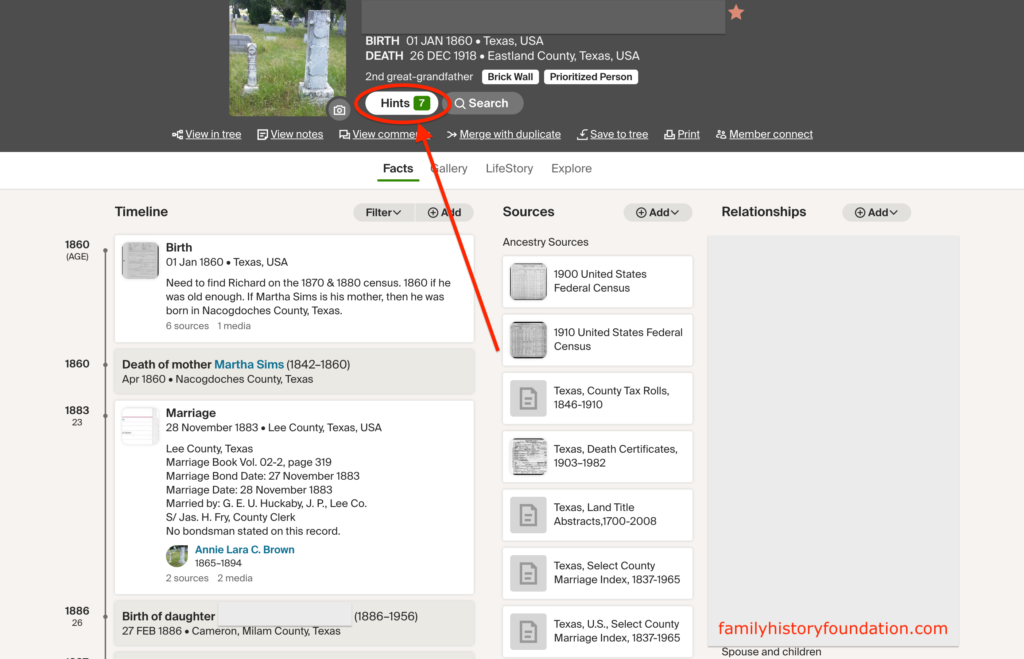
To find the HINTS, use the “Hints” button just under your ancestor’s profile picture and stats at the top of the page.
Bad Ancestry Hints: “Distracting”
Bad ancestry hints, which are not very useful, fall within the range of indexed records and snippet-type records which show minimal information, often something you’ve already established on your own tree. For example, if I am researching Martha Sims and I already know her Birth and Death dates of 1851 and 1935, then the record below is not very useful.
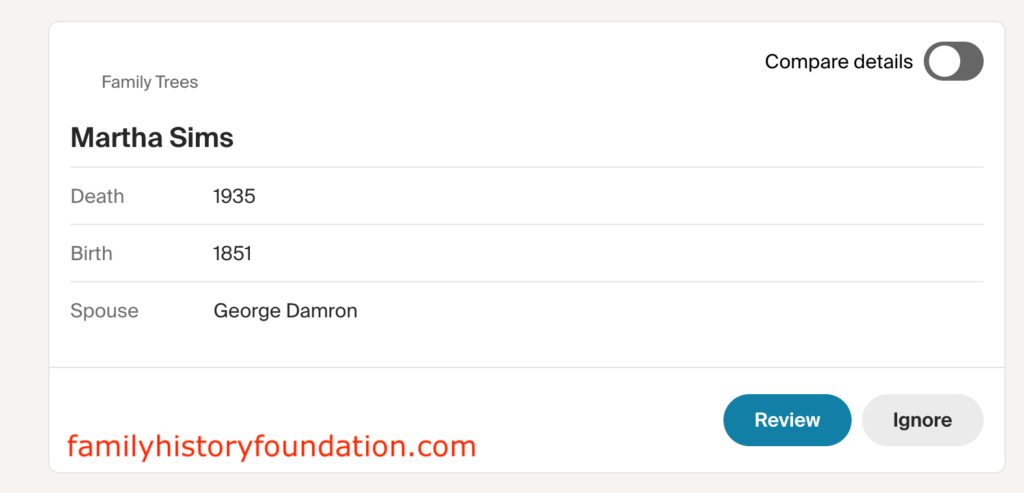
Feel free to review these as you may find other data beneath the displayed record!
Good Ancestry Hints: “Useful”
Good ancestry hints have information you can investigate! They show you details which you want to follow up with. Let’s take a look at how to do that.
Below is a hint record of a “brick wall” ancestor of mine and it names a potential father and mother. This is very USEFUL for me. However, I don’t trust the source until I verify it, that’s just the Source Hound in me!
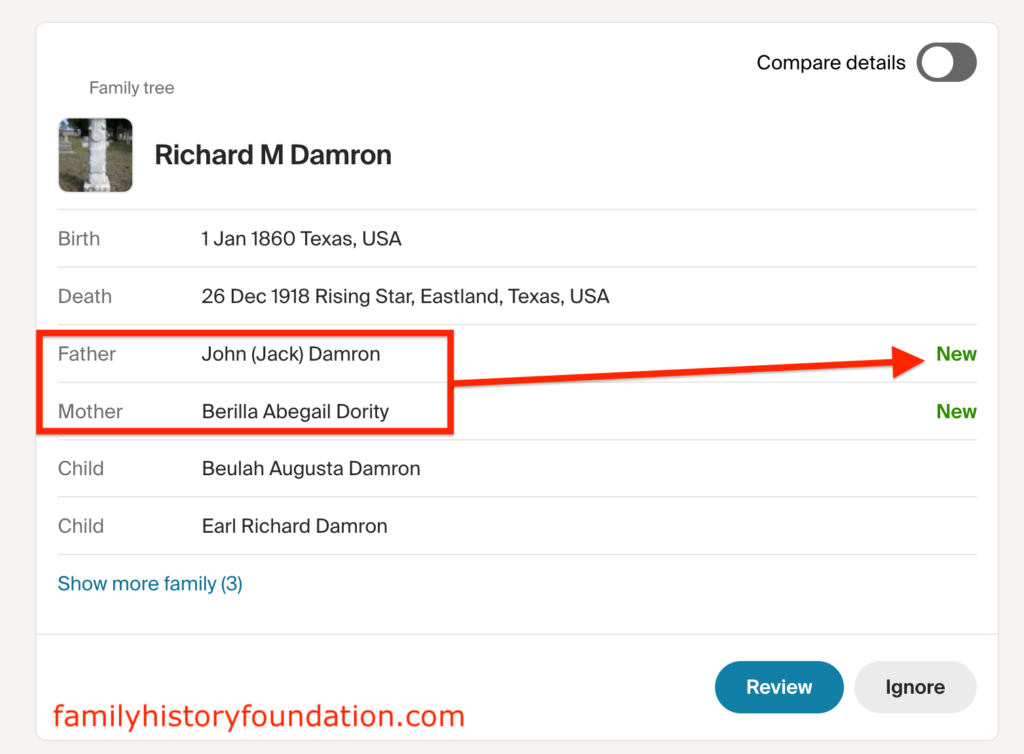
Also notice that this is a New record. Maybe someone has broken through! My next course of action is to open up the “Compare details” tab, review the source, investigate this researcher’s family tree on Ancestry, and then make contact if I think there is a viable research path here!
Ancestry Hints Course of Action:
- open up the “Compare details” tab,
- review the source,
- investigate this researcher’s family tree on Ancestry,
- and then make contact if you think there is a viable research path here!
Let’s open the “Compare details” tab.
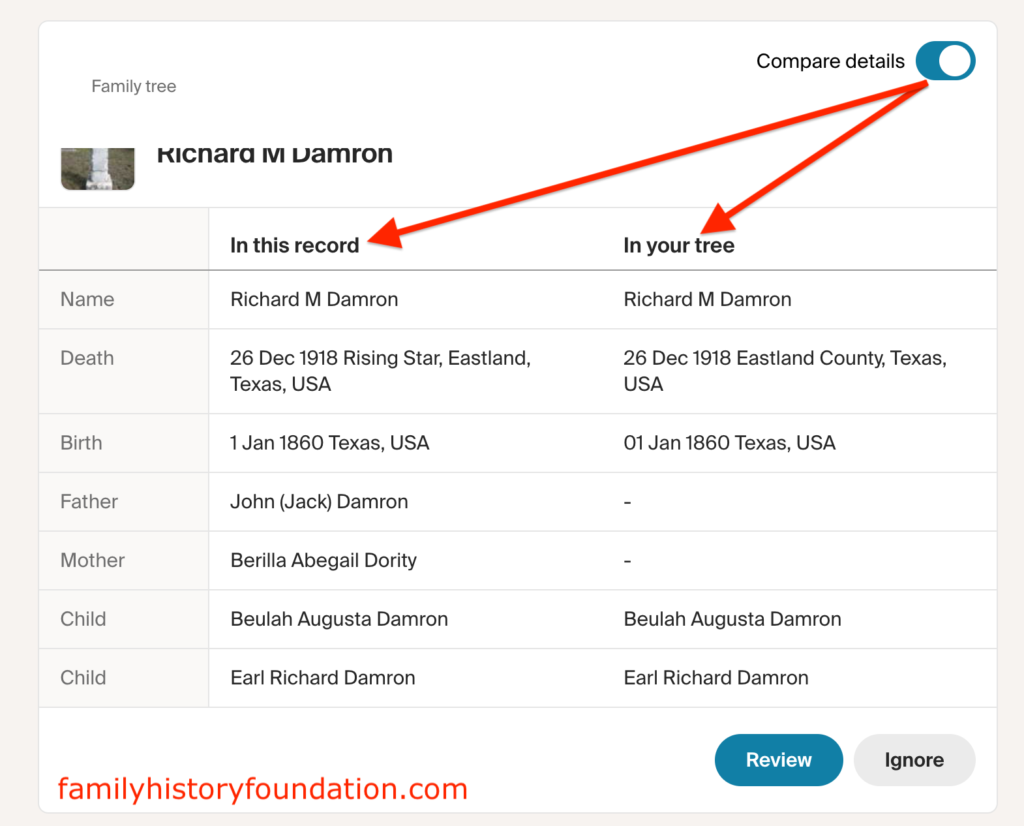
With that I can see that all of our information is the same, except for a father and mother. This is very USEFUL for me!
What constitutes good versus bad Ancestry hints is how complete the record is with respect to where you are in your research. This is important to note.
Think about this: it is Ancestry.com’s job to keep our screens filled with information and records! Their algorithm is designed to feed us facts, and rightfully so. Who would pay a subscription for a blank screen? We love to dig, but we also want information coming to us. The algorithm is an information game.
Look for hints you can use as immediate avenues of investigation.
You may want to circle back to this article, Have you Missed Ancestry Hints?
Source Hound Genealogy Ancestry Hints
I’ve covered a bit of Source Hound methodology in the last section. Let’s look at how hints show up when that method is applied to records YOU put in YOUR tree.
Think about this, every record you see in your hints section was inputted by another researcher, whether that be an organization like the LDS Church, The US Census Bureau, or another Ancestry user.
That being said, what you see is the direct result of how they input that data! I will show how this works you by way of a HINT I came across . . . which I recognized. Take a look at the record and image below.
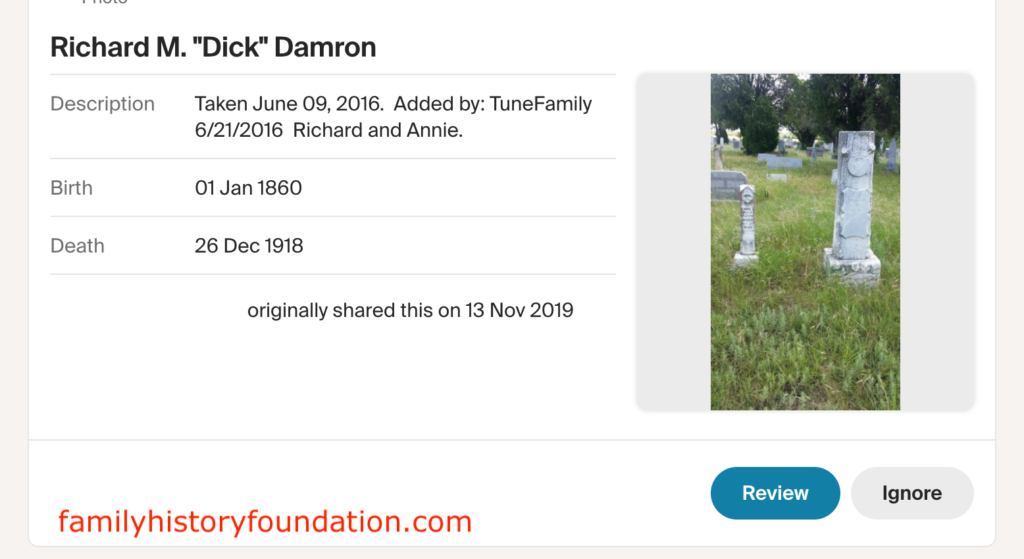
As I was perusing my 2nd great-grandfather’s hints, I noticed this gravestone image and said “hold up! I took that picture!” “That’s my photo!”
I drove about 200 miles from Dallas to Eastland County, Texas to take that photo on a road trip with my cousins. Here it is attached to another researcher’s record on my hints page. What made it pop was the attribution on the photo: my name and the date I took it.
This is your lesson. Not only is it important for you to verify Ancestry hints on your profile page, but to also be responsible in how you upload and catalogue information. What you share, others will use. Share wisely!
I’ll show you how to use the Ancestry Gallery feature to do this in the next section!
But first, sign up for my Newsletter.

The Family History Foundation Newsletter
It’s Not About You, It’s About Documenting Before It Disappears
Join 600+ family historians getting Franklin’s Source Hound weekly research breakthroughs — real case studies, source hacks, and the exact strategies that turn brick walls into discoveries.
Free. No fluff. Straight from the Source Hound’s desk to yours.
Your privacy is sacred — almost as sacred as a primary source. Read our Privacy Policy.
Ancestry Gallery Feature Best Practices
The gallery feature is super easy on Ancestry, I’m sure you’ve used it already. If not, here’s a run through on the best practices on using this powerful feature. It all comes down to taking the time to input as much information as you can while you are uploading.
Click on the Gallery Link
Click on the “Gallery” link and it will take you to the gallery page showing you all of the stuff you’ve uploaded as images to your ancestor’s profile. I you haven’t, the page will be blank.
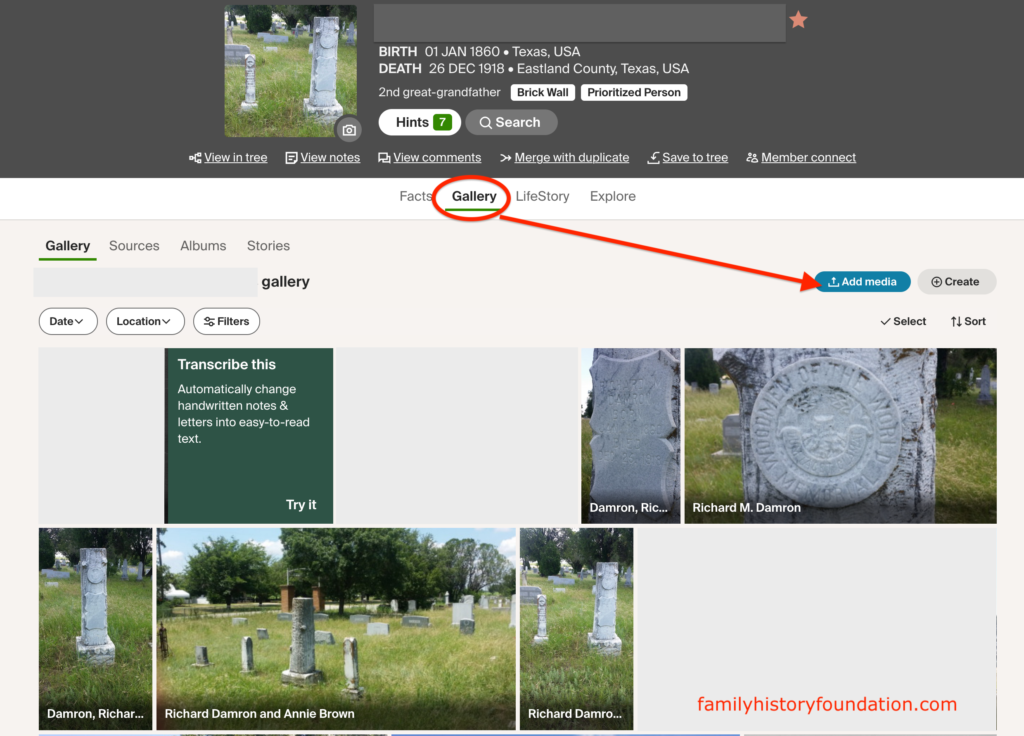
Add Media on the Gallery Link
If you notice in the image above, there is an “Add media” link right on the top-right of the gallery. Use that to upload media. You can also sort by Gallery, Sources, Albums, and Stories.
Once you click “Add media,” you will see this prompt, or something similar to drag-and-drop or upload from your machine.
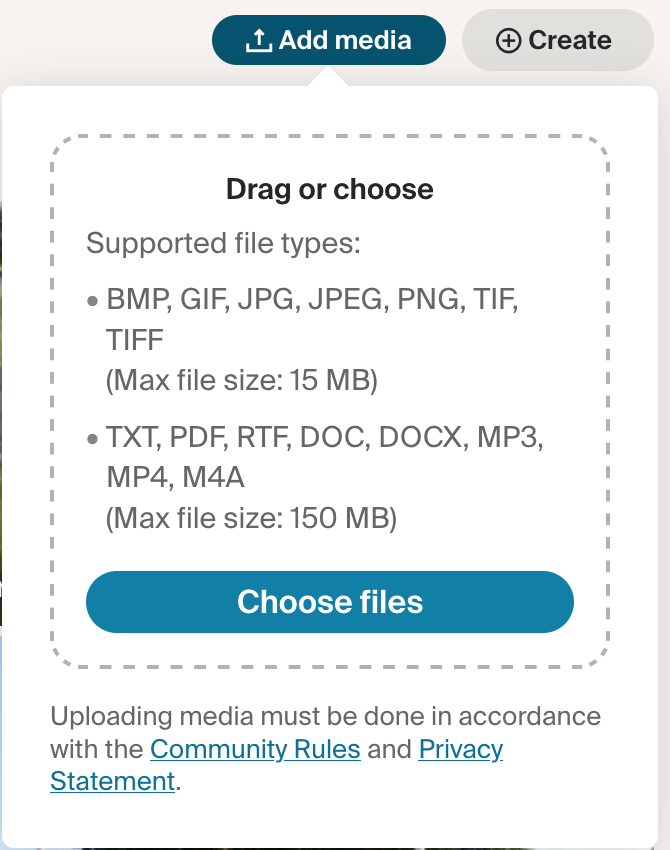
Now you are on the media details page. Whatever you do, DO NOT SKIP THIS PAGE!
The Media Details Page
Always take the time to fill out EVERY SINGLE field, as this is what other researchers will see in their hints page. Be a Source Hound for other Source Hounds!
This is why you are a family historian, the one who labors for hours on end to build out your genealogy and legacy for the future. By not inputting information in these fields, you are robbing others of the ability to connect with their genealogy.
FRANKLIN'S STORY
Was that a bit overzealous? Perhaps, but I am very passionate about my family history as I started with less than nothing as an adoptee and built my family history from sheer will, tenacity, and source hound methods.
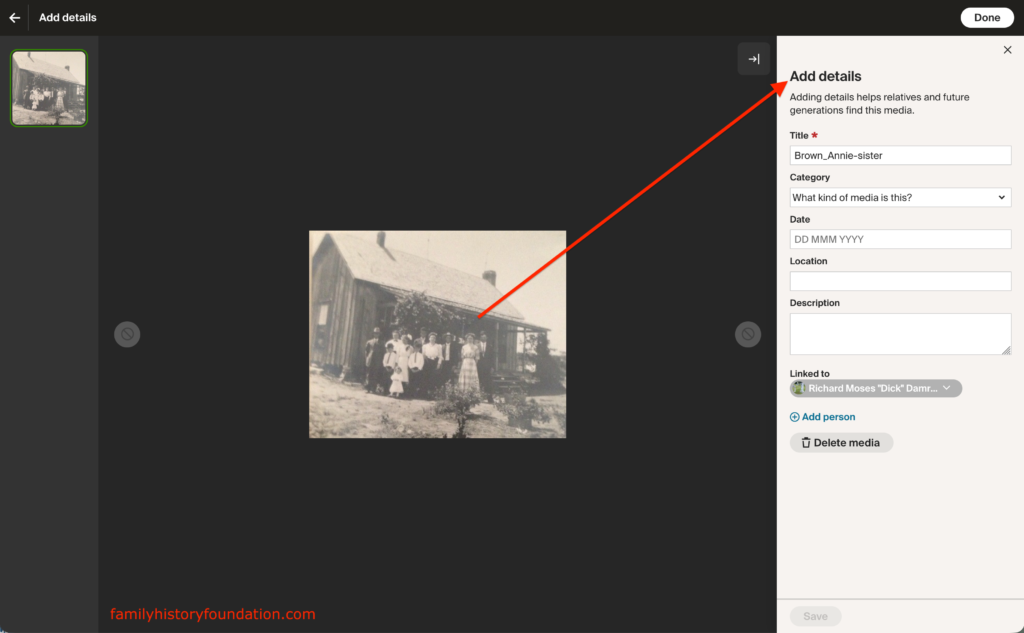
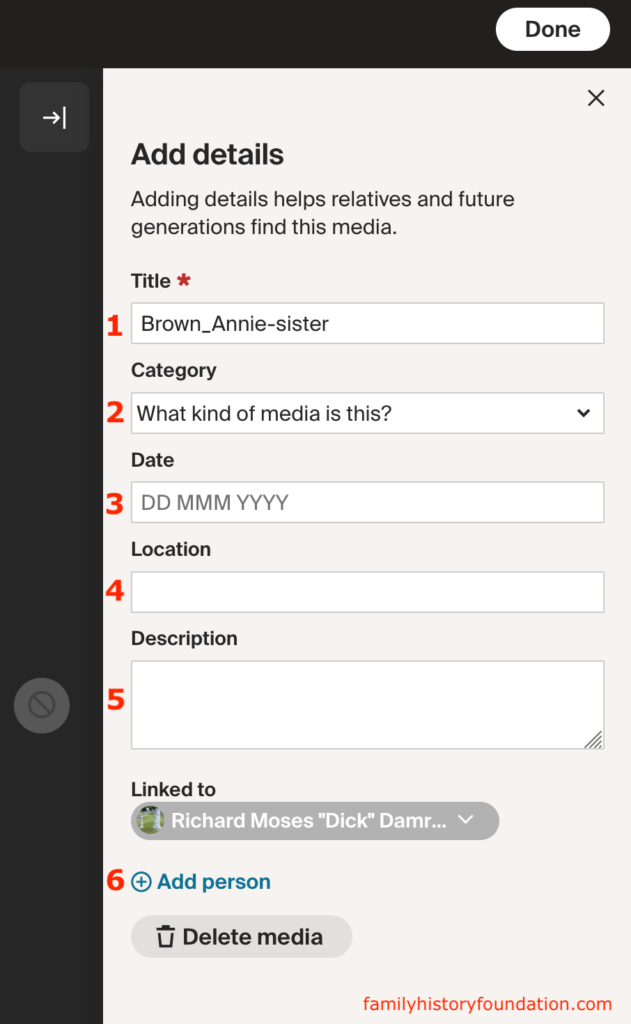
There are basically 6 gallery details fields here.
The 6 Ancestry Gallery fields
- Title
- Category
- Date
- Location
- Description
- Add person
Title
The title field will auto-populate with the imported image name. You should change this. Make it specific to this photo, including details you might find in fields 2-6. It’s not redundant, it’s a trackable file name which the algorithm will pick up on.
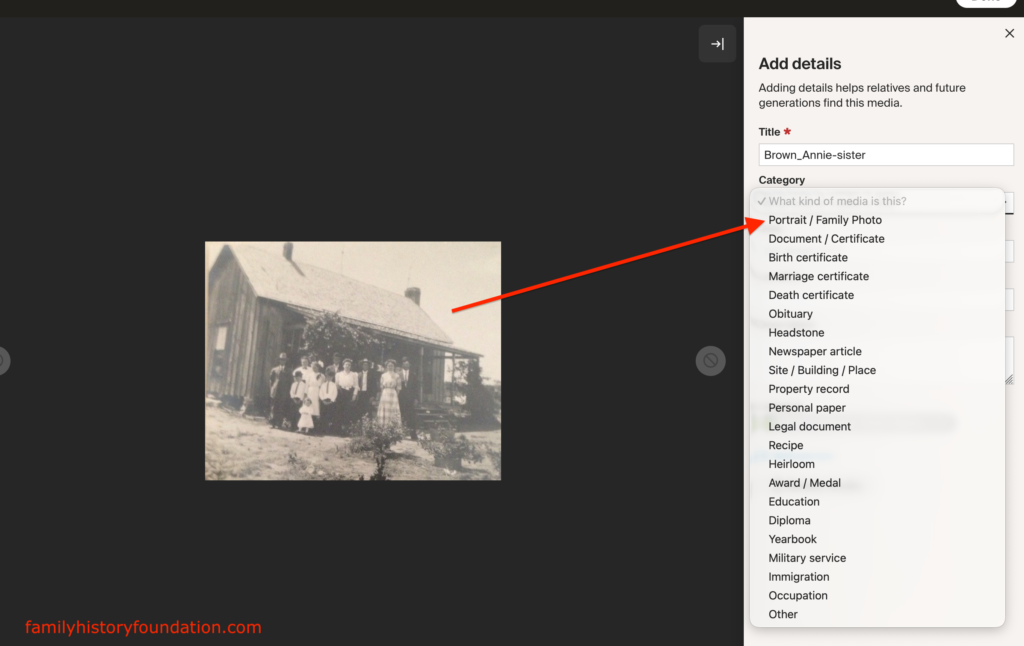
Category
Always choose the best fitting category for your photo or document. This helps sort your gallery media for later use and future search.
Let’s say you get lazy and upload a birth certificate and just click “portrait” because it’s at the top. Well, 3 months later you are searching for that birth certificate under “birth certificates” and you never find it because you hid it from yourself.
Date
Add in the DATE the photo was taken. The DATE corresponds to the date of the record you are adding. Not the date you are adding it, that can go in the description section.
If you do not know the day or month, just add a year; but add something.
Here’s a HINT: you can always go back and edit these fields later. Get your best information in, but don’t NOT put something in, always put something in which is factual.
NEVER GUESS. If you do not know, put “abt.” or “about” or “circa” or leave it blank and add a note in the description section. Better blank than blind.
Location
Add in information about the location of the resource you are uploading. Don’t take anything for granted, which is to say, don’t assume that information is obvious.
For the photo I was uploading in the image above, I would write that it was taken in Texas or possibly Missouri at the home of my 2nd-great grandmother’s homestead. I don’t have a definitive date, so then I might give my best estimate or even a year range. You can follow this up with a note in the Description section.
Description
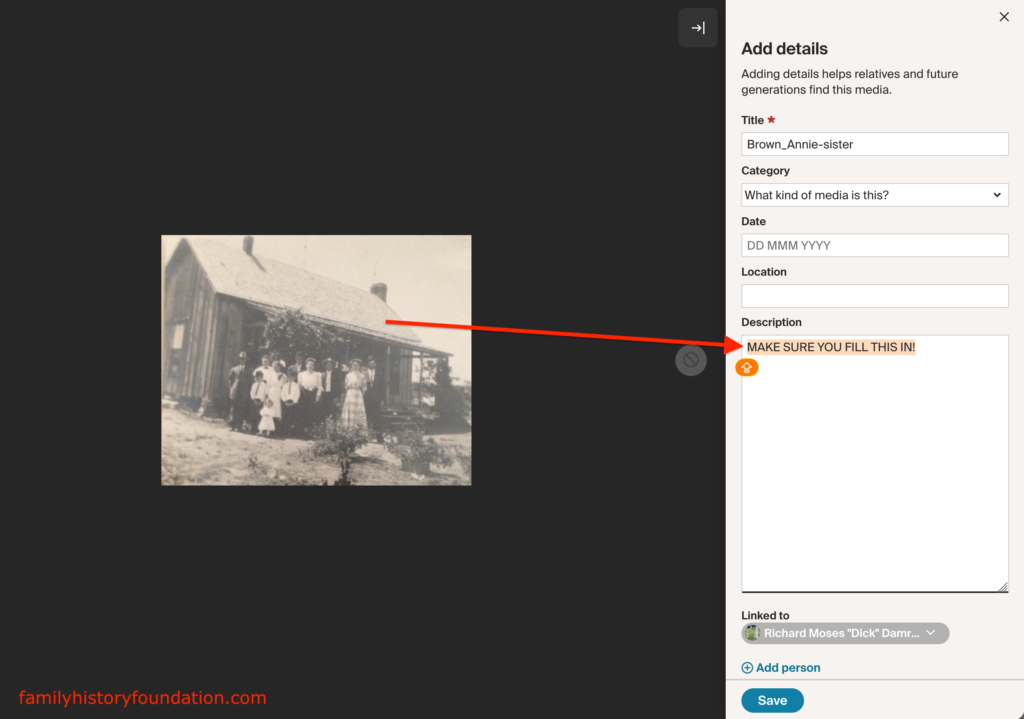
This section does the heavy lifting in my opinion. It is the Hercules of the Gallery page and how to stop bad Ancestry hints.
The Description field can be expanded, which means you can add a lot of text. You should be detailed!
Don’t feel like you are duplicating information. If you look at the photo I saw on my own ancestor’s hints page, it had the date the photo was taken, where, who it was attached to – all of that information is duplicated from the other fields, but shows up as a source of its own.
Add your own research notes in there. You can also add things like “ongoing research,” “not proven yet,” “This record comes from x-source,” or “record most likely also includes sister” or anything which helps you to remember the status of the document in situ, which means at the time you uploaded is pertinent to your research.
Add Person
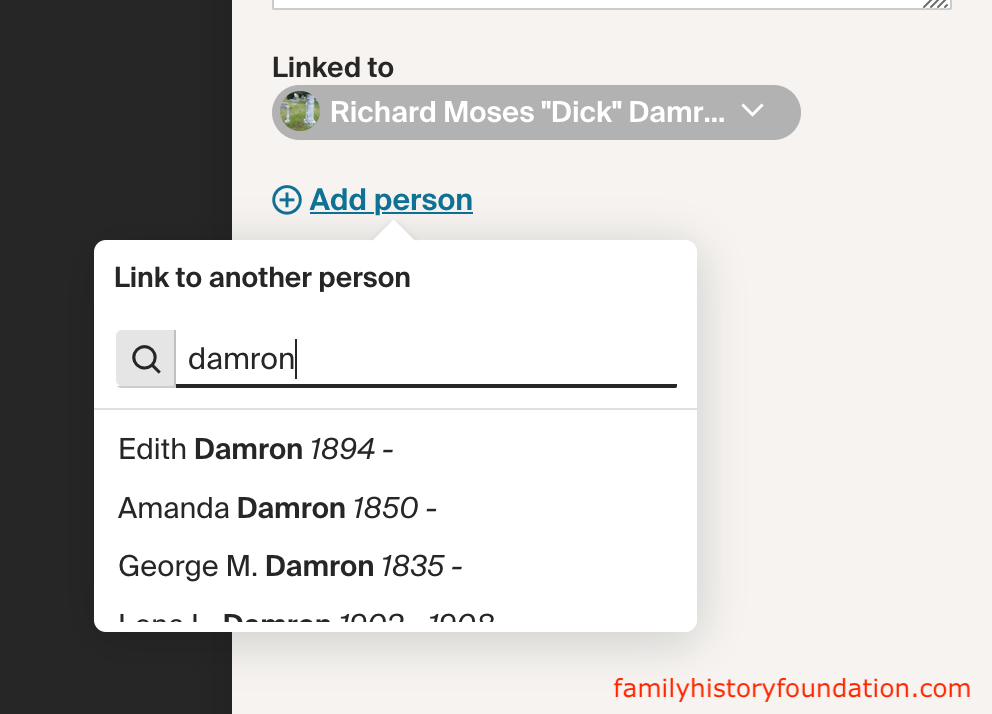
The Add Person link is also crucially important if you would like to attach this record to another ancestor. If you add person, it will add what you upload to their profile Gallery as well. Cool!
Just use the search feature and make sure you click the correct person. Often times we have multiple ancestors named “John Collins.”
If you add someone by mistake, use the drop down arrow to the right of that person to un-add the record. Or, you can go to that person’s profile and delete the record directly from their Gallery.
Best Practices to Avoid Bad Ancestry Hints
The best practices for bad Ancestry hints comes from reviewing everything in this article and arming yourself with the highest research standards in genealogy.
- Read the companion article: Missed Ancestry Hints on Your Ancestor Profile Page
- Read: Verify Ancestry Hints: The 1 “Red Flag” Checklist Every Gallant Genealogist Needs
- Read: Genealogy Research Online: The Source Hound’s Guide to Online Genealogy
Watch This Episode on YouTube
Join the Family History Foundation Source Hound Community
Our family history is disappearing every day, join the Source Hound community and join our pledge to be the protector of your family history. The lives and voices of our ancestors are depending on it for our future generations.
Celebrate Family History Fridays with us across our social media and community platforms!
📬 Subscribe to the Newsletter — tips, active challenges, and deep-dive case studies. Never an overloaded inbox, always something you can use this weekend.
 Like & Subscribe on YouTube — every Friday, a video companion to the week’s article. Watch these techniques demonstrated rather than described.
 Pin Us on Pinterest — printable question sheets, research charts, and visual guides to save for your next session.
 Podcasting on Spotify! — podcasting now on Spotify, you can find all of the latest episodes on any of your favourite podcast platforms, starting with Spotify.
 Podcasting on Amazon! — If you are not on Spotify we are also on Amazon Podcasts so you can listen while you drive and work. Every episode is curated just for you to binge your favourite episodes.
 Podcasting on Audible! — Audible is an alternative offshoot of Amazon Podcasts to listen while search for your next favourite book. Ready for your next “audible?” Set, Go!
Let’s make Family History a household word. 🏠
The Family History Foundation Newsletter
The Family History Foundation Newsletter
Our Family History Is Disappearing Every Day!
Join 600+ family historians getting Franklin’s Source Hound weekly research breakthroughs — real case studies, source hacks, and the exact strategies that turn brick walls into discoveries.
Free. No fluff. Straight from the Source Hound’s desk to yours.
Your privacy is sacred — almost as sacred as a primary source. Read our Privacy Policy.
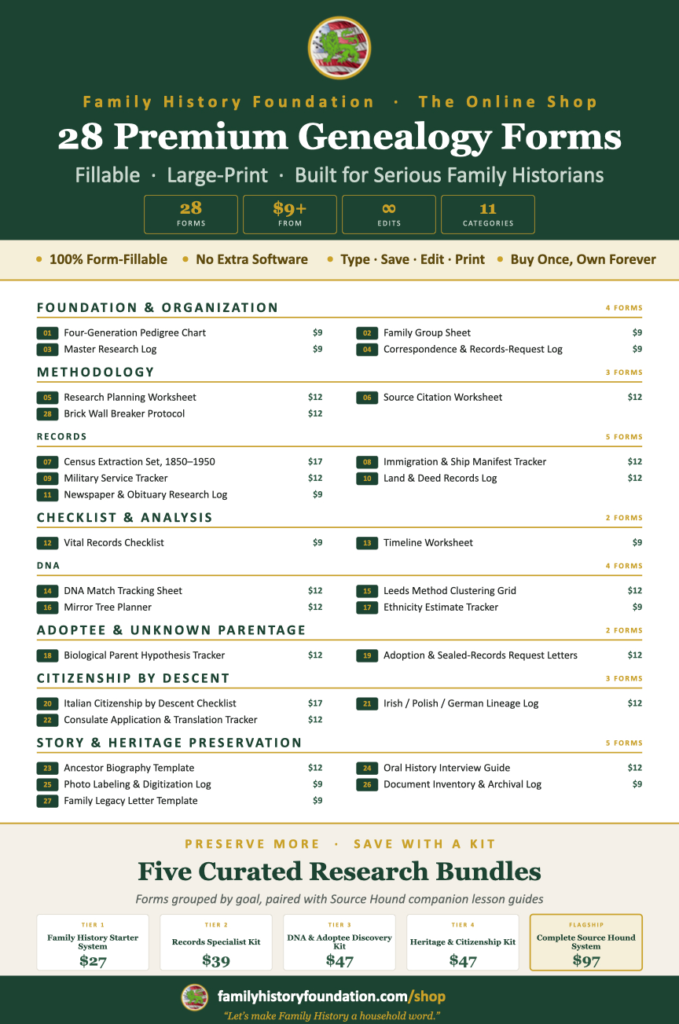
Shop Premium Genealogy Forms

About the Author
Hi there, my name is Franklin, the founder and author of The Family History Foundation.
Our family stories are disappearing every day and it’s crucially important that the next generation is able to learn and appreciate their family history. It is up to you to take up the mantle of responsibility to ensure that how you research today will be passed on tomorrow with the highest standards possible.
I believe that genealogy is not just about names and dates, it’s about your stories and how those stories inform your identity.
With a penchant for storytelling and a background in research, the insights and techniques you learn on The Family History Foundation will help you uncover the incredible stories and identities hidden within the tapestry of your ancestry.

Motto: “The Past ‘Relative’ to the Future.”
Mission: “Let’s make Family History a household word.”
Stop Bad Ancestry Hints and Gallery Best Practices FAQs
1. Why do bad Ancestry hints and unverified uploads ruin genealogy research for others?
Answer: Uploading unverified or erroneous information creates a “telephone game” effect where inaccurate data propagates across public trees, leading researchers down false paths and cluttering the Ancestry hint ecosystem with poor-quality matches that undermine community research standards. Tips and tutorial: https://familyhistoryfoundation.com/blog/bad-ancestry-hints/.
2. How does the Ancestry Gallery feature help improve genealogical research?
Answer: The Ancestry Gallery allows users to upload, store, and attach primary resources like historical photos, census records, and documents directly to an ancestor’s timeline, transforming personal research into a shared, document-rich database that aids fellow family historians. Tips and tutorial: https://familyhistoryfoundation.com/blog/bad-ancestry-hints/.
3. What is the proper way to upload and document media on Ancestry to prevent bad hints?
Answer: Rather than clicking through quickly and leaving records bare, researchers should link the correct relative, give the file a descriptive title, select the accurate category (such as portrait, family photo, or headstone), add reliable dates and locations, and write clear, fact-based descriptions. Tips and tutorial: https://familyhistoryfoundation.com/blog/bad-ancestry-hints/.
4. Why is taking time to properly tag and describe genealogy photos important for future researchers?
Answer: Proper documentation takes only a few minutes but leaves a lasting legacy for generations, ensuring that when your photos or documents appear as automated hints for other researchers, they provide verified facts, clear context, and reliable source attribution rather than confusing anomalies. Tips and tutorial: https://familyhistoryfoundation.com/blog/bad-ancestry-hints/.