Your ancestors’ genealogy land patents are waiting for you! The United States government’s Bureau of Land Management houses all of its land records on the General Land Office (GLO) website going back to any original genealogy land patent for each of our 50 states.
I will show you how to access those records, how to use the complex search function, and how to connect those records to your family tree by using an example of my own research. You can also re-up your knowledge of mastering genealogy research online like the professionals do with this foundational article on the Source Hound method.
 AI Trust badge. This post is 100% human content.
All words were generated by Franklin, the founder.
Table of Contents
The BLM GLO Portal to Genealogy Land Patents
To access the genealogy land patents and records from the General Land Office’s website, there are two things you should know off the bat. One is that the GLO site is housed under the auspices of the Bureau of Land Management’s website.
Why would that make a difference or matter to you? Well, just think government bureaucracy! Actually, how it might play into your searches is that many times the Bureau of Land Management (BLM) is often cited as the source of all of the land records and you might end up on that site instead of the GLO website.
I hope that’s not confusing but that’s the way it is. For instance, you will often see genealogy land patents and records being referenced as “BLM GLO records,” further confusing the well-intended searcher.
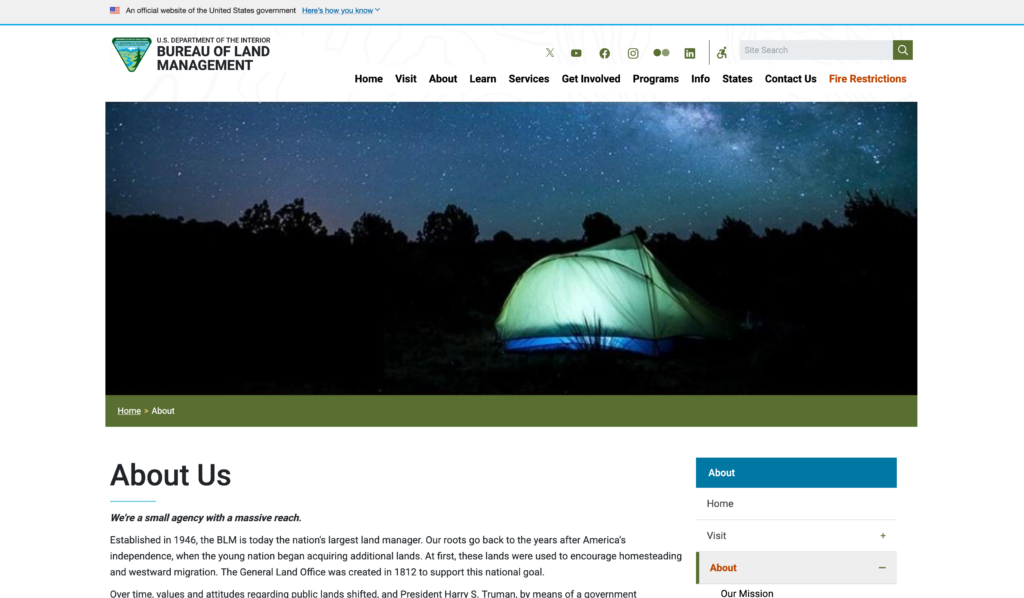
This is the Bureau of Land Management. The agency is a part of the U.S. Department of the Interior, a HUGE branch of our government. Let’s take a quick tour to show you how confusing it can be and how to bookmark the correct site.
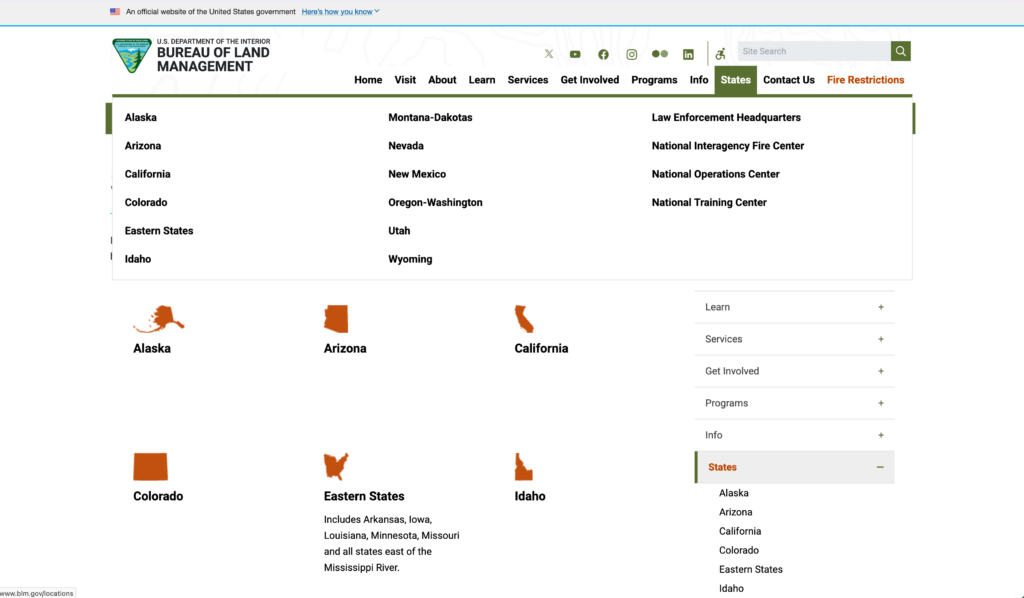
For instance, you might be tempted to select the “States” menu to find your land records by state. But no! This confused me at first as I noticed that there are only 12 states and thought “where are the rest of the states?” Well, here’s where you should go.
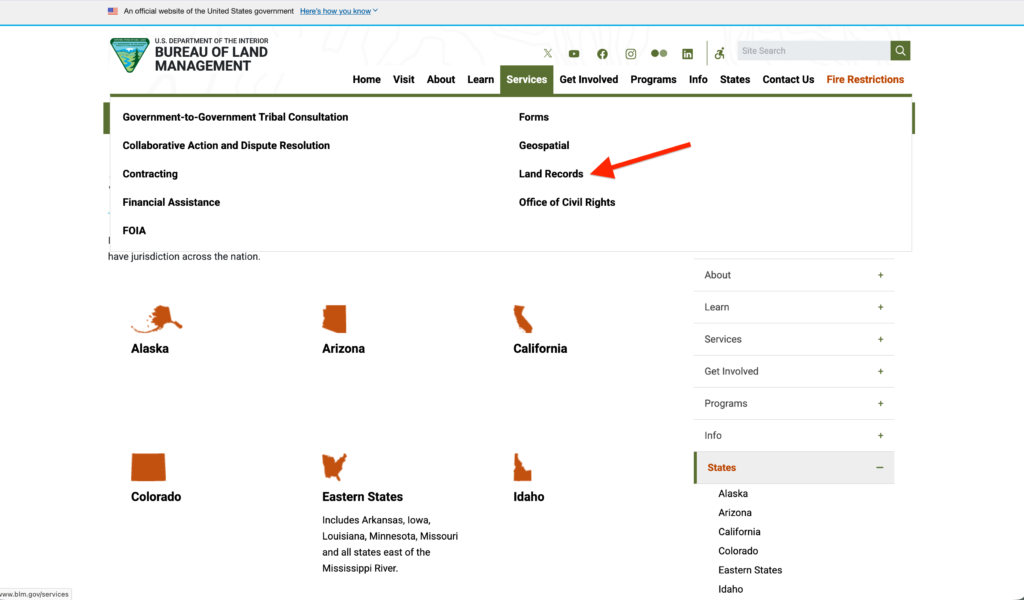
If you look for the “Land Records” link in the dropdown menu of the “Services” tab, that’s where you want to go. That page will take you to the hidden page where you actually find the GLO link!
Sorry for the confusion, but now you know so you don’t have to be confused any longer and you will ever-after understand the relationship between the BLM and the GLO. “Holy Acronym Hell, Batman!”
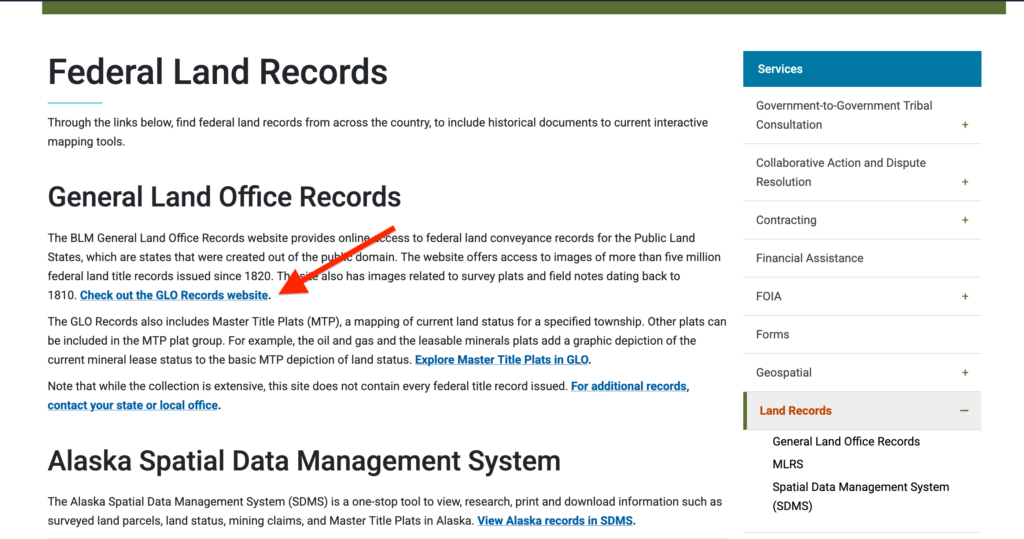
This link will take you directly to the General Land Office (GLO) website to find your genealogy land patents. So let’s go!
The GLO Website and Genealogy Land Patents
Clicking that link you will be on the General Land Office (GLO) website, you should bookmark this resource for your future genealogy searches. There are 2 methods to search this site: ONE of which is readily apparent; and TWO, the other buried deep in the genealogy land records maps tool. Let’s disaggregate them now.
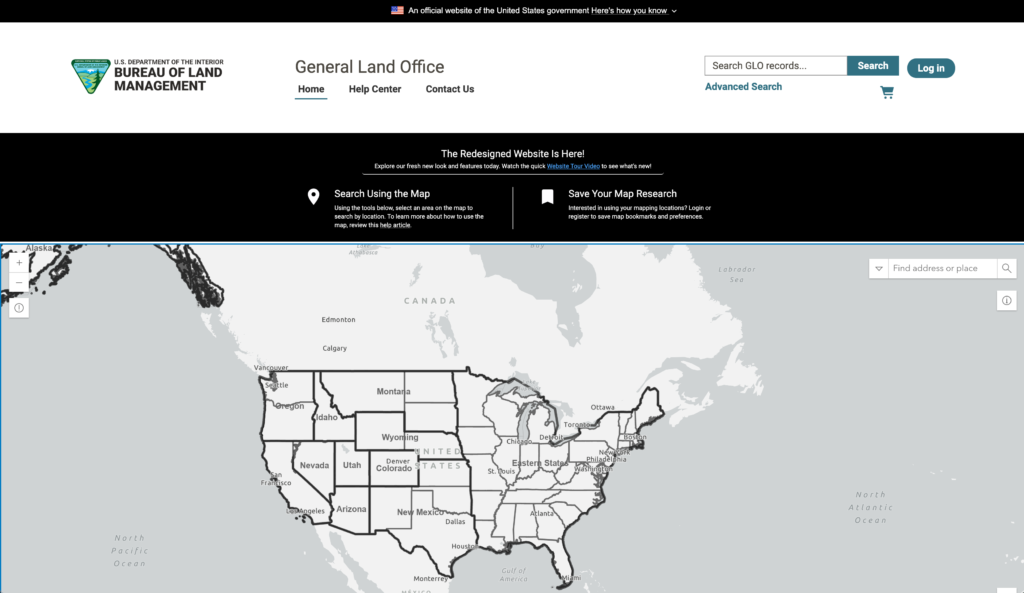
In this section I will be showing you how to use the Advanced Search tools in the top-right menu. I will also take you on a brief tour of the Map Research tool, which I will cover in detail in a subsequent post.
I would recommend familiarizing yourself with the Advanced Search tool FIRST because there are certain terminologies you must acquaint yourself with in order to understand the land records and deeds themselves.
If you do not know the terms meridian, plat, accession, range, etc., then read on to learn about the Search tools and the importance of these terms in deciphering your genealogy land patents. They are crucial, you will need to know them.
I will be using actual research I did on my ancestor David C. Manasco and Elijah Howton. If you take a peak at the historical biography I wrote on this ancestor, you can see the GLO maps in action! Notice how I painstakingly drew boxes around my ancestors’ plots to learn more about their lives!
Using The Search Function on the GLO Website
The Advanced Search function is found on the top-right of the GLO homepage. Clicking on this will open up a search field page where you can enter in your search parameters, including: state, county, name, surveyor, and date range.
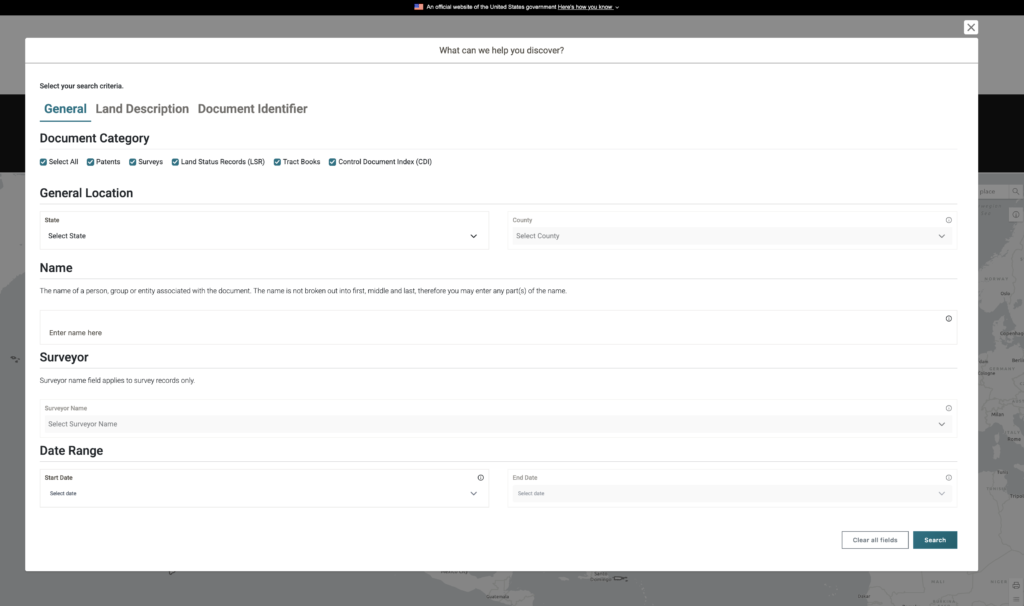
On the menu bar there are also search criteria for Land Descriptions and Document Identifiers. Hold off on those for now, let’s dive into the General search fields and show you how they work first.
The reason is that once you perform the General search, you can get to those other criteria (Land Descriptions and Document Identifier) directly from the search results page! Plus, you will need to know your exact map plat and range and such to use those fields effectively.
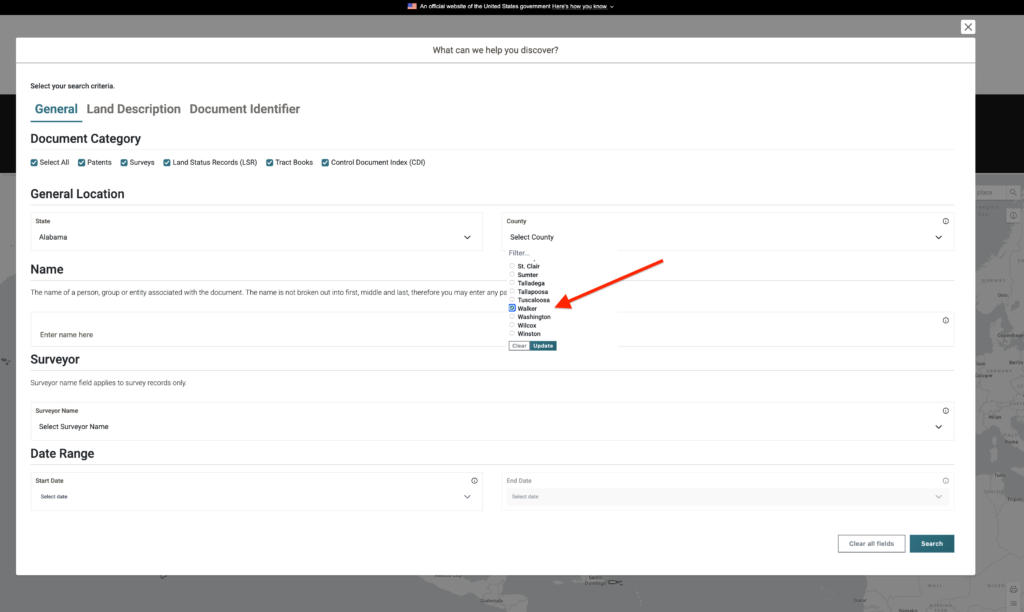
Once you fill in the State field, the County list will auto-populate. Select the county of the ancestor or land patent you are searching for. You can only search one county at a time.
For my ancestor, I selected Walker County, Alabama. If you are unsure of the county, use Google Maps, or go to the Map Search and simply zoom in – more on how to do that in the next section.
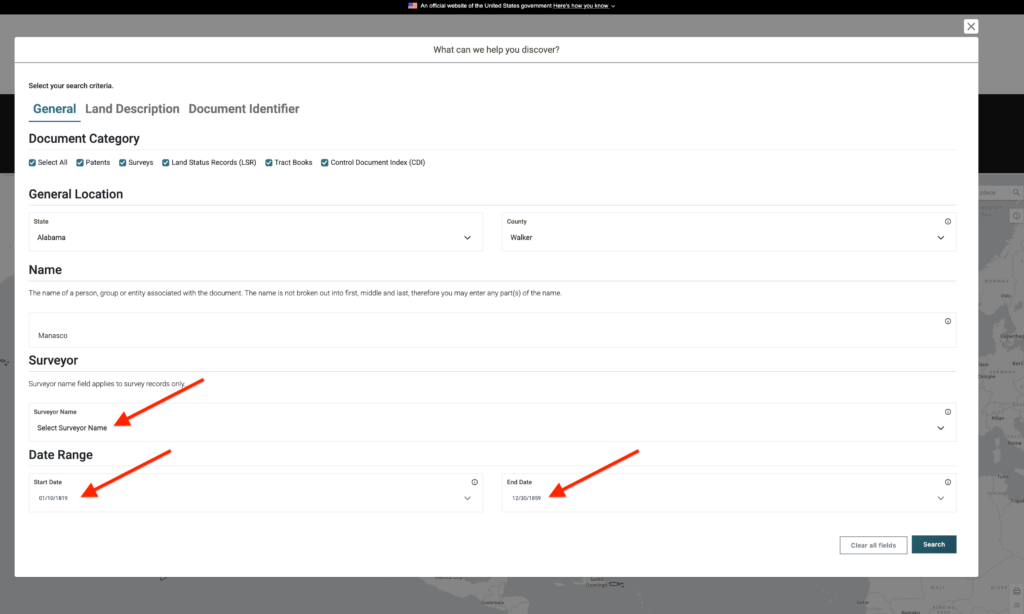
Enter in the NAME of the ancestor you are searching for. You can get as narrow or as broad as you like. I am searching SURNAME only in this example to get as many returns as possible. The best way to narrow your search is by DATE in the Date Range fields at the bottom.
Once you hit “Search,” you will be shown a results page in table format. See image below.
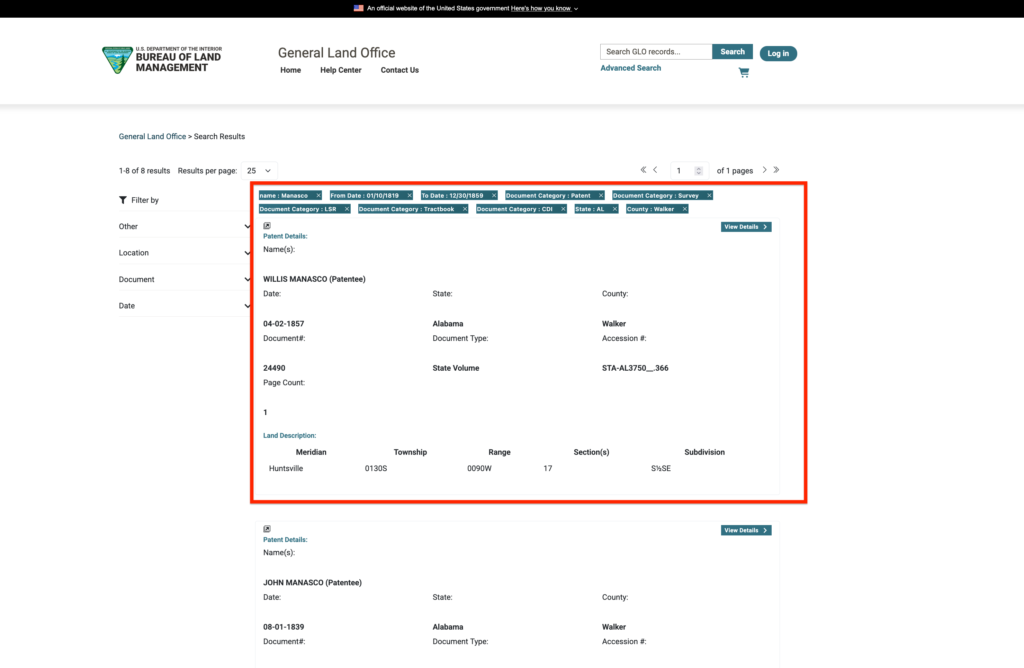
Reading this is tricky at first. The lines adjacent to one another do not actually go together. Be careful of the spacing; for instance, “Document#” is “24490” and the “Document Type” is “State Volume.” Make sense? Great!
Now, find the “View Details” button on the top-right of the record. Click that and you will be taken to the individual record for this genealogy land patent. Now comes the surprise!
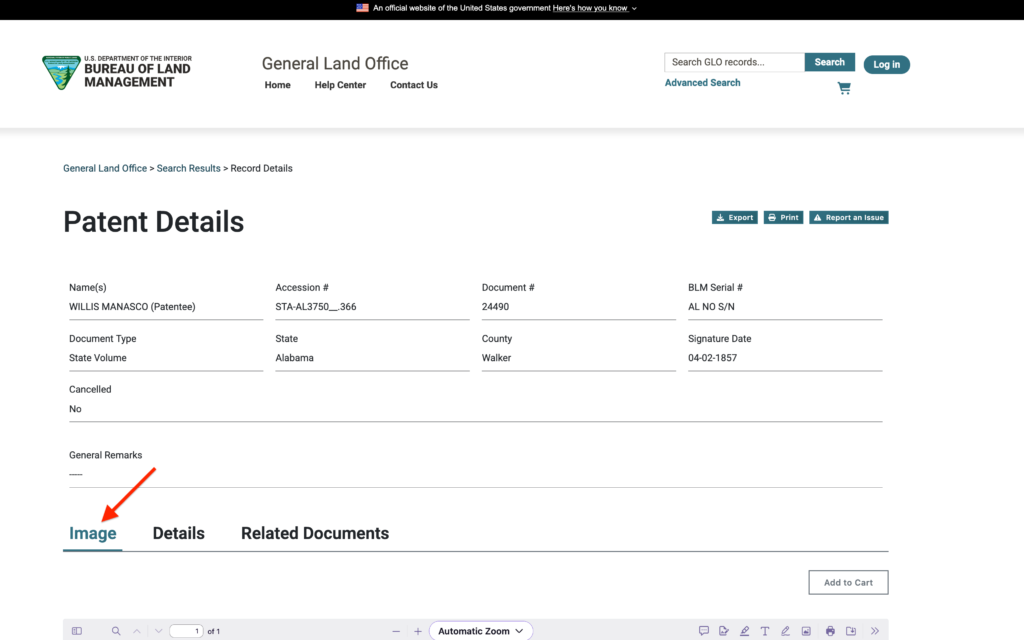
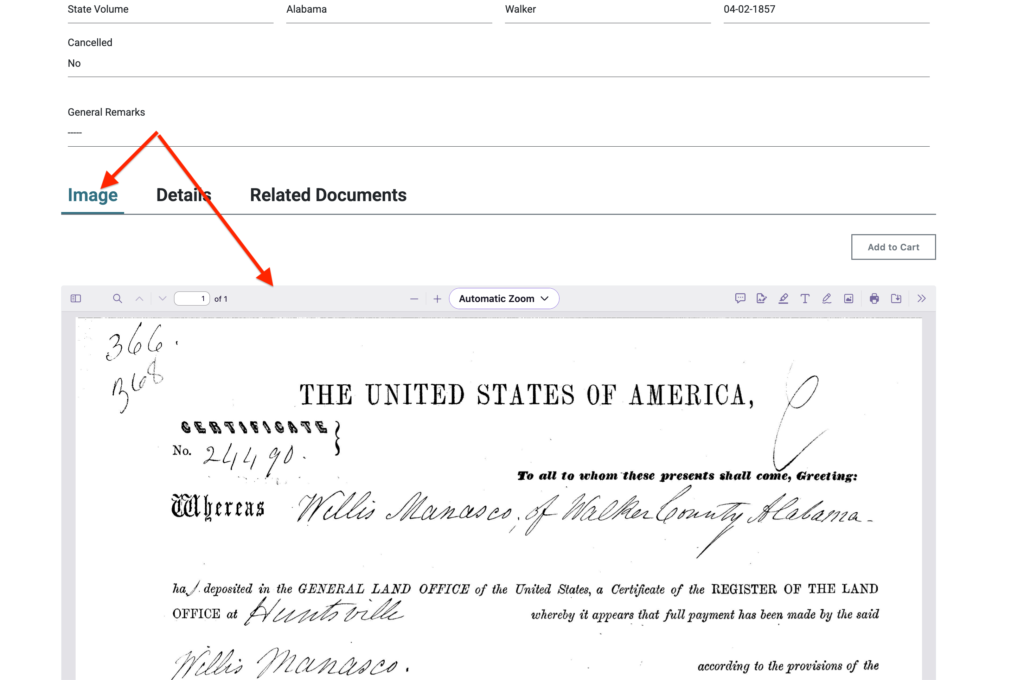
If you scroll down to the lower menu bar, you will see the “Image” tab. Look what shows up, you actually get the genealogy land patent associated with the land record!
You actually get a first-hand, source document. This is the deed, I will show you how to find the map plats in a subsequent post. For now, let’s finish squeezing every bit of information we can from this page.
TOP TIP: Take the time to read through the actual deed. Even if you do a quick scan, you might find some new bit of genealogical information you never knew existed.
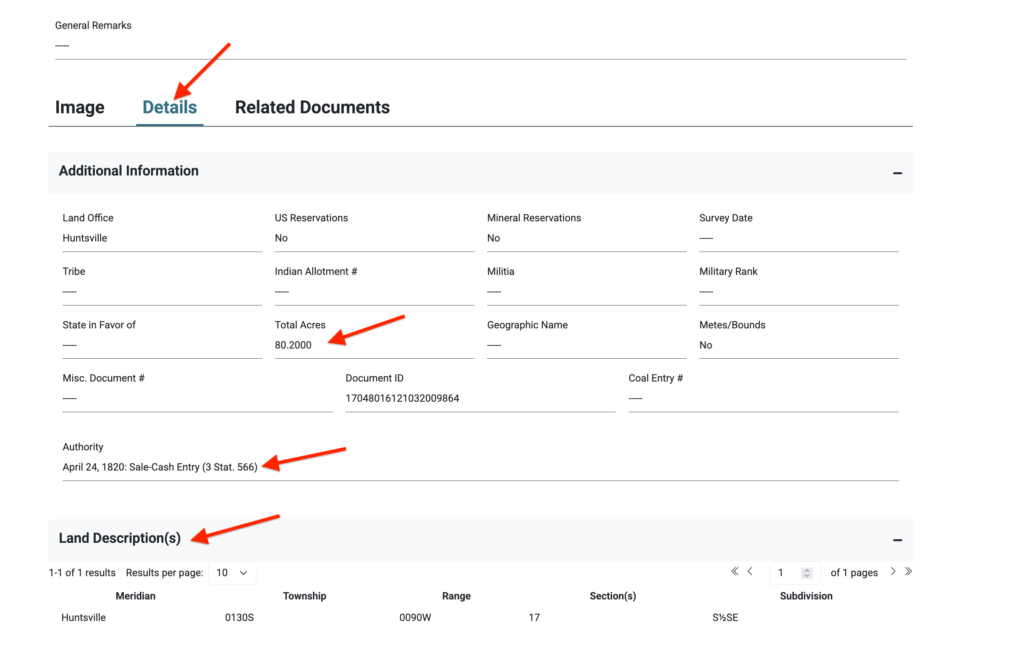
If you click on the “Details” tab, you will be shown more information about this genealogy land patent. There are several key facts you will need to log in order for you to reference this document in the future or attach it to an ancestor on Ancestry.com.
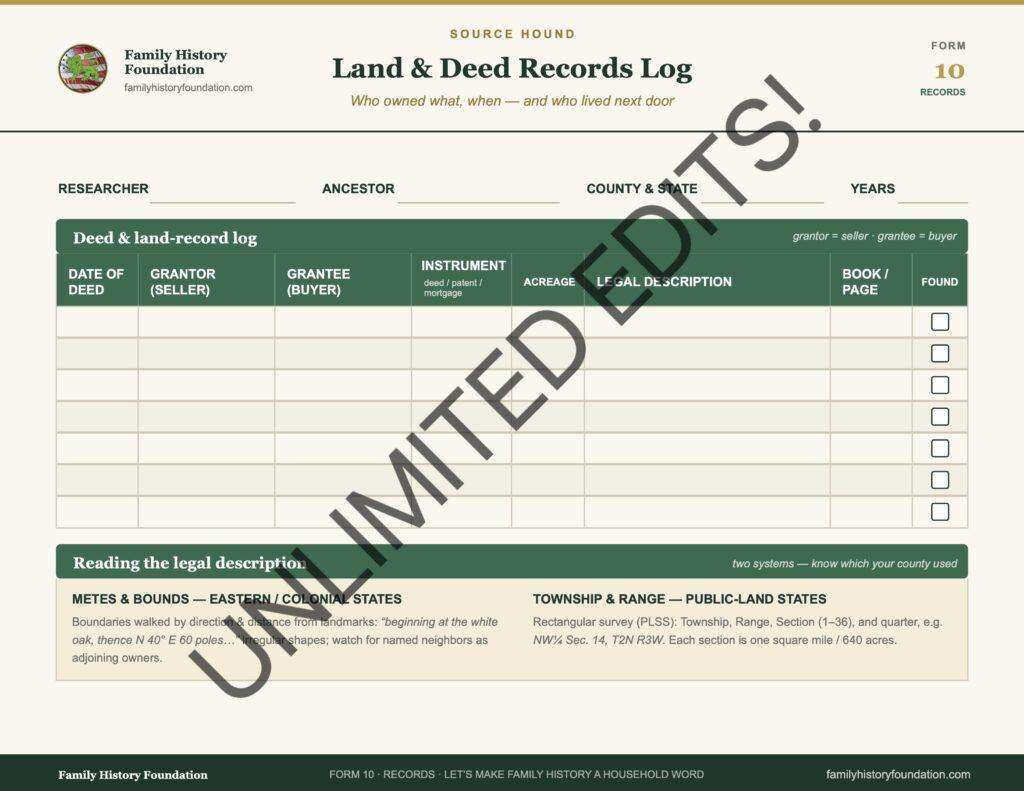
You’re in luck, I have a form-fillable Land & Deed Records Log available in my Online Shop. Have a gander!
I’ve highlighted those key facts with arrows. Compile every bit of information you can – my record shown has minimal information, but what it has is all you really need anyway.
- Total Acres
- Date
- Cash Entry
- Land Description: Meridian, Township, Range, Section(s), and Subdivision
Next is the “Related Documents” tab. Clicking this will take you to a page showing other related plots and land records.
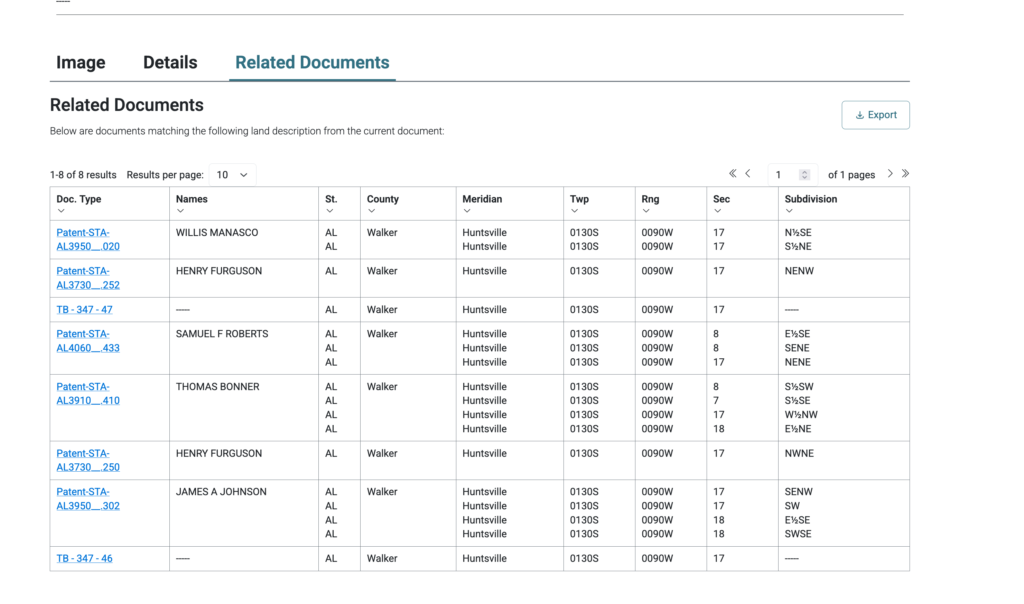
Searching through this list just might produce additional properties purchased by your ancestor. I know I have found multiple deeds directly through this Related Documents tab.
TOP TIP: Double-check the related genealogy land patents by comparing the meridian, township, range, section, and subdivision to get an idea of how close these properties are.
Using The Map Function on the GLO Website
Let’s go back to the main GLO homepage and use the Map Search feature. This is where you can interface directly with the map on the lower-half of the page by simply scrolling in like you would on Google Maps.
Keep scrolling in until you are zooming into the state you are researching. Again, I am using my ancestor from Walker County, Alabama. Notice that as you zoom in, more details become visible. You will not see features like shops and hotels like you would on Google Maps, but plots and survey gridlines!
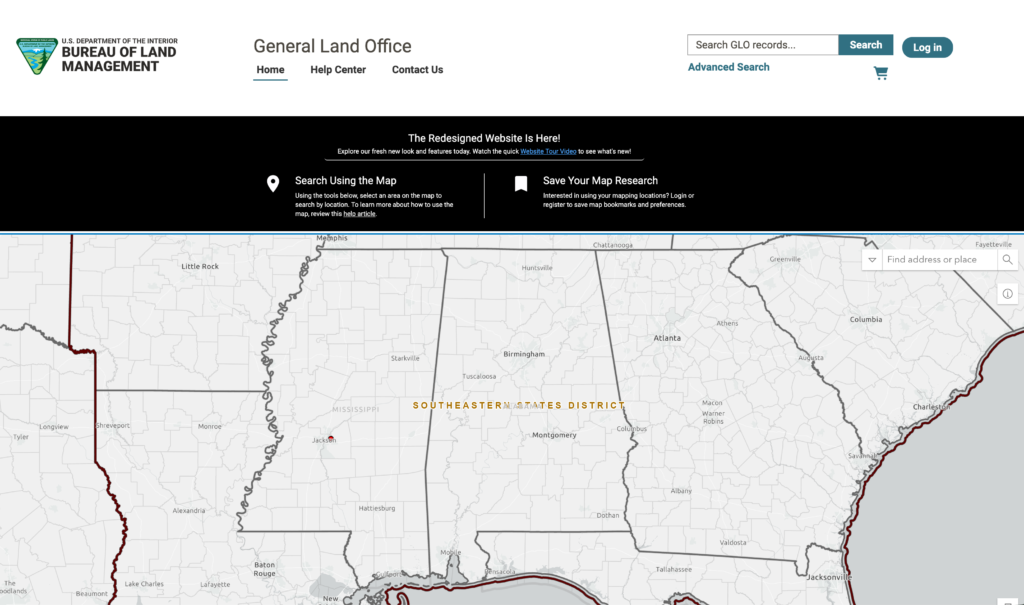
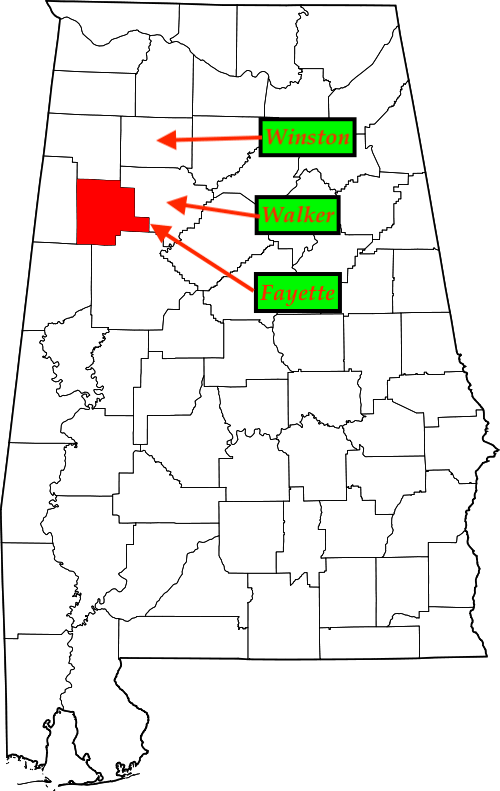
Keep zooming in for more detail. It’s important to know where the counties lie before you zoom in and get disoriented. Know where the counties are in relationship to one another.
For example, my 4th great-grandfather lived in Walker County so I got a map of the counties of Alabama as they existed in the 1840s so I knew where I should be looking. I’ve also been there researching Manasco, Alabama in person so I know up from down!
The image below is when you zoom in even further. What you are seeing are MERIDIANS overlaying the towns and geography of the county. Each of the numbers represents various Land Descriptions: Meridian, Township, Range, Section(s), and Subdivision.
TOP TIP: If you are unsure of where you are searching, open up Google Maps and search for the town or area in question in another window. Follow along with the clues on the Google Maps window to ensure you are looking at the correct GLO records map plat.
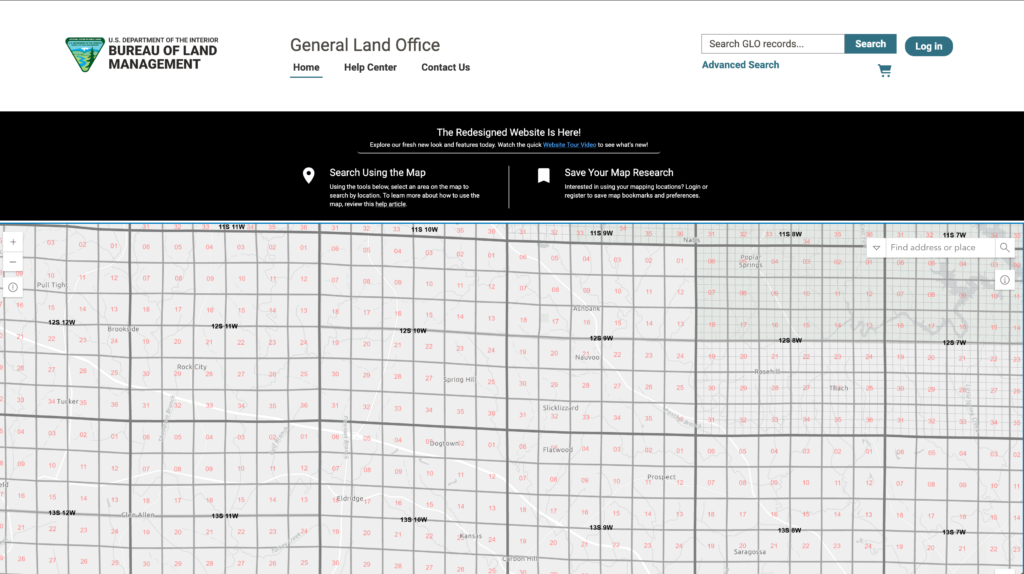
The numbers on this Map Research image are the map vectors you will need. Again, those numbers are the same numbers you saw on the General results page in the previous section.
12S 10W sits above 13S 10W, as 12S 9W sits directly to the east of 12S 10W. Can you find Nauvoo, AL? Which section is it in? Answer in the comments below. 😀
Original Genealogy Land Patent Deeds on the GLO Website
Within this Map Search function are more hidden goodies! I will cover them in a subsequent post just dedicated to MAPS like the ones I showcased in my historical biography post on David Mansco and Elijah Howton I referenced earlier.
Using this technique I will show you how I triangulated my ancestors on genealogy land patents so that I could unravel the mystery of how they lived and how ancestors from various branches of my family got to know one another. I figured out where they all lived!
Join the Family History Foundation Source Hound Community
Our family history is disappearing every day, join the Source Hound community and join our pledge to be the protector of your family history. The lives and voices of our ancestors are depending on it for our future generations.
Celebrate Family History Fridays with us across our social media and community platforms!
📬 Subscribe to the Newsletter — tips, active challenges, and deep-dive case studies. Never an overloaded inbox, always something you can use this weekend.
 Like & Subscribe on YouTube — every Friday, a video companion to the week’s article. Watch these techniques demonstrated rather than described.
 Pin Us on Pinterest — printable question sheets, research charts, and visual guides to save for your next session.
 Podcasting on Spotify! — podcasting now on Spotify, you can find all of the latest episodes on any of your favourite podcast platforms, starting with Spotify.
 Podcasting on Amazon! — If you are not on Spotify we are also on Amazon Podcasts so you can listen while you drive and work. Every episode is curated just for you to binge your favourite episodes.
 Podcasting on Audible! — Audible is an alternative offshoot of Amazon Podcasts to listen while search for your next favourite book. Ready for your next “audible?” Set, Go!
Let’s make Family History a household word. 🏠

The Family History Foundation Newsletter
Our Family History Is Disappearing Every Day!
Join the quest with 500+ family historians getting Franklin’s Source Hound weekly research breakthroughs — real case studies, source hacks, and the exact strategies that turn brick walls into discoveries.
Free. No fluff. Straight from the Source Hound’s desk to yours.
Your privacy is sacred — almost as sacred as a primary source. Read our Privacy Policy.
Shop Premium Genealogy Forms

About the Author
Hi there, my name is Franklin, the founder and author of The Family History Foundation.
Our family stories are disappearing every day and it’s crucially important that the next generation is able to learn and appreciate their family history. It is up to you to take up the mantle of responsibility to ensure that how you research today will be passed on tomorrow with the highest standards possible.
I believe that genealogy is not just about names and dates, it’s about your stories and how those stories inform your identity.
With a penchant for storytelling and a background in research, the insights and techniques you learn on The Family History Foundation will help you uncover the incredible stories and identities hidden within the tapestry of your ancestry.
My mission is “Let’s make Family History a household word.”
My motto is “The Past ‘Relative’ to the Future.”
FAQs for Genealogy Land Patents
What is a land patent and why is it valuable for genealogy?
A land patent is the official legal document that transfers ownership of a piece of public land from the federal government to a private individual. For genealogists, a land patent is incredibly valuable because it places your ancestor in a specific location at a specific time. It can also provide clues about their military service (via Military Bounty Land Warrants), their wealth (Cash Entries), or their migration path.
Does a land patent mean my ancestor lived on that property?
Not necessarily. It depends on how the land was acquired:
• Homestead Act: If the patent was acquired under the Homestead Act of 1862, the applicant had to prove they lived on and improved the land for a set number of years (usually five).
• Cash Sales & Military Bounty Land: If the land was purchased outright (Cash Entry) or acquired using a Military Bounty Land Warrant (often assigned or sold by the veteran to someone else), the patentee did not have to live on the land. Many people bought land purely for speculation or investment.