An AncestryDNA ThruLines Reality Check is the absolute first step you must take before you even think about accepting a genetic hint on your family tree.
We have all been there.
Table of Contents
It’s late at night. The coffee is cold. You are staring at a brick wall that has plagued your research for a decade.
Suddenly, a notification pops up. A “Shaky Leaf.” A dotted line connecting you to a 4th Great-Grandfather you have never heard of.
The dopamine hits you like a freight train. Ancestry says it’s a “Potential Ancestor.” The path looks clean. The photos are there. It feels like magic.
But here is the hard truth that most hobbyists ignore: That dotted line is not a fact. It is a suggestion. And often, it is a suggestion based on the sloppy work of strangers.
If you are a true Source Hound, you know that easy answers are usually wrong.
To build a tree that stands the test of time, you have to stop clicking and start verifying. You have to treat every single genetic hint as a suspect in a lineup until you have interrogated it with hard data.
In this guide, I am going to teach you the art of the AncestryDNA ThruLines Reality Check. We are going to move beyond the pretty graphics and dive into the trenches of manual verification, the Card Catalog, and the discipline required to turn a hypothesis into history.
Having free forms is cool ~ having 100% FORM-FILLABLE genealogy forms with no fuss is even better! Visit The Family History Foundation Shop for Citizenship tracking forms, as well as 28 editable and fillable genealogy forms!
What is an AncestryDNA ThruLines Reality Check?
Why Do I Need to Verify ThruLines?
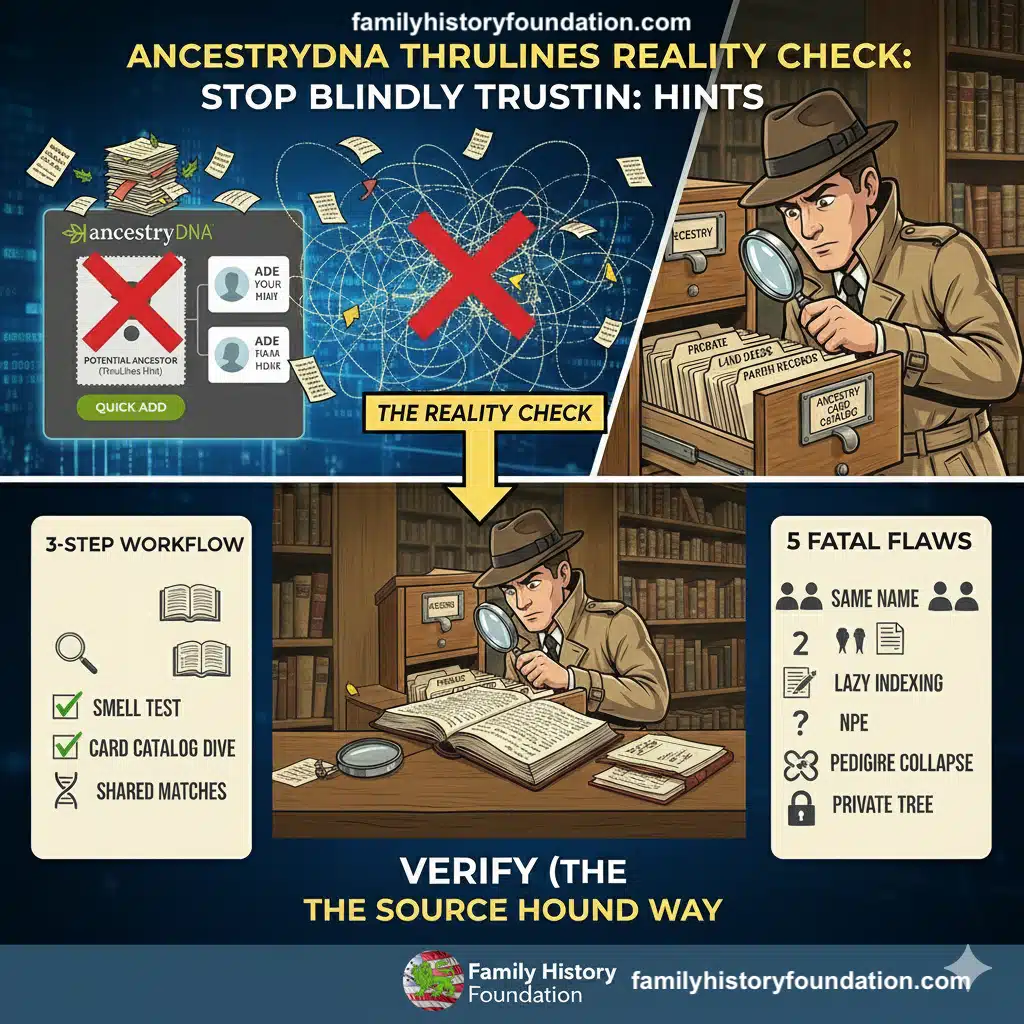
An AncestryDNA ThruLines Reality Check confirms that while these hints offer a powerful hypothesis for common ancestors, they are built on member trees that often contain errors. Researchers must stop blindly accepting these suggestions and instead manually verify every relationship using primary records found in the Card Catalog to move from genetic hypothesis to historical fact.
The “Shaky Leaf” Trap: Why Algorithms Lie
Let’s be honest about what ThruLines actually is.
It is not a magical DNA decoder. It does not compare your blood to the bones of your ancestors.
ThruLines is a massive data-scraping algorithm. It looks at your DNA matches, looks at the trees attached to those matches, and tries to “bridge the gap” using other public trees in the database.
It is essentially a giant game of “Telephone.”
If User A makes a mistake in 1998, and User B copies it in 2005, and User C imports it in 2015, Ancestry’s algorithm eventually sees that mistake as a “pattern.”
When you blindly accept that pattern without performing an AncestryDNA ThruLines Reality Check, you aren’t doing genealogy. You are just repeating a lie.
This is why I constantly harp on the importance of genealogy research online. If you don’t understand the source, you don’t have a fact. You have a rumor.
The Problem with “Clickers”
The “Clicker” is the enemy of the Source Hound.
The Clicker sees a hint and adds it. Their tree grows by 500 people in a weekend. They have ancestors who became parents at age 9 and died in states that didn’t exist yet.
The AncestryDNA ThruLines Reality Check is the antidote to “Clicker Syndrome.”
It forces you to slow down. It forces you to look at the evidence. It ensures that when you finally do add that ancestor to your tree, they stay there.
The “Golden Nugget”: How ThruLines Solved My Texas Mystery 🕵️♂️
I don’t want you to think I hate ThruLines. I actually love it—but I use it as a compass, not a map.
Let me tell you about a time the AncestryDNA ThruLines Reality Check actually worked in my favor, but only because I did the legwork.
I had been stuck on a massive brick wall attempting to find my 2nd Great-Grandfather from Texas.
This man was a ghost. He had a 20-year gap in his census records. From 1860 to 1880, he just vanished. No land records. No marriage bond. Nothing.
For years, I was dead in the water.
Then, ThruLines appeared.
Because he had a rare surname, the algorithm picked up on a pattern. It showed me a “Potential Ancestor” connection to a family in a neighboring state that I had never considered.
The algorithm suggested he was my ancestor’s family.
Now, a “Clicker” would have just added the brother and moved on. But I performed my AncestryDNA ThruLines Reality Check.
I looked at the matches. I had genetic cousins descending from this “brother.”
I used that lead to triangulate the line. I went into the Card Catalog and hunted down more records for that specific county in the adjacent state.
And there it was. Not in a census, but in a dusty, unindexed marriage ban. My ancestor’s father (my 3rd great grandfather) living with a doctor on a census, with undisclosed information coordinated from a visit to a historical society in the small town where he ended up residing and is laid to rest.
I got closer to solving the mystery with ThruLines DNA, but only because I verified the hints with paper.
That is the power of the AncestryDNA ThruLines Reality Check. It points you to the X on the map, but you still have to dig the hole.
The Source Hound Method: How to Verify a ThruLine
So, how do you actually do it?
How do you perform an AncestryDNA ThruLines Reality Check that stands up to scrutiny?
You need a system. You need the “Sniper Method.”
We don’t spray and pray. We target. We verify. We confirm.
Step 1: The “Smell Test” (Evaluate the Tree)
When you click on a ThruLine, look at the trees that provide the link.
If the tree linking you to your “new ancestor” has zero sources attached to it, your AncestryDNA ThruLines Reality Check should trigger a red alert.
If the only source is “Ancestry Family Trees,” that is not a source. That is an echo chamber.
You need to see:
- Census records.
- Vital records (Birth, Marriage, Death).
- Probate records.
If the tree is barren, the hint is likely garbage.
However, don’t give up hope! If this is a legitimate DNA match, you might have grounds to follow up in the next step! Remember: DNA IS SCIENCE!
Step 2: The Card Catalog Deep Dive
Once you have a name from ThruLines, leave the DNA page.
Go to the Card Catalog.
This is where the real AncestryDNA ThruLines Reality Check happens. You need to find independent proof that this person existed and was related to you.
Search for the ancestor in the location ThruLines suggests.
Use the filters. Drill down: USA > State > County.
If ThruLines says your ancestor died in 1850 in Kentucky, but the census records show him living in Texas in 1860, the algorithm is wrong.
You have to trust the primary source over the predictive algorithm every single time.
Step 3: Triangulate the Matches
An effective AncestryDNA ThruLines Reality Check involves looking at the other people in the cluster.
Click on the matches who are supposedly descended from this ancestor. Use the “Shared Matches” tool.
Do these people match each other?
If you match Cousin A, and Cousin A matches Cousin B, and you all descend from the same ThruLines ancestor, that is strong evidence.
But if you match Cousin A, but Cousin A shares zero DNA with Cousin B, you might be looking at a “false positive” or a case of endogamy.
The “Hidden Gem”: Unindexed Records 📚
Here is a secret that 90% of researchers miss.
Sometimes, your AncestryDNA ThruLines Reality Check will fail because the records aren’t indexed.
You type the name into the search bar, and nothing comes up. You think the ThruLine is wrong.
But remember: The Global Search Bar is a slot machine.
Many of the best records on Ancestry are “Browse Only.” They are digitized images of old books—wills, deeds, estate inventories—that have not been typed out by a computer.
To truly pass an AncestryDNA ThruLines Reality Check, you often have to go into the Catalog, find the county probate collection, and manually turn the digital pages.
I have confirmed dozens of ThruLines by finding a handwritten will that mentioned “my beloved daughter Sarah,” proving the connection that the algorithm guessed at.
This is the difference between a user and a Source Hound. We look where the search bar can’t see.
If you are hitting a wall, check out our guide on genealogy brick walls.
10 Best Free Family Tree Templates
“10 Best Free Family Tree Templates to Download (And How to Use Them!)” the article is the best place on the net to get all the free genealogy templates you can imagine, best of all, it was written by The Family History Foundation! Yes!
Interactive Quiz: Are You a Source Hound? 🧠
Let’s test your skills. Can you pass the AncestryDNA ThruLines Reality Check quiz?
Scenario 1: The “Famous” Ancestor
The Situation: ThruLines connects you to a famous Revolutionary War General. You have 1 match (8 cM) who also claims this General. The General’s Wikipedia page says he died childless. Your Verdict: A) Add him! Wikipedia is often wrong. B) Ignore it. 8 cM is too low, and the “childless” fact is a major red flag. C) Create a new tree just for him.
(Answer below)
Scenario 2: The “Cluster” Match
The Situation: ThruLines suggests a 3rd Great-Grandfather. You have 15 different matches ranging from 20 cM to 90 cM who all point to this man. You check the probate records, and his will names your 2nd Great-Grandmother. Your Verdict: A) Verify the dates, then add him. B) Wait for more matches. C) Ignore it because it looks too easy.
(Answer below)
Scenario 3: The “Name Game”
The Situation: ThruLines suggests “John Smith” born 1840. Your records show your ancestor was “John Smythe” born 1842. The locations match perfectly. Your Verdict: A) Reject it. The spelling is wrong. B) Perform an AncestryDNA ThruLines Reality Check on the location and neighbors to see if it’s the same man. C) Assume it’s a different family.
Answers:
- B. An 8 cM match to a “famous” person who died childless is the classic “Clicker” trap.
- A. This is the Holy Grail. DNA matches + Primary Source (Will) = Confirmed Fact.
- B. Spelling didn’t count in the 1800s. You need to investigate the context.
The Source Hound’s Newsletter
Still Hitting Dead Ends In Your Research?
Join 500+ family historians getting the Source Hound’s weekly research breakthroughs — real case studies, source hacks, and the exact strategies that turn brick walls into discoveries.
Free. No fluff. Straight from the Source Hound’s desk to yours.
Your privacy is sacred — almost as sacred as a primary source. Read our Privacy Policy.
Monetization: Redundancy is Key
You might be wondering, “If ThruLines makes mistakes, why should I pay for it?”
Because when it works, it saves you decades of time.
ThruLines is not a magic wand; it is a metal detector. It beeps when it finds something potential. It is up to you to dig it up.
If you haven’t tested your DNA yet, or if you need to upgrade your subscription to access the Card Catalog for a proper AncestryDNA ThruLines Reality Check, you are working with one hand tied behind your back.
And once you have the tools, you need the map. I have compiled a checklist of the top 50 “Hidden” collections that I use for my own reality checks. These are the record sets that crack the cases the algorithm can’t.
Download “The Catalog Cracker” Checklist (Link coming soon!)
Common Pitfalls During Your Reality Check
Even experienced researchers get tripped up. Here are the most common ways an AncestryDNA ThruLines Reality Check goes wrong.
1. The “NPE” Surprise (Non-Paternity Event)
Sometimes, the paper trail is perfect, but the DNA says “No.” If you have a documented paper trail to Great-Grandpa Joe, but ThruLines is showing you matches to a “Great-Grandpa Sam” who lived next door, you might be looking at an NPE. This is where the AncestryDNA ThruLines Reality Check requires sensitivity. The DNA doesn’t lie, but the paper often does. If this happens, tread carefully. You are uncovering secrets that have been buried for a century.
2. Pedigree Collapse
If your family is from a small island or a tight-knit religious community, you are going to have “sticky” DNA. You might share more DNA with a cousin than you “should” because you are related in three different ways. ThruLines often struggles to map this. It will pick one path and ignore the others. A rigorous AncestryDNA ThruLines Reality Check involves looking at the amount of cM shared. If the numbers are too high for the relationship, suspect pedigree collapse.
3. The “Floating Branch”
Sometimes ThruLines gives you a correct ancestor but connects them through the wrong child. It might say you descend from “Son A,” but your research proves you descend from “Son B.” The ancestor is right. The path is wrong. This is why you must verify every single link in the chain during your AncestryDNA ThruLines Reality Check. Do not assume the middle generation is correct just because the top generation matches.
For more on fixing these errors, read our guide on Ancestry family tree mistakes.
Advanced Tactics: Using “Maiden Names” to Verify
One of the best uses of an AncestryDNA ThruLines Reality Check is finding elusive maiden names.
If you have a “Mary Unknown” in your tree, and ThruLines suddenly links her to the “Johnson” family because you match 12 other Johnsons… pay attention.
The algorithm is seeing a genetic cluster that you can’t see on paper.
But don’t just change her name to Johnson!
Use that hint to go to the Card Catalog. Search for “Johnson” wills in that county. Look for a daughter named “Mary.”
When you find the will of “Old Man Johnson” leaving $5 to “my daughter Mary, wife of [Your Ancestor],” you have struck gold.
You used the AncestryDNA ThruLines Reality Check to generate a lead, and the Catalog to prove the fact.
This is exactly how I approach finding maiden names.
Heraldic Lion Positions [Illustrated List & Meanings]
Ever wonder what those heraldic lions mean on a shield or coat of arms? Well, wonder no longer because I’ve written the exclusive post on this as it applies to your genealogy.
Read it now: Heraldic Lion Positions [Illustrated List & Meanings] article.
The Ethics of the Reality Check
As a Source Hound, you have a responsibility.
When you perform an AncestryDNA ThruLines Reality Check and find that a popular tree is wrong, what do you do?
Do you stay silent? Do you go to war in the comments section?
I believe in “Kind Correction.”
If verified evidence proves a ThruLine is false, I will often message the owner of the incorrect tree.
“Hi! We are DNA matches. I was doing an AncestryDNA ThruLines Reality Check and noticed we are linked through John Miller. I found a Bible record that actually lists his death date as 1840, not 1860. Would you like a copy?”
Most people want their trees to be accurate. They just don’t know how to do the research.
By sharing your AncestryDNA ThruLines Reality Check results, you help clean up the entire database for everyone.
Summary: Be the Hound, Not the Hare 🐇
Genealogy is a marathon, not a sprint.
The hare clicks every hint, adds every leaf, and finishes the race with a tree full of fiction.
The Hound takes it slow. The Hound sniffs out the truth.
An AncestryDNA ThruLines Reality Check is your daily discipline. It is the filter that keeps the “AI Slop” and the “Dead Internet” junk out of your precious family history.
When you look at your tree, you want to feel pride, not doubt. You want to know that every name, every date, and every relationship has earned its place.
So the next time you see that dotted line… pause.
Take a breath.
Open the Card Catalog.
And verify before you click.
Frequently Asked Questions (FAQ)
Q: Does a ThruLines hint mean the relationship is proven?
A: Absolutely not. It is a hypothesis based on DNA and user trees. An AncestryDNA ThruLines Reality Check is required to prove it with documentation.
Q: Can I trust a match with only 6 cM?
A: Be very skeptical. 6 cM is the danger zone for “noise” or false positives. Unless you have a watertight paper trail found during your AncestryDNA ThruLines Reality Check, treat these with extreme caution.
Q: How do I fix a wrong ThruLine?
A: You cannot “edit” ThruLines directly. You can only fix your own tree. If you fix the data in your tree, the algorithm will eventually recalculate (this can take days or weeks).
Q: Why did my ThruLines disappear? A: Ancestry updates the algorithm regularly. If a tree you were linked to is made private, deleted, or edited, the ThruLine will vanish. This is why you must document your proofs immediately.
Q: Is ThruLines better than the old “DNA Circles”? A: Yes, because it visualizes the path. But with great power comes great responsibility. The visual nature of ThruLines makes it easier to be fooled if you skip the AncestryDNA ThruLines Reality Check.
Q: What if I don’t have a subscription? A: You can see your matches, but you cannot view the trees or records needed for a full AncestryDNA ThruLines Reality Check. A subscription is essential for the verification phase.
Q: Why does ThruLines show me as related to my husband’s family? A: This usually means you have pedigree collapse or you are distantly related to your spouse! It’s more common than you think.

About the Author
Hi there, my name is Franklin, the founder and author of The Family History Foundation.
Our family stories are disappearing every day and it’s crucially important that the next generation is able to learn and appreciate their family history. It is up to you to take up the mantle of responsibility to ensure that how you research today will be passed on tomorrow with the highest standards possible.
I believe that genealogy is not just about names and dates, it’s about your stories and how those stories inform your identity.
With a penchant for storytelling and a background in research, the insights and techniques you learn on The Family History Foundation will help you uncover the incredible stories and identities hidden within the tapestry of your ancestry.
My mission is “Let’s make Family History a household word.”
My motto is “The Past ‘Relative’ to the Future.”
The Source Hound’s Newsletter
Still Hitting Dead Ends In Your Research?
Join 500+ family historians getting the Source Hound’s weekly research breakthroughs — real case studies, source hacks, and the exact strategies that turn brick walls into discoveries.
Free. No fluff. Straight from the Source Hound’s desk to yours.
Your privacy is sacred — almost as sacred as a primary source. Read our Privacy Policy.