Learning how to animate old photos is one of the most emotionally powerful things a genealogist can do in the digital age — and this year, it has never been easier or more accessible. If you have ever stared at a sepia portrait of your great-grandmother and wondered what she really looked like when she smiled, or wished you could see your grandfather’s eyes move just once, this tutorial is for you.
Deep Nostalgia™ by MyHeritage is the tool that makes it possible. Powered by deep learning AI, it takes a still photograph — even a cracked, faded, century-old print — and transforms it into a short, hauntingly realistic video of your ancestor blinking, turning, and smiling. Over 119 million animations have been created since the feature launched. That number is not a statistic. That number is 119 million moments where someone saw their ancestor move for the very first time. 😢
This guide will walk you through exactly how to animate old photos using Deep Nostalgia, step by step, on both desktop and mobile. We will also cover the AI technology behind the tool, how to get the best results from your vintage photographs, what to do with your animations once they are created, and the ethical conversation that comes with bringing the past to life.
Let’s get into it. 👇
Table of Contents
🎥 Watch: Video Guide to “How To Animate Your Ancestors – Step-by-Step MyHeritage Deep Ancestry Walkthrough”
If you prefer a visual guide, I’ve put together this quick walkthrough showing exactly how I use these tools to bring my own ancestors to life. It covers the settings I recommend for the most natural results without over-animating the features. Grab a coffee, pull up a chair, and let’s get started.
🤔 What Is Deep Nostalgia — And Why Is Everyone Talking About It?
Before we get into how to animate old photos, it helps to understand what Deep Nostalgia actually is and why it generated such a cultural moment when it launched.
Deep Nostalgia™ is a photo animation feature offered by MyHeritage — one of the world’s leading genealogy platforms. The tool uses a type of artificial intelligence called deep learning to analyze the face in a still photograph and apply a sequence of pre-recorded human gestures to it.
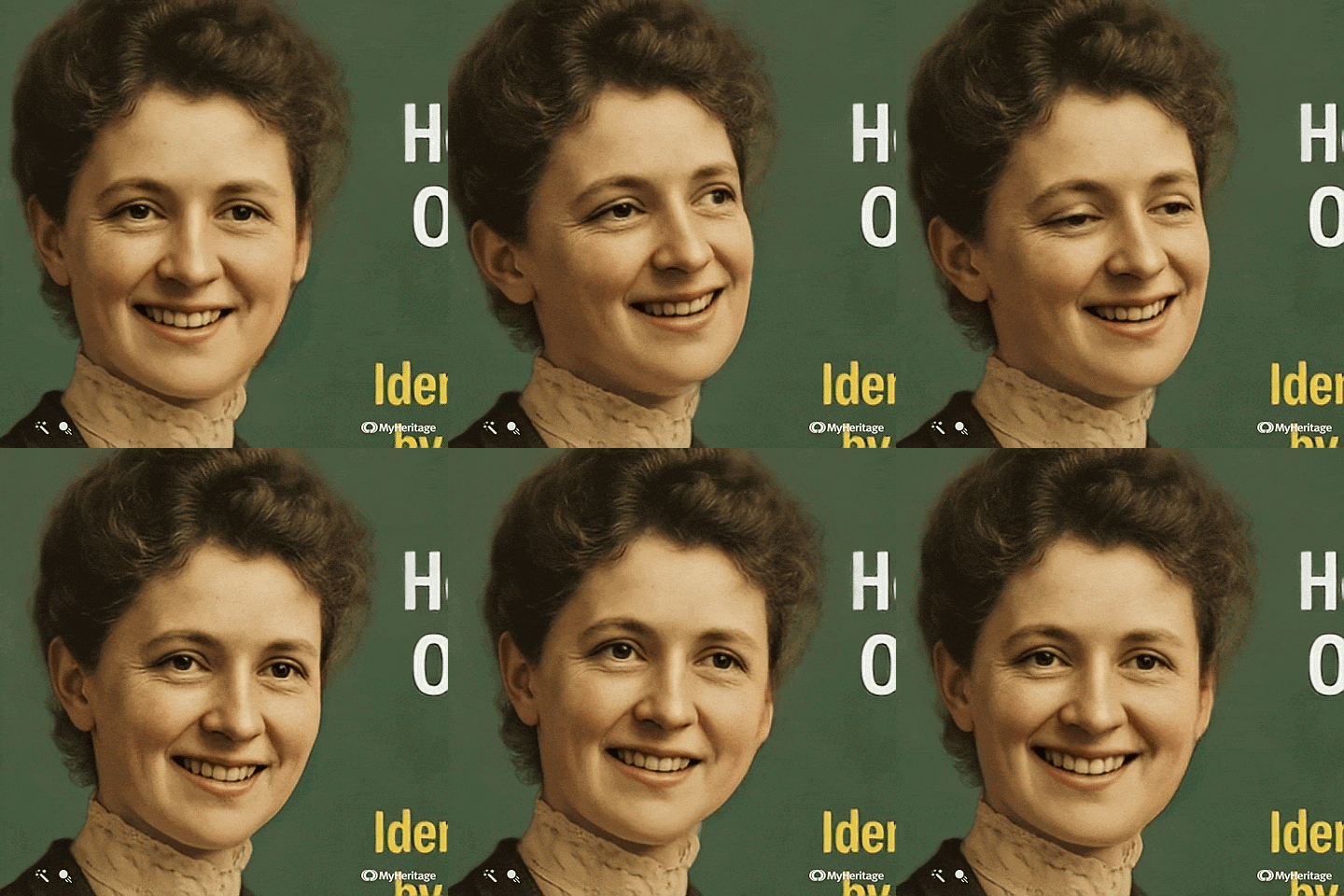
The result is a short video — typically 10 to 30 seconds — in which your ancestor appears to blink, look around, tilt their head, and smile. The effect is subtle enough to feel realistic and powerful enough to make grown researchers cry at their kitchen tables. Below is an image I ran through Deep Nostalgia!
The technology was developed by a company called D-ID, which specializes in video reenactment using deep learning. MyHeritage licensed the technology and integrated it into their platform’s suite of photo tools, alongside their colorization and photo enhancement features.
When Deep Nostalgia launched in early 2021, it spread across social media almost instantly. People were sharing animations of grandparents, great-grandparents, and ancestors they had never met. The emotional reaction was universal: seeing someone you only knew as a photograph suddenly move, even in simulation, hits differently than anything else in genealogy. 🌊
For family historians, the ability to animate old photos is not just a novelty. It is a storytelling tool, a connection device, and — for many — a deeply personal encounter with a life that predates your own.
🧬 Why Animating Old Photos Matters for Genealogists
Genealogy is, at its core, about making the past feel present. We dig through census records, decode handwritten letters, and cross-reference ship manifests — all in the service of the same fundamental goal: to know the people who came before us.
When you animate old photos, you close a gap that no document can fully close. A birth certificate tells you someone existed. A census tells you where they lived. But watching your great-great-grandmother’s face move — even in a deep learning simulation — tells you something no record ever could: that she was a real, living, breathing person.
This is especially meaningful for adoptees who are discovering biological family for the first time, or for descendants of ancestors who were never photographed in life. The ability to animate old photos becomes an act of reclamation — of bringing someone back into the light of memory.
If you are new to genealogy research altogether and want a strong foundation before adding tools like Deep Nostalgia to your workflow, my Ultimate Beginners Guide to Professional Genealogy Research Online is the perfect starting point.
For researchers already building their trees, animating photos is one more layer of the story you are telling — for yourself, your family, and the generations who will come after you. 🌳
🖥️ How to Animate Old Photos Using Deep Nostalgia — Step-by-Step Desktop Tutorial
Let’s walk through the complete desktop process for how to animate old photos using Deep Nostalgia. This is the most straightforward method and the best starting point for first-time users.
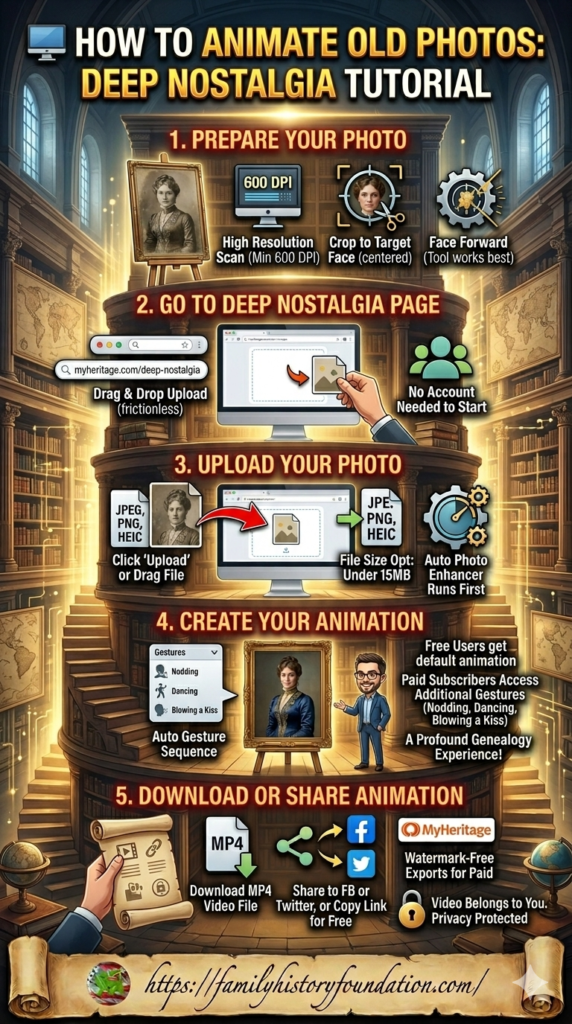
Step 1: Prepare Your Photo
The quality of your input photo directly determines the quality of your animation. Before you try to animate old photos, take a few minutes to optimize your image.
Scan at high resolution. If you are working from a physical print, scan it at a minimum of 600 DPI. The higher the resolution, the more detail Deep Nostalgia has to work with when it maps facial geometry.
Crop to the face. Deep Nostalgia works by detecting a face in the image. If your photo contains a crowded group or a background with a lot of visual noise, crop it so the target face is prominent and centered before uploading.
Use an enhanced version if possible. MyHeritage offers a free Photo Enhancer tool that sharpens resolution and restores detail in older images. Running your photo through the enhancer before you animate old photos often produces noticeably better results.
Face forward. The tool works best with faces that are looking roughly toward the camera. Severe profile angles or heavily obscured faces may produce less convincing animations.
Step 2: Go to the Deep Nostalgia Page
Open your browser and navigate to myheritage.com/deep-nostalgia. You do not need an account to begin the upload — MyHeritage allows you to drag and drop a photo immediately upon arriving at the page.
The interface is clean and minimal: a large upload area in the center of the screen, a brief description of the tool, and a demo video showing an example animation. It is one of the most frictionless upload experiences in genealogy software. ✅
Step 3: Upload Your Photo
Click the “Upload photo” button or drag and drop your image directly into the upload frame. Supported file formats include JPEG, PNG, and HEIC. File size should typically be under 15MB for optimal processing speed.
Once uploaded, MyHeritage will automatically run the Photo Enhancer on your image before generating the animation. This happens behind the scenes and takes anywhere from a few seconds to about a minute depending on the complexity of the photograph and server load.
Step 4: Create Your Animation
Once the enhancement is complete, Deep Nostalgia will present your animated result. The platform selects the gesture sequence it calculates will work best for the specific orientation and expression of the face in your photo.
Free users receive a default animation sequence. Paid subscribers with a MyHeritage Complete plan have access to additional gesture options — including nodding, dancing, blowing a kiss, and more — available via a drop-down selector above the animation preview.
Take a moment here. This is often the part where researchers realize why so many people have called the ability to animate old photos one of the most profound experiences in modern genealogy. 😢
Step 5: Download or Share Your Animation
Once you are happy with the result, you have two options:
Download: Click the Download button to save your animation as an .mp4 video file. This is the format you will want for sharing in family group chats, embedding in presentations, or archiving alongside your research documents.
Share: Click the Share icon to post the animation directly to Facebook or Twitter, or to copy a shareable link. Note that free users will see a small MyHeritage watermark in the bottom-right corner of the video. Complete subscribers receive watermark-free exports.
Important: MyHeritage is clear that the animated video belongs to you, not to the platform. Your privacy is protected — the photos and animations are not shared with third parties.
📱 How to Animate Old Photos Using Deep Nostalgia — Step-by-Step Mobile Tutorial
The process to animate old photos on mobile is slightly different from desktop, and for researchers who want to digitize and animate physical photographs in a single workflow, the mobile app is actually the superior choice.
Step 1: Download the MyHeritage App
Deep Nostalgia is available on both iOS and Android via the free MyHeritage mobile app. Download it from the App Store or Google Play. If you already have the app installed, make sure it is updated to the latest version before proceeding.
Step 2: Scan Your Physical Photo
One of the most underrated features of the MyHeritage mobile app is its built-in photo scanner. Rather than scanning a physical print on a flatbed scanner and transferring it to a computer, you can scan it directly within the app using your phone’s camera.
Go to the Photos section of the app and tap the orange plus (+) button in the bottom right corner. Select “Scan a photo” and hold your phone steady over the physical print. The app will detect edges, correct for angle and lighting, and capture the image at the highest resolution your device supports.
This one-step scan-and-animate workflow is especially valuable for researchers who want to animate old photos during a visit with elderly relatives — capturing and animating in the same sitting. 📸 Do not underestimate the gift of doing this in real time with a living family member present.
Step 3: Animate from the Photos Section
Once your photo is in the app, navigate back to the Photos section and select it. Tap the animation icon that appears at the top of the photo. If your photo has not yet been enhanced, the app will run the enhancer automatically at this stage.
Step 4: Watch, Download, and Share
The animation process on mobile typically takes 30 to 60 seconds. Once complete, you can watch the animation directly in the app, download it to your camera roll, or share it across messaging apps, email, or social media — all without leaving the MyHeritage environment.
💡 Pro Tips: How to Animate Old Photos and Get the Best Possible Results
Over time, researchers who regularly animate old photos have identified a handful of best practices that consistently produce better animations. Here are the most impactful ones:
Go for solo portraits over group photos. Deep Nostalgia processes one face per animation. Group photos introduce confusion — the algorithm may focus on the wrong face, or the result may be less precise. When you want to animate old photos for multiple people in a single image, crop and process each face individually.
Clean the photo before you upload. Physical damage — tears, foxing, heavy creasing, faded tones — can confuse the facial detection algorithm. Run badly damaged images through MyHeritage’s Photo Repair feature first (it corrects damage automatically using AI), then proceed to the animation step.
Try different gesture sequences. If your first animation result does not feel right for the specific photo, try the other available gesture options. Different sequences work better depending on the orientation of the head, the expression in the original photo, and the lighting. Free users have access to at least one alternative; paid subscribers have significantly more. 🔄
Match the animation to the story. When you animate old photos for a family presentation or archive project, consider which gesture sequence best fits what you know about that person. A gentle smile and turn is often more fitting for a formal Victorian portrait than a playful wave. The gesture you choose shapes how others will receive the animation emotionally.
Preserve the original. Always archive the unedited, un-animated original photograph separately. MyHeritage applies a small embossed icon to animated images to flag them as AI-generated — a transparency measure worth respecting. Your original photograph remains the primary historical document. Your animation is a storytelling layer on top of it.

The Family History Foundation Newsletter
Our Family History Is Disappearing Every Day!
Join the quest with 500+ family historians getting Franklin’s Source Hound weekly research breakthroughs — real case studies, source hacks, and the exact strategies that turn brick walls into discoveries.
Free. No fluff. Straight from the Source Hound’s desk to yours.
Your privacy is sacred — almost as sacred as a primary source. Read our Privacy Policy.
🤖 The AI Behind Deep Nostalgia: How It Works When You Animate Old Photos
Understanding the technology helps you use it more intelligently — and helps you have honest conversations with family members about what they are watching.
When you animate old photos using Deep Nostalgia, the AI is not guessing how your ancestor moved. It is applying a pre-recorded sequence of real human gestures — filmed with actual people, most of them MyHeritage employees — to the geometry of the face in your photograph.
The algorithm analyzes the orientation of the head, the direction of the eyes, the position of key facial landmarks, and the lighting conditions in the image. It then overlays the motion from the closest matching driver video onto your ancestor’s face, warping the pixel data in real time to simulate movement.
The result is not authentic. It is a simulation. MyHeritage is transparent about this — which is why they apply the motion icon watermark to every animated image. They do not want people to mistake AI-generated video for genuine historical footage. That ethical transparency is worth acknowledging and reinforcing with your own family. ⚠️
What the technology is doing is creating a plausible, emotionally resonant approximation of how a face might have moved — informed by real human motion and bounded by the data in the photograph. For genealogists, that is more than enough to serve its purpose.
This AI-in-genealogy moment is not an isolated one. Platforms across the industry are integrating machine learning into research and discovery workflows. If you are curious about how AI tools are changing the Ancestry platform specifically, my post on New Ancestry Features in 2026 covers their AI Ideas feature, Full Text Search beta, and other recent developments in detail.
🎭 Beyond Deep Nostalgia: DeepStory and the Future of AI Ancestor Experiences
Once you have learned to animate old photos, it is worth knowing about the next evolution of the same technology: DeepStory™.
Also offered by MyHeritage, DeepStory takes the animated portrait a step further. Rather than just facial movement, it creates a full video biography in which your ancestor appears to speak — narrating their own life story, drawn from your MyHeritage family tree data and text you provide.
You choose the language (over 30 available), the voice (over 140 options), and the narrative content. The result is a short video of your ancestor telling their own story in their own words — words you have given them, rendered through AI animation and text-to-speech synthesis.
For families with no living video footage of a grandparent or great-grandparent, DeepStory is an extraordinary storytelling tool. It is available for free on a limited basis, with full access under a MyHeritage Complete subscription.
The broader trajectory here is clear: the ability to animate old photos was just the beginning. AI is steadily building a bridge between historical documents and living memory that genealogists of even five years ago could not have imagined. 🌉
🗂️ What to Do After You Animate Old Photos — Building a Living Family Archive
Knowing how to animate old photos is only the first step. What you do with those animations determines their lasting value for your family.
Here are the most meaningful ways researchers are using their Deep Nostalgia animations:
Family reunion slideshows. A short presentation featuring animated portraits of ancestors — introduced with brief biographical notes — transforms a family gathering from a social event into a living history lesson. The emotional impact of seeing a long-deceased ancestor smile in a room full of their descendants is something no static slideshow can replicate.
YouTube memorial videos. Many genealogists are building family memorial channels or unlisted family history playlists on YouTube. An animated portrait paired with narrated biography is a powerful format. If you are already producing video content for your research community, adding ancestor animations to your workflow is a natural extension.
Research archive documentation. When you animate old photos and save the resulting .mp4 files alongside your research documents, you create a richer, more engaging family archive. Future generations who inherit your research will encounter not just names and dates but faces that moved.
Social sharing to find living relatives. This is a use case that surprises people: when you animate old photos and share them on social media, it occasionally surfaces previously unknown relatives who recognize the face. The animated format draws more attention and engagement than a static photograph — and more engagement means more potential connections.
Speaking of organizing your family research materials, my Free Genealogy Forms Bundle gives you 15 downloadable templates — including photo documentation logs and family group sheets — that pair beautifully with a Deep Nostalgia archive project. 📂
And if your photo research is leading you toward DNA discoveries and potential biological family connections, my post on Missing DNA Matches and the Filter Setting Hiding Your Biological Family covers a critical setting that many researchers — especially adoptees — overlook entirely.
🔥 How to Access Ancestry Records for Free (Limited Time)
Having free forms is cool ~ having 100% FORM-FILLABLE genealogy forms with no fuss is even better! Visit The Family History Foundation Shop for Citizenship tracking forms, as well as 28 editable and fillable genealogy forms!
🔁 How Deep Nostalgia Fits Into Your Broader Research Workflow
It would be easy to treat Deep Nostalgia as a standalone novelty — a one-time experiment you try with your grandmother’s photo and then forget about. The researchers who get the most from it use it as one layer in a broader, intentional family history workflow.
Here is how it fits:
You identify an ancestor through traditional genealogy research — census records, vital documents, DNA matches. You build out their profile with sources and dates. Then you find a photograph. You colorize it, enhance it, and finally you animate old photos of them using Deep Nostalgia. What started as a name on a census form becomes a living face. That is the full arc of what it means to animate old photos with intention: Document. Source. Visualize. Animate. Share.
Platforms like Ancestry.com support the documentation and sourcing side of that workflow with unmatched record depth. If you want to understand the full toolkit available to you across the most important research platforms, my guide on 15 Ancestry Tools Hidden in Plain Sight covers features most researchers walk past every single day.
For researchers building out family branches that span multiple countries and record systems, my post on Ancestry UK vs Ancestry US addresses the cross-border research strategy that helps you find the photographs worth animating in the first place.
And if you are working with the US Federal Census records as part of your ancestor identification process — which is the most common path to finding historical photographs worth animating — my Comprehensive Guide to Every US Federal Census 1790–1950 is the resource that will accelerate that research dramatically. 📜
⚖️ The Ethical Conversation: What to Consider Before You Animate Old Photos
No honest tutorial on how to animate old photos is complete without acknowledging the conversation that surrounds it.
When Deep Nostalgia launched, it generated not just wonder but genuine ethical debate. Some researchers and ethicists raised questions: Is it appropriate to simulate the movements of deceased people without their consent? Can a deep learning animation mislead people about what historical footage is authentic? Does watching a simulated ancestor move affect how we relate to historical truth?
These are real questions and they deserve real consideration.
MyHeritage’s response has been to prioritize transparency: every animated image carries a visible motion icon marking it as AI-generated, not original footage. They do not claim the animations are authentic simulations of how the person actually moved — only that they are plausible, motion-guided approximations.
As a genealogist using this tool, your responsibility is to carry that transparency forward. When you share an animation with your family, label it clearly. Say: “This is an AI animation of great-grandmother Clara — not original footage.” Include a note when you archive it. Preserve the original unedited photograph as the primary document.
The ability to animate old photos is a gift of modern technology. Used with honesty and intentionality, it deepens connection without distorting history. 🕯️
❓ Frequently Asked Questions: How to Animate Old Photos with Deep Nostalgia
Is Deep Nostalgia free to use?
Yes — MyHeritage offers a limited number of free animations to new users. You will need to create a free MyHeritage account to access the tool after uploading your first photo. Free users receive at least one animation and may see a MyHeritage watermark on their exported video. Unlimited, watermark-free animations are available with a MyHeritage Complete subscription.
What types of photos work best when you animate old photos with Deep Nostalgia?
Clear, forward-facing portrait photos with a visible, unobscured face produce the best results when you animate old photos. High resolution images — scanned at 600 DPI or higher — give the AI more facial data to work with. Black and white, sepia, and colorized photos all work. Damaged photos should be repaired and enhanced first for best results.
Does MyHeritage own my photo after I upload it?
No. MyHeritage does not own the photos you upload or the animations generated from them. The resulting video belongs entirely to you, consistent with their privacy policy. Photos uploaded without completing signup are automatically deleted to protect your privacy.
Can I animate old photos of living people, not just ancestors?
Technically yes — the tool works on any clear photograph of a face. Many users animate photos of recently deceased parents or grandparents, or even playfully animate their own photos. The tool is designed primarily for family history use, and MyHeritage’s ethical framework centers on historical and memorial applications.
How long is the Deep Nostalgia animation video?
The animations produced when you animate old photos with Deep Nostalgia are typically between 10 and 30 seconds in length, depending on the gesture sequence selected. They are saved as .mp4 files and can be looped, trimmed, or incorporated into longer video projects using standard video editing software.
What is the difference between Deep Nostalgia and DeepStory?
Deep Nostalgia animates facial movement only — blinking, turning, smiling — from a still photograph. DeepStory goes further, creating a full video biography in which the animated face appears to speak a narrative about their life. Both tools are available on MyHeritage; DeepStory requires more content input from the user and a paid subscription for unlimited use.
Does Deep Nostalgia work on damaged or very old photographs?
Yes, with preparation. MyHeritage’s Photo Repair feature automatically restores damage in old images using AI, and the Photo Enhancer sharpens resolution before animation begins. Running a badly damaged photograph through both tools before you attempt to animate old photos significantly improves your output quality.
Is the animated video an accurate representation of how my ancestor moved?
No — and MyHeritage is transparent about this. The animation applies pre-recorded human gesture sequences (filmed with real people) to the geometry of the face in your photograph. It is a plausible simulation, not an authentic re-creation. MyHeritage marks all animated images with an embossed motion icon to flag them as AI-generated, not original footage.
🌺 Let’s Connect — Your Family History Community Is Waiting!
If today’s tutorial helped you understand how to animate old photos — and inspired you to bring your own ancestors back to life — I would love to see what you create! Drop a comment below and tell me: whose face did you animate first? And what did it feel like to watch them move for the very first time? 👇😢✨
The ability to animate old photos is one of the most emotionally profound things a family historian can do in 2026 — and it is only the beginning of where AI is taking genealogy. We are living through an extraordinary moment in this field, and there is so much more to discover together.
Come find us across our platforms — a community of passionate, curious family historians is waiting to meet you! 🌟
📺 YouTube — New Genealogy Tutorials Every Friday! Ancestry walkthroughs, DNA strategies, census deep-dives, AI tool tutorials, and more — dropped every Friday at 6am EST. Subscribe, hit the bell, and never miss a discovery. Your next family history breakthrough could be one video away! 👉 youtube.com/@familyhistoryfoundation
📌 Pinterest — Build Your Family History Inspiration Board! Save your favorite genealogy tips, research guides, and Source Hound strategies for easy reference anytime. The more you save, the richer your research toolkit becomes. 👉 pinterest.com/familyhistoryfoundation
Posts and pages may contain affiliate links, meaning I get a commission if you decide to make a purchase — at no cost to you. The products that I advertise are the ones I believe in because I actually use them myself.

About the Author
Hi there, my name is Franklin, the founder and author of The Family History Foundation.
Our family stories are disappearing every day and it’s crucially important that the next generation is able to learn and appreciate their family history. It is up to you to take up the mantle of responsibility to ensure that how you research today will be passed on tomorrow with the highest standards possible.
I believe that genealogy is not just about names and dates, it’s about your stories and how those stories inform your identity.
With a penchant for storytelling and a background in research, the insights and techniques you learn on The Family History Foundation will help you uncover the incredible stories and identities hidden within the tapestry of your ancestry.
My mission is “Let’s make Family History a household word.”
My motto is “The Past ‘Relative’ to the Future.”
The Family History Foundation Newsletter
It’s Not About You, It’s About Documenting Before It Disappears
Join 500+ family historians getting Franklin’s Source Hound weekly research breakthroughs — real case studies, source hacks, and the exact strategies that turn brick walls into discoveries.
Free. No fluff. Straight from the Source Hound’s desk to yours.
Your privacy is sacred — almost as sacred as a primary source. Read our Privacy Policy.