⏱️ Read Time: 12 minutes
Ancestry rolled out four powerful new Ancestry features in 2026 that some genealogists don’t know about yet and you may have seen them and simply glossed over them. These new features transform how you research family history. Let’s explore each of the new 4 Ancestry features in 2026 and how to use them effectively.
If you’re looking to transform your family history research, the new Ancestry features in 2026 are absolute game-changers that most genealogists don’t even know exist yet. Ancestry.com just rolled out four powerful tools—AncestryPreserve, Full Text Search (beta), AI Ideas, and Networks (beta)—that are revolutionizing how we discover our roots. 🌳
I’ll walk you through all of these features and show you key insights into how to best use these new features. Hold on . . . you might be thinking: “wait, another useless Ancestry update?” Let me assure you that I feel your pain on some of the tools that didn’t come out fully sharpened in the Ancestry toolbox!
In this complete guide, I’ll walk you through each of these new Ancestry features in 2026 with step-by-step instructions, practical applications, and honest assessments about which ones are worth your time and money.
Table of Contents
What Are the New Ancestry Features in 2026?
The tools themselves can be broken down into preserving, searching, and suggesting categories. The efficacy of each of these tools varies on user intent and experience, but I believe that everyone can benefit at some level from each of them.
After reading this article and watching my YouTube video on this topic (link below), I would suggest going and playing with these tools yourself and see what you can discover. You can also drop a comment below and let others know what you were up to.
The new Ancestry features in 2026 are:
- AncestryPreserve (preserving)
- Search Full Text (searching)
- AI Ideas (suggesting)
- Networks (suggesting)
Let’s see what they can do for you and your family history search.
What’s New in Ancestry 2026?
The new Ancestry features in 2026 represent some of the platform’s biggest update in years, combining cutting-edge AI technology with practical preservation tools. Unlike previous updates that simply added more records, these features fundamentally change how you interact with your family history. 🚀
The good news is that as Ancestry adds more tools, all of these are FREE, except AncestryPreserve. Using AncestryPreserve will have you parting with your hard-earned cash. I’ll fill you in on the relative dollar (currency) amounts, and you make the decision.
Make sure to watch my YouTube exposé on this post! Link below 😁.
As we discussed in our guide on genealogy research online, the landscape of family history research is evolving rapidly. The new Ancestry features in 2026 represent the next evolution of that digital transformation.
Here’s the truth: you can’t find DNA matches if you’re not in the database. I recommend AncestryDNA because it’s what I use personally, and it’s where most of your relatives have probably tested. Simple cheek swab, fast results, and potentially life-changing connections. Ready to discover who you’re connected to? 🌳
You can also get “the Family discount,” that is, the latest and deepest discounts on Ancestry.com Subscription packages, courtesy of The Family History Foundation. 🌳 (these are sponsored links).
#1: AncestryPreserve – Digitally Preserve Family Documents
AncestryPreserve is arguably the most universally useful among the new Ancestry features in 2026 in terms of preservation, not as far as records search. This paid tool allows you to digitally preserve family documents, photos, and heirlooms in a secure, shareable format that protects them for future generations. 📸

How to Use AncestryPreserve
Getting started with this essential component of the new Ancestry features in 2026 is straightforward:
- Log into your Ancestry.com account and navigate to the “Preserve” section
- Click “Create New Project” and give it a descriptive name (e.g., “Grandmother Schmidt’s WWII Letters”)
- Upload your digital files (JPG, PNG, PDF, or TIFF formats accepted)
- Add metadata: tag people, locations, dates, and descriptions
- Share collections with family members
As I explain in my post about organizing family history documents, proper preservation and organization are the foundation of successful genealogy research. ✍️
My review. While AncestryPreserve is like the Uber Eats or Door Dash of Ancestry.com, but in reverse, it has the potential to be very EXPENSIVE. Not to mention the fact that, unlike delivery services which bring stuff to you, you have to part with your family heirlooms and send them off in the mail to get digitized. For me, heck no!
I would never send off my old family reels or photo albums no matter how much I love and support Ancestry.com.
Oh, and let’s talk cost. In my YouTube walkthrough of these New Ancestry Features in 2026, I filled out the order form with a reasonable amount of items . . . you’ll never guess how much it came out! Wow. Video link below.

All that being said, maybe this new too is for you. Go for it if it suits your needs as I’m sure Ancestry will deliver great results. If you have tried this tool, please drop a comment below and share your results. We all would love to hear from you 📣.
#2: Full Text Search (Beta) – Find Hidden Mentions in Publications
Full Text Search is the breakthrough feature among the new Ancestry features in 2026 that changes everything about genealogy research. Instead of searching only indexed records, you can now search the actual text inside documents—including un-indexed publications, historical society archives, and historical manuscripts. 🔍
This is gold! You can search publications that are more local histories and closer to manuscripts where other family historians were writing about collateral lines.
For example, I wrote an article on The Family History Foundation about one of my ancestors named Elijah Howton. Your ancestor might appear in a reference like this which would provide you with some clue as to who your ancestors were.
How Full Text Search Changes Genealogy Research
Traditional Ancestry searches only found records where someone manually indexed your ancestor’s name. Full Text Search uses optical character recognition (OCR) to search the actual document text, uncovering mentions that previous methods missed entirely.
This tool also searches databases which are smaller and, dare I say, more homegrown. I see this Full Text tool like being able to search a historical society or local county courthouse without actually having to go there.

How to Use Full Text Search
To access this powerful component of the new Ancestry features in 2026:
- Navigate to any Ancestry search page
- Use the Search top menu bar
- Look for the “Search Full Text (Beta)” link at the bottom of the drop down menu
- Enter your search terms
- Review results, which now include text mentions inside documents
- Filter by collection type, date range, or location to narrow results
- Click any result to view the full document with your search term highlighted

Important: Full Text Search results may include false matches due to OCR errors, especially on handwritten documents. Always verify results by viewing the original document. The feature works best on printed materials from 1850 onwards.
You can also filter your search by RECORD LOCATION or BROWSE BY COLLECTION. In the screenshot below, I typed in the name of my 3rd great-grandfather and got back a healthy return of ~6,000 returns. The filter tool is the next step to whittle down those results.

Real-World Example: Finding Hidden Ancestor Mentions
I found out more information about my immigrant ancestor who entered the Virginia Colony in 1651 using this new Search Full Text tool. I found references to my family through a family history written about a prominent land-owning family from the Northern Neck who included facts and wills pertinent to my line, as both of our families had married.
I used the Browse by collection button for this and found Virginia-specific records.

Without Full Text Search among the new Ancestry features in 2026, I never would have found that needle-in-a-haystack mention. ⭐
Try searching unusual name combinations, nicknames your ancestor might have used, or specific addresses. The new Ancestry features in 2026 excel at finding these contextual mentions that traditional indexing misses entirely.
For more search strategies, check out our guide on breaking through genealogy brick walls. 🧱
#3: AI Ideas Function – Your Free Research Assistant
The AI Ideas button is one of the most innovative new Ancestry features in 2026, offering personalized research suggestions based on your existing family tree data. Think of it as having a genealogist look over your shoulder and suggest next steps. 🤖
How Ancestry’s AI Suggests Research Directions
The AI analyzes your family tree, identifies gaps and patterns, then suggests specific searches, records, or research strategies you might not have considered. It might recommend:
- Searching specific census years you’ve missed
- Exploring siblings’ records to find parents
- Checking immigration records based on birthplace patterns
- Looking for military records based on ancestor birth years
Step-by-Step: Using AI Ideas
Access this helpful feature among the new Ancestry features in 2026 by:
- Open any ancestor’s profile in your tree
- Click the “AI Ideas” button (lightbulb icon)
- Review the suggested research directions
- Click any suggestion to launch a pre-filled search
- Evaluate the search results and add new information to your tree
- Return to the AI Ideas button for updated suggestions based on new data
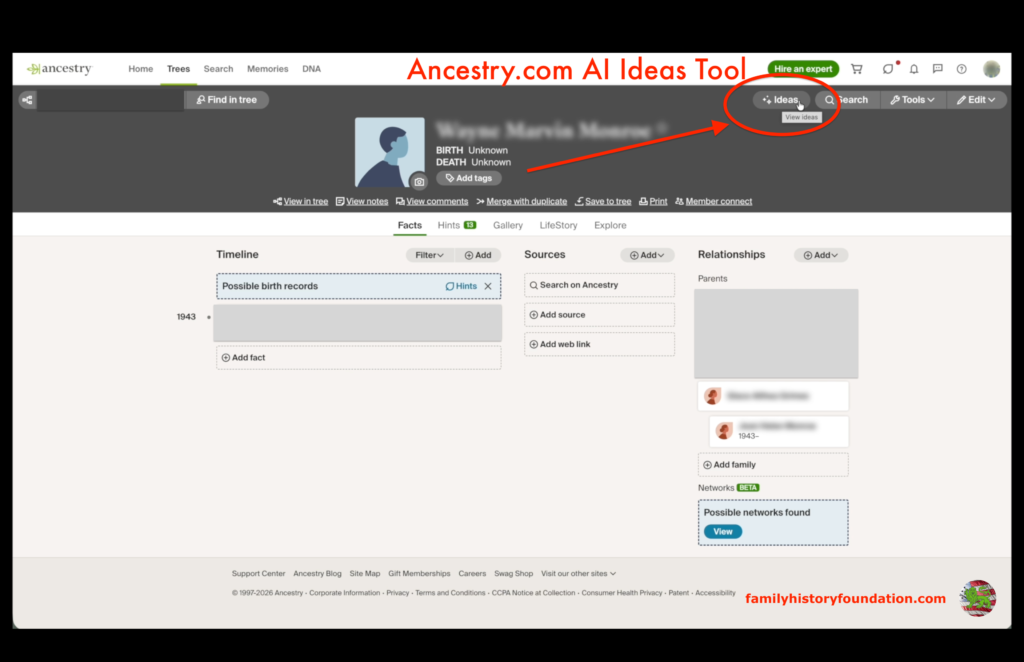
The AI learns from your research patterns and gets smarter over time. While it’s not perfect, the suggestions often uncover research angles you hadn’t considered. 💡
Is the AI Ideas Feature Accurate?
One question you may be asking about the new Ancestry features in 2026 is whether AI-generated suggestions can be trusted. The answer requires nuance. AI Ideas analyzes patterns across millions of family trees and historical records, making educated suggestions based on probability and historical context.

However, AI Ideas provides research direction, not verified facts. Always treat suggestions as starting points requiring verification through primary sources. The feature excels at identifying gaps in your research and suggesting logical next steps, but human judgment remains essential for evaluating evidence quality.
I’ve found the most valuable suggestions come when you’ve already built a substantial tree (50+ people). The AI needs enough data to identify meaningful patterns. If you’re just starting out, focus on manual research first, then let AI Ideas help you expand strategically.
Have you ever visited a county courthouse to do research and been met by someone who was less than helpful? At the end of the day, treat this tool like you might question anyone’s suggestion, with a touch of good old sarcasm and skepticism. I’m being a bit facetious, of course. You are always the end authority of your own research.
#4: Networks (Beta) – Visualize Ancestor Connections
Networks is the premium feature among the new Ancestry features in 2026, it really has a wow factor for me. It creates suggestions showing how your ancestors may be connected with their communities—neighbors, business associates, fellow church members, and more. 🕸️
How to Access Networks
Navigate to an ancestor’s profile and click the “Possible Networks found” tab. The tool generates an interactive visualization showing people connected to your ancestor through multiple records displayed in the side tab, just like other general records.
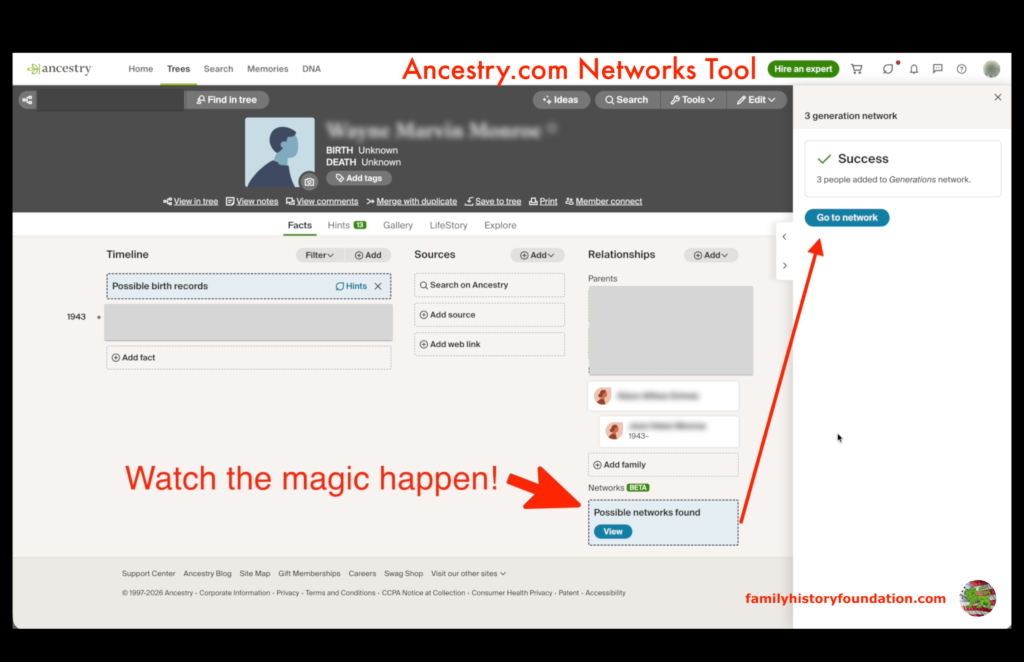
You can click any connection to explore that person’s profile and potentially discover new family connections. You have the option to:
- Create your own Network
- Explore the suggested networks in the tab
- Use the search page provided once the network has been created

After the Network has been created
Once a Network has been created, it will show up above the “Possible networks found” tab in on your ancestor’s profile page. Simply click on this to explore the 5 tabs of searchable and editable information.
I found this tool super utilitarian as a research holding spot where you can update and add information at will before actually making permanent additions to your family tree. It’s a powerful research tool that has loads of family history potential.
Watch me add this live in the YouTube video walkthrough if you’re hesitant. You’ll be amazed at what you might dream up as far as your own family tree. Use it. If you don’t like it, you can always delete the network and start over or create a new one. Or multiple ones! Video link below! ⬇️

Which New Ancestry Features Are Worth Using?
All four new Ancestry features in 2026 bring value, but priorities depend on your research stage:
Beginner Researchers: Full Text Search will uncover hidden mentions and breakthrough discoveries. This feature alone justifies exploring the new Ancestry features in 2026. Pair it with our DNA testing guide for a comprehensive research approach.
Intermediate Researchers: If you’re working on complex family networks or hitting brick walls despite exhaustive searching, Networks (Pro Tools) might be worth a potential genealogy payoff.
Advanced: Explore AncestryPreserve to digitize and organize family materials, then use AI Ideas for research direction.
For more beginner tips, read our post on how to start your family tree. 🌲

The Source Hound’s Newsletter
Still Hitting Dead Ends In Your Research?
Join 500+ family historians getting the Source Hound’s weekly research breakthroughs — real case studies, source hacks, and the exact strategies that turn brick walls into discoveries.
Free. No fluff. Straight from the Source Hound’s desk to yours.
Your privacy is sacred — almost as sacred as a primary source. Read our Privacy Policy.
Frequently Asked Questions About New Ancestry Features in 2026
Q: Are these features available to all Ancestry users?

A: Full Text Search, AI Ideas, and Newtorks are available with any active Ancestry subscription. AncestryPreserve requires separate Ancestry payments per record.
Q: Can I use Full Text Search on mobile?
A: Yes! Full Text Search works on both desktop and the Ancestry mobile app, making it one of the most accessible new Ancestry features in 2026.
Q: Is the AI Ideas feature accurate?
A: AI Ideas provides suggestions based on patterns, but you must verify all findings with actual records. Treat it as a research assistant, not a definitive source.
Q: Do I need Pro Tools to benefit from the new features?
A: Absolutely maybe! Three of the four new Ancestry features in 2026 are free with any subscription. Most researchers will find tremendous value without upgrading to Pro Tools.
Final Thoughts: Start Using These New Ancestry Features Today
The new Ancestry features in 2026 represent some of the most significant innovation in genealogy research tools in recent years. Whether you’re preserving family memories with AncestryPreserve, uncovering hidden mentions with Full Text Search, getting AI-powered research suggestions, or visualizing community networks, these tools transform how we connect with our ancestors. 🎉
Don’t let these powerful features sit unused in your Ancestry account. Start with the Full Text Search to discover mentions you’ve been missing, then search with the AI Ideas tool, then the Networks suggestions. The combination of these new Ancestry features in 2026 could be exactly what you need to break through that stubborn brick wall.
Ready to see these features in action? Watch my complete video walkthrough where I demonstrate each of the new Ancestry features in 2026 with real examples from my own family research. You’ll see exactly how to use each tool and what results to expect.
Connect With Our Community
Did you find this guide to the new Ancestry features in 2026 helpful? I’d love to hear about your experiences with these new tools! Drop a comment below sharing which feature you’re most excited to try, or let me know if you’ve already discovered breakthrough findings using Full Text Search or AI Ideas. Your insights help our entire genealogy community! 💬
Subscribe to stay updated on the latest genealogy tools, research strategies, and family history discoveries. We’re constantly exploring new ways to help you connect with your ancestors!
Share Your Family History Journey
🎥 YouTube: Watch more in-depth tutorials and family history walkthroughs on our YouTube channel—don’t forget to subscribe for weekly genealogy tips!
📌 Pinterest: Get inspired by our collection of genealogy research tips, family tree templates, and historical resources on Pinterest—perfect for visual learners!
The new Ancestry features in 2026 are just the beginning of an exciting era in family history research. Together, we’re preserving our past and building connections that span generations. Happy researching! 🌟

About the Author ✍️
Hi there, my name is Franklin, the founder of The Family History Foundation—a one-person blog built from love, legacy, and lengthy research sessions. Let’s make Family History a household word!
With a penchant for storytelling and a background in research, I help others uncover the lives and legacies of those who came before.
This site is a space dedicated to making genealogy accessible, emotional, and empowering for professional family historians and weekend genealogists alike.
I invite you to explore our extensive library of articles, engage with me on social media via our YouTube channel and Pinterest page, and share your own discoveries. Your family’s story is waiting to be told, and I’m honored to be a part of your journey.
I believe that genealogy is not just about names and dates—it’s about the stories and finding your identity. Join me on this journey to uncover the incredible stories and identies hidden within your ancestry. 🌿
My mission is to make family history a household word ❤️
My motto is “The Past ‘relative’ to the Future.”
If you are ready to stop guessing and start discovering, pull up a chair and let me help you make those discoveries. 🕵️♂️📚
The Source Hound’s Newsletter
Still Hitting Dead Ends In Your Research?
Join 500+ family historians getting the Source Hound’s weekly research breakthroughs — real case studies, source hacks, and the exact strategies that turn brick walls into discoveries.
Free. No fluff. Straight from the Source Hound’s desk to yours.
Your privacy is sacred — almost as sacred as a primary source. Read our Privacy Policy.